
Myth Busted? Can You Use Any Projector For Golf Simulator
Can you use any projector for a golf simulator? No, you cannot. While many projectors show images, a golf simulator needs specific features. Using just any projector will not give you a good golf game. You need a projector built for this special use. This means looking at certain key features to get the best experience. Choosing the wrong one can lead to blurry images, slow responses, or poor visuals. This will make your golf simulator less fun and less real.
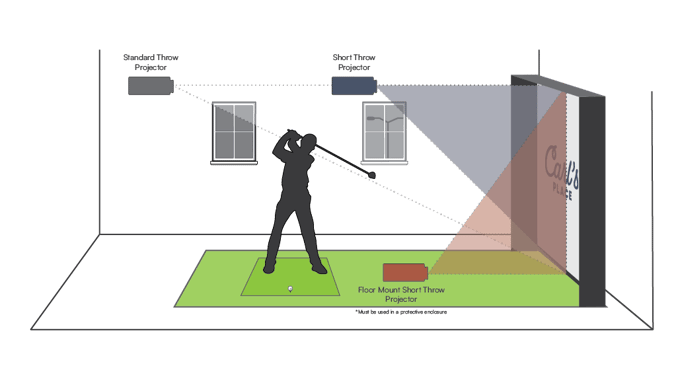
Image Source: www.carlofet.com
Deciphering Projector Needs for Golf Simulators
A golf simulator is more than just a game. It is a full experience. It makes you feel like you are on a real golf course. To do this, every part of the setup must work well. The projector is a very important part. It puts the golf course image onto your screen. If the projector is not right, the image will not be clear. It might be dull or blurry. It might also show delays. These issues can ruin your game.
Good golf simulator projector requirements are strict. They help you get a clear, bright, and fast image. A bad image can make your shots feel off. It can also make it hard to see the ball fly. This takes away from the fun. Let’s look at what makes a projector good for golf.
Key Aspects of Golf Simulator Projectors
Choosing the right projector means looking at several important features. Each feature plays a big role in how well your simulator looks and feels.
Projector Brightness: Lumens Explained
Projector brightness is measured in lumens. The more lumens, the brighter the image. This is a very important point for a golf simulator. You often play in a room that is not totally dark. Light from windows or room lights can wash out the image. A bright projector fights this.
For a golf simulator, you need enough lumens. Most experts say you need at least 3,000 lumens. Some even suggest 4,000 lumens or more. This is especially true if your room has any light. If your room is very dark, you might get by with a bit less. But more lumens are always better for golf. They make sure the grass is green and the sky is blue. They make the ball easy to see.
Think of it like this:
* 2,000-3,000 lumens: Good for very dark rooms. Still might look a bit dim.
* 3,000-4,000 lumens: A good starting point for most home setups.
* 4,000+ lumens: Best for rooms with some light. Gives a very clear, sharp image.
The projector lumens golf simulator needs are high. This is because simulator screens are often large. They are also made to absorb some light. So, a powerful light source is key.
Image Sharpness: Projector Resolution
Resolution means how many pixels make up the image. More pixels mean a sharper, more detailed picture. For a golf simulator, a high resolution is a must. You want to see every blade of grass. You want to see the texture of the bunkers. Low resolution makes the image look blocky or fuzzy.
Common resolutions for golf simulators are:
* 1080p (Full HD): This is 1920 x 1080 pixels. It is a good starting point. Many simulators use this. It gives a clear picture for most needs.
* WUXGA: This is 1920 x 1200 pixels. It is like 1080p but a bit taller. This extra height can be good for some simulator screens. It gives a more complete image.
* 4K UHD: This is 3840 x 2160 pixels. This is the best resolution. It gives an amazing level of detail. The grass looks real. The ball flies with crispness. If your budget allows, 4K is the way to go.
When we talk about golf simulator projector resolution, we are looking for sharpness. This directly affects how real your golf course feels. A high-resolution image makes the game much more fun.
Throw Distance and Projector Type
Throw distance is how far the projector needs to be from the screen. This is crucial for golf simulators. Most simulator setups are in tight spaces. You do not want a projector casting shadows. You also do not want to stand in the way of the image.
There are different types of throw ratios:
* Standard Throw: These projectors need a long distance from the screen. They are not good for golf simulators. They often cast shadows from your body or club.
* Short Throw: These projectors can be close to the screen. They are often placed within a few feet. This means they do not cast shadows from players. They are very popular for golf simulators. A short throw golf projector is often the best choice.
* Ultra-Short Throw (UST): These projectors can sit right at the base of the screen. They project upwards. This is great for very small rooms. They cast no shadows at all. But they can be more expensive. They also need a perfectly flat screen.
The projector throw distance golf sim needs is short. This is why short-throw and ultra-short-throw projectors are so vital. They ensure the image is clear and no shadows get in the way.
Screen Shape: Aspect Ratio
The aspect ratio is the shape of the image. It is given as a ratio of width to height. Common aspect ratios are 16:9 (widescreen TV) or 4:3 (older TV). For golf simulators, the screen is often square-like or a bit wider than a TV.
Typical golf simulator screens are:
* 4:3: This is a classic ratio. It can work well for older simulator software.
* 16:10: This is a bit wider than 4:3. It is often a good match for hitting bays. Many WUXGA projectors use this. It gives a nice tall image.
* 16:9: This is standard for most movies and new games. It can work if your screen matches. But some golf software might not fill the whole screen.
The golf simulator screen aspect ratio should match the projector’s native aspect ratio. If they do not match, the image might look stretched or have black bars. You want the image to fill your entire screen. This makes the game feel more real.
Image Quality: Contrast Ratio
Contrast ratio tells you the difference between the brightest white and the darkest black. A high contrast ratio makes images look more vibrant. Colors pop. Shadows look deeper. This makes the golf course look much more real.
For golf, good contrast means:
* Green grass looks truly green.
* White golf balls stand out against the course.
* Dark areas, like trees or shadows, look rich and natural.
A good projector contrast ratio golf needs is at least 10,000:1. The higher, the better. This makes the picture rich and full of life. It makes your golf course come alive.
Responsiveness: Input Lag
Input lag is the delay between your computer sending a signal and the projector showing it. For golf, this is very important. You hit the ball. The simulator tracks it. It sends this info to the computer. The computer then tells the projector what to show. If there is a delay, the ball on screen will move later than it should. This can feel very strange. It can mess with your swing and aim.
Low input lag is key. Look for projectors with input lag under 50ms (milliseconds). Even better is under 30ms. The lower the number, the better. This makes the game feel instant. Your shot on screen will match your real-world swing. This makes the game smooth and real. The projector input lag golf sim needs to be as low as possible.
Table: Key Projector Specifications for Golf Simulators
| Feature | What it Means | Why it Matters for Golf Simulators | Ideal Specs |
|---|---|---|---|
| Lumens (Brightness) | How bright the image is. | Fights room light; makes image clear and vibrant. | 3,500+ lumens (more for brighter rooms) |
| Resolution | Number of pixels; image detail. | Sharp images; clear grass, ball, and course details. | 1080p, WUXGA, or 4K UHD |
| Throw Ratio | Distance from projector to screen. | Prevents shadows from players; allows close placement. | Short-Throw (0.5:1 or less) or Ultra-Short Throw |
| Aspect Ratio | Shape of the image (width:height). | Fills the screen perfectly; no black bars or stretching. | Match your screen (e.g., 16:10, 4:3) |
| Contrast Ratio | Difference between darkest darks and brightest whites. | Rich colors; depth; golf ball stands out. | 10,000:1 or higher |
| Input Lag | Delay from signal to image display. | Smooth, real-time ball movement; no disconnect. | Under 50ms (ideally 30ms or less) |
Choosing the Right Projector for You
Now that we know the key terms, how do you pick the best projector? It depends on your room, your budget, and what you want from your golf simulator.
Space Matters: Room Size and Layout
First, look at your room. How much space do you have? This will tell you if you need a short throw or ultra-short throw projector.
* Small room: Ultra-short throw or short throw.
* Medium room: Short throw.
* Large room: Short throw (still better for shadows).
Measure your screen size. Also, measure how far back you can place the projector. This will help you find the right throw ratio. Many projector brands have online throw distance calculators. These tools help you pick the right model for your space.
Budget: Balancing Cost and Quality
Projectors can cost from a few hundred dollars to several thousands. Your budget will affect your choices.
* Budget-friendly: You might choose a 1080p short-throw projector with decent lumens. You might not get 4K or ultra-high contrast. But you can still get a good experience. This is where the budget golf simulator projector options come in.
* Mid-range: You can get a solid 1080p or WUXGA short-throw. These often have good lumens and contrast.
* High-end: This is where 4K short-throw projectors live. They offer amazing picture quality.
Remember, a cheaper projector might save money now. But it could lead to disappointment. A better projector improves your golf experience greatly.
The Best Golf Simulator Projectors: What to Look For
When people ask for the best golf simulator projectors, they usually mean models that excel in the key areas. These often include:
* High Lumens: 3,500+ lumens for a bright, clear image.
* High Resolution: 1080p, WUXGA, or 4K for sharp detail.
* Short Throw: A throw ratio of 0.5:1 or less to avoid shadows.
* Low Input Lag: Under 30-40ms for a smooth, real-time game.
* Good Contrast: 10,000:1 or higher for rich colors.
Brands like BenQ, Optoma, and Epson often make projectors that fit these needs. They have specific models made for gaming or home theater. These models often work great for golf simulators too. Some brands even make projectors specifically for golf simulators.
Projector Lamp vs. Laser
Projectors use either a lamp or a laser for light.
* Lamp projectors: These are cheaper to buy. But the lamps wear out. You need to replace them every 2,000-4,000 hours. Replacements cost money.
* Laser projectors: These cost more upfront. But their light source lasts much longer (20,000+ hours). They need almost no upkeep. They also turn on and off faster. They often have better color too.
For a long-term setup, a laser projector might save you money and hassle. It is a good choice if your budget allows.
Setting Up Your Golf Simulator Projector
Once you pick your projector, setting it up correctly is vital.
Mounting Your Projector
Most golf simulator projectors are mounted to the ceiling. This keeps them safe and out of the way. Make sure the mount is strong. It should hold the projector steady. The projector needs to be lined up perfectly with the screen. Use the projector’s tools (like lens shift or keystone correction) to fine-tune the image. Some people mount projectors to the floor or a shelf for ultra-short throw models.
Connecting Your Projector
You will connect your projector to your golf simulator computer. Use a high-quality HDMI cable. For 4K signals, make sure your HDMI cable supports 4K at 60Hz. A long, cheap cable can cause signal issues. Invest in a good one.
Screen Material
The type of screen material also matters. Impact screens are made to take hits from golf balls. They also affect how bright the image looks. Some screens are better at reflecting light. This can make the image look brighter, even with fewer lumens. Make sure your screen material works well with projectors.
Common Projector Pitfalls and How to Avoid Them
Even with the right projector, issues can arise. Knowing them helps you fix them.
- Shadows on Screen: This is usually because the projector is too far from the hitting area. A short-throw projector solves this. Or, move your projector closer to the screen.
- Dim Image: Not enough lumens for your room’s light levels. Try to darken the room. Or, you might need a brighter projector.
- Blurry Image: The projector might be out of focus. Adjust the focus ring on the lens. It could also be an issue with resolution or throw distance not matching.
- Image Not Filling Screen: Check your aspect ratio settings. Make sure the projector’s aspect ratio matches your screen. Also, check your computer’s display settings.
- Slow Ball Movement: This is input lag. Make sure your projector is in “Game Mode” if it has one. This turns off extra image processing. These extra steps add delay.
The Long-Term View: Investment in Fun
A golf simulator is an investment in your game and your fun. The projector is a big part of this investment. Do not cut corners here. A good projector makes every swing better. It makes practice feel more real. It makes playing with friends more fun.
Think about how much you will use it. If you play golf often, a better projector will pay for itself in enjoyment. It will also last longer. It will need less upkeep. This means more time playing golf and less time fixing things.
Consider the entire simulator setup. The launch monitor, the software, the hitting mat, the net, and the projector. Each piece works together. A weakness in one area can affect the whole experience. The projector is often the biggest visual component. It is worth spending time and money to get it right.
The Benefits of a Tailored Projector
- Realism: High resolution and contrast make the course look lifelike. This adds to the feeling of being on a real course.
- Immersion: A full, bright, and sharp image fills your vision. This pulls you into the game.
- Accuracy: Low input lag means the ball flight matches your swing. This is crucial for improving your game.
- Comfort: No shadows to distract you. No eye strain from a dim or blurry image.
- Durability: A good projector can handle many hours of use. Especially laser models.
In the end, while you can connect any projector to a computer, you cannot use just any projector for a golf simulator and get a good result. The unique demands of a golf simulator mean you need a projector designed for the job. Focus on lumens, resolution, throw distance, aspect ratio, contrast, and input lag. By doing so, you will build a golf simulator that truly brings the course to your home.
Frequently Asked Questions (FAQ)
Q1: Do I really need a short-throw projector for a golf simulator?
A1: Yes, a short-throw projector is highly recommended. It lets you place the projector close to the screen. This stops players from casting shadows on the image as they swing. It also makes setting up easier in smaller rooms.
Q2: How many lumens do I need for a golf simulator projector?
A2: For most golf simulator setups, aim for at least 3,500 lumens. If your room has a lot of ambient light, or you have a very large screen, 4,000 lumens or more is even better. This ensures a bright, clear, and vibrant image.
Q3: What is the best resolution for a golf simulator projector?
A3: The best resolution depends on your budget. 1080p (Full HD) is a good starting point. WUXGA (1920×1200) offers a bit more vertical space, which can be useful. For the best visual experience, 4K UHD (3840×2160) provides amazing detail and realism.
Q4: Can I use a regular home theater projector for a golf simulator?
A4: Maybe, but it depends on its specs. A regular home theater projector might have good resolution and contrast. But it might lack the high lumens needed for a simulator. It also might not be short-throw. And its input lag could be too high for golf. Check all the specific requirements listed above.
Q5: What is projector input lag, and why is it important for golf simulators?
A5: Input lag is the delay between your computer sending a signal and the projector showing the image. For golf, low input lag (under 50ms, ideally 30ms or less) is very important. It makes sure the ball flight on the screen matches your real-time swing. High input lag can make the game feel disconnected and unnatural.
Q6: Should I get a lamp or laser projector for my golf simulator?
A6: Laser projectors cost more at first. But they last much longer (20,000+ hours) and need less care than lamp projectors. Lamp projectors are cheaper to buy. But their lamps wear out and need replacing every few thousand hours. For long-term use and ease, laser is often better if your budget allows.
Q7: How do I match the projector’s aspect ratio to my golf simulator screen?
A7: First, find the native aspect ratio of your projector (e.g., 16:9, 16:10, 4:3). Then, make sure your golf simulator impact screen has a matching aspect ratio. If they do not match, the image might be stretched or have black bars. You can often adjust the aspect ratio in your projector’s settings or your computer’s display settings.