
Is your internet slow and frustrating? Do you dream of lightning-fast streaming and lag-free gaming? Choosing the right Router Quest 3 can feel like a confusing adventure. So many buttons, features, and brand names! It’s easy to feel lost in the tech jungle when you just want reliable Wi-Fi.
Picking the wrong router means buffering videos and dropped connections – nobody wants that! This guide cuts through the confusion. We will break down what makes a Router Quest 3 great and what you actually need for your home.
By reading on, you will learn exactly which Router Quest 3 fits your needs and budget. Get ready to say goodbye to Wi-Fi woes! Let’s dive into finding your perfect networking companion.
Top Router Quest 3 Recommendations

- High-Speed Cable-Free Streaming: Equipped with Wi-Fi 6 dual-band wireless, the cost-effective Puppis S1 Lite delivers a total network speed of up to 1500 Mbps — 1200 Mbps on the 5GHz band and 300 Mbps on the 2.4GHz band. Say goodbye to the cable clutter of Link Cables and free up the USB port on your VR headset.
- One-Click Stream Check: The One-Click Scan feature in the PrismXR Desktop App performs real-time monitoring with 19 item checks and provides up to 30 detailed recommendations to help you quickly identify and resolve streaming issues for a smoother PC-to-VR experience.
- Plug-and-Play: Just plug in the power and Ethernet cables, and the Puppis S1 Lite instantly creates a dedicated link between your PC and VR headset—no extra configuration needed in the streaming software.
- Dedicated Streaming Link: Puppis S1 Lite specialized router creates a dedicated connection via PrismPulse Mode. One-click Game Boost Mode instantly optimizes performance for lag-free, immersive gameplay. Advanced beamforming minimizes Wi-Fi interference, ensuring smooth PC-to-VR streaming.
- Broad Compatibility: Compatible with Switch, Steam Deck, Quest and Pico4 headsets. Works seamlessly with Virtual Desktop, Steam Link, and other major streaming tools. Compatible with Windows 10/11.

- 𝐒𝐞𝐜𝐮𝐫𝐞 𝐖𝐢-𝐅𝐢 𝐎𝐧-𝐓𝐡𝐞-𝐆𝐨 - Roam 6 connects to public Wi-Fi and creates a private network for multiple devices at once, ideal for hotels, cafes, airports, and homes. VPN enables secure work. Not eSIM/SIM card compatible. Requires external internet source.
- 𝐑𝐨𝐚𝐦 𝟔 𝐀𝐗𝟏𝟓𝟎𝟎 𝐝𝐮𝐚𝐥-𝐛𝐚𝐧𝐝 𝐬𝐩𝐞𝐞𝐝𝐬 - Wi-Fi 6 Speeds up to 1,201 Mbps (5 GHz) and 300 Mbps (2.4 GHz) for up to 60 devices simultaneously. Actual Wi-Fi speeds vary based on source bandwidth, environment, distance to devices, and obstacles. ◇§
- 𝐏𝐨𝐫𝐭𝐚𝐛𝐥𝐞 𝐚𝐧𝐝 𝐝𝐮𝐫𝐚𝐛𝐥𝐞 𝐝𝐞𝐬𝐢𝐠𝐧 - A portable travel router compactly designed for trips and adventures, featuring a 1 Gbps WAN/LAN port and a 1 Gbps LAN port for reliable wired connectivity.
- 𝐌𝐮𝐥𝐭𝐢𝐩𝐥𝐞 𝐰𝐚𝐲𝐬 𝐭𝐨 𝐜𝐨𝐧𝐧𝐞𝐜𝐭 - (1) Router Mode: Connects to public Wi-Fi, ISP, or phone (USB tethering). (2) AP/RE/Client Mode: Adds WiFi to wired setups, extends WiFi, or connects wired devices wirelessly.
- 𝐎𝐮𝐫 𝐜𝐲𝐛𝐞𝐫𝐬𝐞𝐜𝐮𝐫𝐢𝐭𝐲 𝐜𝐨𝐦𝐦𝐢𝐭𝐦𝐞𝐧𝐭 - TP-Link is a signatory of the U.S. Cybersecurity and Infrastructure Security Agency’s (CISA) Secure-by-Design pledge. Advanced security is integrated into the device’s design, development, and ongoing maintenance.


- GOLF+ — Play your next round at TPC Sawgrass. Get GOLF+, 1,800 in-game credits and more with Meta Quest 3.
- HOW TO REDEEM — Activate and set up your Meta Quest, pair your Meta Quest with the Meta Horizon app and claim GOLF+ during the pairing process.
- NEARLY 30% LEAP IN RESOLUTION — Experience every thrill in breathtaking detail with sharp graphics and stunning 4K+ Infinite Display.
- NO WIRES, MORE FUN — Break free from cords. Game, play and explore in immersive worlds — untethered and without limits.
- 2X GRAPHICAL PROCESSING POWER — Enjoy lightning-fast load times and next-gen graphics for smooth gaming powered by the Snapdragon XR2 Gen 2 processor.
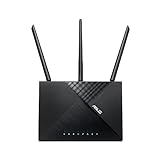
- Maximum Range : 3000 Sq Ft.Antenna: External antenna x 3. Memory : 128 MB Flash, 128 MB RAM.
- Fast Wi-Fi Speed – Concurrent dual-band AC1750-level Wi-Fi delivers smooth streaming for home network.
- MU-MIMO for Full Speed on Multiple Devices – The revolutionary technology connects multiple MU-MIMO-compatible clients at each device’s maximum speed simultaneously.
- Optimized Coverage with AiRadar Beamforming – The WiFi signal is focused towards connected devices to ensure stable connection.
- Parental Control – Protect children from internet addiction.

- Carina D1 Accessory Kit 6 in 1
- Includes: Magnetic Positioning Component x 1, Positioning Bracket x 1, QSG x 1, Rechargeable Ni-MH AA Battery x 2, Controller Battery Cover (L) x 1 Compatible with Meta Quest 3, Controller Battery Cover (R) x 1 Compatible with Meta Quest 3

- Extend VR Playtime: This 4-pack of 6000mAh VR battery chargers extends your total playtime more than 10 hours.so you can dive deeper into your favorite VR worlds without the worry of running out of power, Use them in rotation for non-stop VR adventures, ideal for long gaming sessions, travel, or sharing with friends, bringing you immersive VR gaming fun.
- Exclusive Innovative Design: Upgraded slide-in design is compatible with Meta Quest 3 and Meta Quest 2; fits snugly on the VR headset and perfectly avoids blocking the headphone jack, making it easier than ever to enjoy uninterrupted VR gameplay.
- Safe and Fast Charging: The extended battery pack for TREE.NB quest 3s/3/2 provides 5V/2A input and output, and has passed the safety certification, can provide over-charge, over-current, over-voltage, short-circuit protection.
- Lightweight and Portable: Slim design and lightweight, this charger is compatible with meta quest 3 only 4.6oz, will not add any significant weight to your VR headset; at the same time, it can also be carried in your pocket or bag for your charge other Type-C device.
- Wide Compatibility: TREE.NB Quest 2/3/3s accessory battery pack is compatible with Original Strap, Elite Strap, and most third-party head straps, and also applicable to devices with Type-C.

- Simultaneous charging of headset and 2 controllers: Designed for the elite gamer, our magnetic, rechargeable charging dock, the VR charging station on the Quest 3S/Quest 3 allows you to conveniently charge your headset and touch controllers at the same time. With a stable and secure charging mode, you can fully charge your headset and controllers in just 4-5 hours.
- Simultaneous charging of headset and 2 controllers: Designed for the elite gamer, our rechargeable charging dock, the VR charging station on the Quest 3S/Quest 3 allows you to conveniently charge your headset and touch controllers at the same time. With a stable and secure charging mode, you can fully charge your headset and controllers in just 4-5 hours.
- Save Money and Be Environmentally Friendly: Our charging dock for meta quest 3S/quest 3 includes the controller cover and 2 customized rechargeable batteries that can be used over 3000 times. This not only saves you the cost of constantly replacing batteries, but also promotes a more environmentally friendly approach. Reusable batteries are not only cost-effective, but also safer for the environment.
- Neat and Organized Gaming Setup: Keep your gaming room tidy and organized with our VR charging dock. It provides a dedicated space to store your headset and touch controllers, ensuring they're always within reach and ready for your gaming session. Say goodbye to tangled cords and cluttered gaming areas.
- All-in-one kit for your convenience: Our kit includes everything you need to enhance your Quest 3S/Quest 3 gaming experience. You'll receive 1 Quest 3S/Quest 3 charging dock, , 2 rechargeable 2100mAh batteries, 1 USB-C adapter, 1 fast-charging charging head, 2 battery covers, and a welcome guide.

- 18W Magnetic Charging - Powerful magnets in both the charging cable ensure a perfect, secure connection every time. Enjoy 100% charging stability — no fiddling or adjustments needed for easy docking and removal
- Free Up Your USB-C Port - Unlock a high-speed USB 3.0 female port (5Gbps) without removing the adapter. Connect your essential gear(link cable, battery strap, etc.) and shield your headset's valuable port from damage (Charging and data transfer cannot occur simultaneously)
- Premium Device Protection - Avoid damaging the USB-C port through repeated plugging and unplugging to extend the lifespan of your device.
- Compatible with Quest 3/3S/Pro - This AMVR Magnetic Charging Cable Kit is specifically designed for Quest 3/3S/Pro, and works seamlessly with your customized setup—accommodating link cable and head straps, etc
- AMVR Services - With 12 months of product warranty and 24x7 friendly customer service.If you have any questions about our products and services, please contact us, we will definitely give you a solution in time
The Router Quest 3 Buying Guide: Finding Your Perfect Wi-Fi Navigator
Choosing a new router can feel like a big adventure. The Router Quest 3 promises a better internet experience. This guide helps you decide if it’s the right fit for your digital journey.
Key Features to Look For
When you look at the Router Quest 3, a few features really matter. These tell you how fast and reliable your internet connection will be.
Speed and Standards
- Wi-Fi 6 or 6E Support: Make sure the router uses the newest Wi-Fi standards (like Wi-Fi 6). This means faster speeds and less crowding when many devices connect.
- Tri-Band Technology: Some high-end models offer three separate bands (two 5GHz and one 2.4GHz). This spreads out the traffic, making streaming and gaming smoother.
Coverage and Range
- Mesh Capability: Does the Quest 3 work well alone, or can it connect to satellites (mesh nodes)? If you have a large or oddly shaped house, mesh is a lifesaver for eliminating dead zones.
- Beamforming: This technology focuses the Wi-Fi signal directly toward your devices instead of broadcasting everywhere weakly.
Security and Management
- Parental Controls: Good routers let you easily set time limits or block certain websites for kids.
- VPN Support: If you use a Virtual Private Network, check if the router handles it without slowing everything down.
Important Materials and Build Quality
The physical parts inside and outside the router affect how long it lasts and how well it performs.
Internal Components
- Processor Power: A faster processor (CPU) inside handles many connected devices smoothly. A slow one causes lag when everyone is online.
- Antenna Design: Look for routers with strong, well-placed internal or external antennas. Better antennas mean a stronger signal reaches farther.
External Build
- Heat Dissipation: Routers get warm. Good ventilation slots or a sturdy casing that allows air to move prevents overheating, which slows performance over time.
- Port Quality: Ensure the rear ports (where you plug in your modem or wired devices) are modern, like Gigabit Ethernet (10/100/1000 Mbps).
Factors That Improve or Reduce Quality
What makes a Quest 3 great or just okay?
Quality Boosters
- OFDMA Technology: This feature (part of Wi-Fi 6) is excellent. It lets the router talk to many small devices at the same time, improving efficiency, especially in busy homes.
- Quality of App Interface: A simple, clean smartphone app makes setup and daily management much easier for everyone.
Quality Reducers (Watch Outs)
- Overcrowding: If you live in an apartment building, many neighbors’ Wi-Fi signals might interfere. The Quest 3 needs good channel selection features to overcome this noise.
- Old Firmware: Manufacturers must release updates. If the company stops updating the software, security risks appear, and performance might suffer.
User Experience and Use Cases
Think about how you use the internet every day. The Quest 3 should match your lifestyle.
For Gamers
Gamers need the lowest latency (ping). Look for a specific “Gaming Mode” setting in the router’s software. This prioritizes game data over background downloads.
For Streaming Families
If four people stream 4K video at once, you need high total bandwidth. Tri-band models handle this heavy lift well. Make sure the router supports Quality of Service (QoS) settings to manage video streams fairly.
For Remote Workers
Stability is key. If your video calls drop, your workday stops. A reliable router with strong processor power ensures your work connection stays solid all day long.
Router Quest 3 Buying FAQ
Q: How hard is the Router Quest 3 to set up?
A: Most modern routers, including the Quest 3, use a simple smartphone app. You usually plug it in, download the app, and follow the on-screen steps. It is generally very easy.
Q: Will the Quest 3 work with my old modem?
A: Yes, almost always. The router connects to your modem using a standard Ethernet cable. If your modem works now, the Quest 3 will connect to it.
Q: What does “Wi-Fi 6” really mean for me?
A: Wi-Fi 6 means your router handles more devices at once without slowing down. Think of it like a wider highway for your internet traffic.
Q: Should I buy the version with external antennas or the sleek, antenna-less one?
A: External antennas often allow you to adjust the direction of the signal, which can improve coverage in specific spots. Sleek designs look better, but performance depends more on the internal technology.
Q: How often should I update the router’s software (firmware)?
A: You should enable automatic updates if possible. If not, check for updates every few months. Updates fix bugs and keep your network safe.
Q: What is the best placement for the Router Quest 3?
A: Place it high up, near the center of your home. Keep it away from large metal objects, microwaves, and fish tanks, as these things block Wi-Fi signals.
Q: Does the Quest 3 support guest networks?
A: Yes. A good router lets you create a separate network for visitors. This keeps their devices separate from your main computers and smart home gadgets.
Q: What if my house is very big? Should I get a single Quest 3 or a Mesh system?
A: For very large or multi-story homes, look for a “Router Quest 3 Mesh Bundle.” This uses multiple units working together for seamless coverage everywhere.
Q: How can I check if the router is causing my slow internet?
A: Plug a computer directly into the Quest 3 using an Ethernet cable. If the speed is fast when wired but slow wirelessly, the router’s Wi-Fi signal needs improvement or adjustment.
Q: Is the higher-priced model worth the extra money?
A: If you have ten or more smart devices, game often, or stream 4K video constantly, the extra power (better processor, more bands) in the premium model usually pays off in frustration-free performance.