
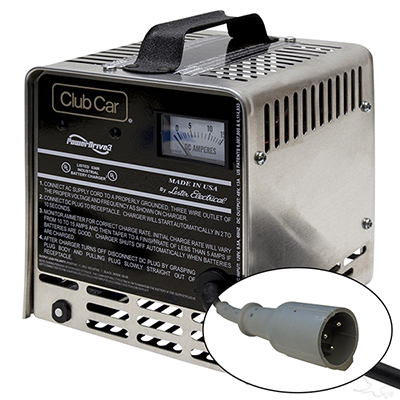
Image Source: jsgolfcarts.com
Pro Guide: How To Test A Golf Cart Battery Charger DIY
A golf cart charger powers up your ride. It takes wall power and changes it for your cart’s batteries. Can you test it yourself? Yes, you can! Many common problems with golf cart charging issues can be checked right at home. Who should test it? Anyone with a golf cart who wants to keep it running well or fix a problem. A bad charger can harm your expensive batteries. Learning how to test it saves money and helps you spot problems early. This guide helps you with golf cart charger troubleshooting. You will learn to find what is wrong and how to fix it.
Why Check Your Charger? Signs of Trouble
Checking your golf cart charger is very important. It keeps your cart running and makes your batteries last longer. Many things can go wrong with a charger. Knowing the signs of faulty charger symptoms helps you act fast.
Why regular checks matter:
- Save your batteries: A bad charger can harm batteries. It might undercharge them. This makes them lose power fast. It might overcharge them. This can boil away water. Both ways, your batteries die sooner.
- Stop surprises: Imagine going to play golf. Your cart will not start. A bad charger is often the reason. Regular checks help you fix issues before they become big problems.
- Save money: A new charger costs a lot. Simple fixes can save you money. Testing helps you know if you need a repair or a new charger.
- Stay safe: Faulty chargers can heat up. They can even cause fires. Testing them makes sure they are safe to use.
Common signs of a bad charger:
- Cart does not charge: You plug it in. The charger light does not come on. Or it clicks but nothing happens. The batteries stay dead. This is a clear sign.
- Short run time: Your cart used to run for hours. Now it runs for a short time. Then it dies. This often means your batteries are not getting a full charge.
- Hot batteries: Your batteries get very hot when charging. They might even smell bad. This can mean the charger is putting out too much power.
- Charger gets hot: The charger itself feels very hot to touch. This can be a sign of internal problems.
- No lights or sounds: Most chargers make noise or show lights. If yours is silent and dark when plugged in, it is likely faulty.
- High electric bill: If your charger is always on, it might be overcharging. This uses too much power.
If you see any of these signs, it is time to test your charger. This guide will show you how.
Safety First: Essential Steps Before You Start
Working with electricity can be dangerous. Golf cart chargers use high voltage and current. You must be careful. Always put safety first.
Crucial safety steps:
- Turn off power: Unplug the charger from the wall outlet. Disconnect it from the golf cart. This is the first and most important step. No power means no shock risk.
- Wear safety gear:
- Safety glasses: Protect your eyes from sparks or acid. Batteries can sometimes spray acid.
- Gloves: Use thick rubber gloves. They protect your hands from shocks and acid.
- Old clothes: Battery acid can ruin clothes. Wear something you do not mind getting dirty.
- Work in a good area:
- Dry place: Never work on electrical items in wet areas. Water conducts electricity.
- Open space: Work in a well-aired space. Batteries can let out gas. This gas can explode if it builds up.
- No metal tools on battery: Do not put metal tools on top of batteries. They can cause a short circuit. This makes sparks and can cause a fire.
- Have help nearby (optional): It is always good to have someone close. They can help if something goes wrong.
- Read your manual: Check your golf cart and charger manuals. They may have special safety rules for your model.
Remember: If you are not sure about something, stop. Get help from a pro. Your safety is worth more than any repair.
Tools You Will Need
You will need a few simple tools to test your golf cart charger. These tools help you check voltage and current.
- Multimeter: This is a key tool. You need a multimeter for golf cart charger testing. It measures voltage (volts), current (amps), and resistance (ohms). Make sure it can read DC voltage. Most basic models do this.
- Clamp meter (optional but good): A clamp meter measures current (amps) without touching wires directly. It is safer and easier for an amperage test. Some multimeters have a clamp feature.
- Safety glasses and gloves: As mentioned, these are a must.
- Screwdrivers: You might need different types. A flathead or Phillips head. Use them to open charger cases or tighten wires.
- Wire cutters/strippers (optional): You might need these if you fix a bad wire.
- Battery hydrometer (optional): This tool checks the acid in your batteries. It does not test the charger directly. But it tells you if batteries are taking a charge well. This helps diagnose golf cart charging issues.
Choosing a multimeter:
Get a digital multimeter. They are easy to read. Make sure it has a “DC V” setting. This measures DC voltage. Also, it should have an “A” or “mA” setting for current. If possible, get one that can handle the voltage of your golf cart (e.g., 50V DC for a 36V cart, or 70V DC for a 48V cart).
| Tool | Purpose | Notes |
|---|---|---|
| Multimeter | Measures voltage, resistance, sometimes current | Essential for electrical tests. Get a digital one. |
| Clamp Meter | Measures current without direct contact | Safer and easier for amperage. Highly recommended. |
| Safety Glasses | Protects eyes from sparks, acid | Always wear them. |
| Rubber Gloves | Protects hands from shocks, acid | Important for handling batteries and wires. |
| Screwdrivers | For opening cases, tightening connections | Phillips and flathead are common. |
| Battery Hydrometer | Checks battery acid density | Helps see if batteries are fully charged/healthy. |
Having the right tools makes the job safer and easier.
Pre-Test Checks: A Visual Review
Before you grab your multimeter, look over your charger. A quick visual inspection can spot many problems. It helps you avoid extra steps. This is part of checking charger fuse and cable health.
What to look for:
- Charger case:
- Are there cracks or holes?
- Does it look melted or burned? This means it got too hot.
- Is it dented? This could harm parts inside.
- Cables:
- Check both the AC cord (plugs into the wall) and the DC cord (plugs into the cart).
- Are they cut, frayed, or bare? Damaged wires are unsafe. They can stop power flow.
- Look for melted spots. This means too much heat.
- Are the connectors (the ends that plug in) bent or broken? They must fit tight.
- Plugs:
- Check the prongs on the wall plug. Are they bent or loose?
- Look at the golf cart plug. Is it clean? Are the pins inside straight?
- Corrosion (green or white powdery stuff) can stop power. Clean it with a wire brush or baking soda paste.
- Fans and vents:
- Does your charger have a fan? Is it clean?
- Are the vents blocked by dirt or dust? Blocked vents cause overheating. Overheating can damage parts.
- Fuses: Many chargers have a fuse. This fuse protects the charger from power surges.
- Locate the fuse: It might be inside the charger case. Or it could be in a small holder on the outside. Some fuses are inside the AC plug itself. Look for a small plastic cap or a clear tube.
- Check the fuse: If it is a clear fuse, look at the metal wire inside. If it is broken or burned, the fuse is bad. You need to replace it. If you cannot see it, you will need to test it with your multimeter later.
- A blown fuse is a common cause for a charger not engaging golf cart.
Before moving on:
Make sure all cables look good. All plugs should be clean and fit well. The charger case should be intact. If you find a bad fuse, replace it first. Then try the charger again. This simple check can fix many issues.
Step-by-Step Testing Procedures
Now it is time to use your tools. This section covers key tests. We will check engagement, voltage, and amperage. We will also check the rectifier.
Grasping Initial Engagement: Is Your Charger Turning On?
First, see if your charger even tries to work. This helps find out why the charger not engaging golf cart.
What to do:
- Safety check: Ensure you followed all safety steps. Charger unplugged from wall and cart.
- Plug into wall: Plug the charger’s AC cord into a working wall outlet.
- Listen and look: Does the charger make any noise? Do any lights come on? Some chargers have a fan that starts. Others have a power light.
- Plug into cart: Now, plug the DC cord into your golf cart’s charge port.
- Observe:
- Does the charger’s fan start?
- Do any lights come on (e.g., “charging” light)?
- Do you hear a click or hum?
- Troubleshoot:
- No power/lights/fan at all (even when plugged into wall): This often means no power is getting to the charger. Check the wall outlet. Check the charger’s internal fuse. If it is an older charger, the power cord might be bad.
- Power/lights on when plugged into wall, but nothing when plugged into cart: This means the charger is sensing a fault. It might be a bad connection to the cart. It could also mean the cart’s batteries are too low for the charger to start. Or the charger cannot sense the battery voltage. This is a common faulty charger symptom.
This first test tells you if the charger is getting power and trying to work. If it does not engage, you have a bigger issue.
Testing Charger Output Voltage
This test is critical. It tells you if the charger sends the right amount of power. We will test charger output voltage.
What you need: A multimeter set to DC Volts (DC V).
Steps:
- Safety first: Ensure all safety rules are followed. Charger unplugged from wall.
- Set multimeter: Turn your multimeter dial to DC Volts. Pick a range higher than your golf cart’s voltage.
- For a 36V cart, set it to 50V or 100V DC.
- For a 48V cart, set it to 70V or 100V DC.
- Prepare the charger: Plug the charger into the wall outlet. But do NOT plug it into the golf cart yet.
- Find the output terminals:
- For chargers with a large plug: The two large pins inside the plug are the main output points. One is positive (+), one is negative (-).
- For chargers with small pins: There might be a small “sense” wire. You will focus on the main power pins. Your cart’s manual may show which pin is positive and negative. Often, the bigger pin is positive.
- Test the voltage:
- Touch the red probe of your multimeter to the positive (+) output pin.
- Touch the black probe of your multimeter to the negative (-) output pin.
- Important: You need to “trick” many chargers into turning on. They need to “see” battery voltage to start charging. This means you will need to plug the charger into the golf cart’s charging port to get a reading.
- Connect to cart: Plug the charger into the cart’s charging port. Make sure the charger is also plugged into the wall.
- Connect probes: Put the multimeter probes into the charger’s output plug. Make sure you get a good contact on the metal pins. Red probe to positive, black to negative.
- Read the display: The multimeter will show a voltage reading.
What numbers mean:
| Golf Cart Voltage | Expected Initial Charger Output (approx.) | Meaning |
|---|---|---|
| 36V | 42V to 45V DC | Normal. Charger is supplying power. |
| 48V | 56V to 62V DC | Normal. Charger is supplying power. |
| Any voltage | 0V (or very low) | Charger is not putting out power. Bad internal parts. |
| Any voltage | Much too high (e.g., 70V for 36V cart) | Charger is faulty. Can harm batteries. |
- If the voltage is zero or very low: The charger is not working. It could be an internal fuse, a bad transformer, or faulty electronics.
- If the voltage is correct: The charger is at least powering up and sending voltage. Next, we check amperage.
- If the voltage is too high: The charger is faulty and will overcharge your batteries. This is dangerous. Stop using it.
This test is a good start. It confirms the charger’s basic output.
Performing a Charger Amperage Test
Voltage is how strong the power is. Amperage (amps) is how much power flows. This test tells you if enough power is reaching the batteries. A charger amperage test is vital for a full check.
What you need: A clamp meter (preferred) or a multimeter with a high amp setting.
Steps using a clamp meter (recommended):
- Safety first: All safety rules apply. Charger plugged into cart and wall. Charger should be on and trying to charge.
- Set clamp meter: Turn the dial to “A” (Amps) and choose “DC” (Direct Current). Set the range to something like 20A or 40A.
- Isolate one wire: You need to clamp around just one of the main power wires in the DC output cord. Do not clamp around both. If your charger plug does not let you do this, you might need to carefully strip back some insulation on one wire (only if you are skilled) or use a “cheater cord” that exposes wires. Be very careful if you strip wires.
- Clamp and read: Open the clamp meter jaws. Place them around only one of the main DC power wires coming from the charger to the cart.
- Observe: Read the amps on the display.
What numbers mean:
- Initial amperage: When you first plug in a good charger to low batteries, the amps should be high.
- For a 36V charger, this might be 15-25 amps.
- For a 48V charger, this might be 10-20 amps.
- The exact number depends on your charger model and battery state.
- Declining amperage: As the batteries charge, the amperage should slowly drop. This is normal. A full charge will see the amps drop to 5 amps or less, or even near zero.
- Zero or very low amps: If the amps are zero or very low right at the start, the charger is not working. It might be putting out voltage but no current. This means the charger is not supplying power. It could be a bad rectifier or other internal part.
- Amps stay high: If the amps stay high for a very long time (many hours past normal charge time), the charger might be overcharging. This can harm batteries. Or the batteries are too bad to accept a charge.
If you must use a multimeter for amps (more risky):
- Set multimeter: Turn the dial to “A” (Amps) DC. Connect the probes to the correct amp jacks on the multimeter.
- Break the circuit: You must put the multimeter in series with the charging circuit. This means you need to cut one of the charger’s DC output wires. Then connect one probe to one cut end and the other probe to the other cut end. This is risky and not advised for beginners. A clamp meter is much safer.
Summary for amperage:
The key is to see if the charger is sending current. Also, watch if the current slowly drops as batteries charge. If not, you have a charger problem. This helps diagnose golf cart charging issues.
Checking Charger Fuse (Detailed)
We mentioned checking the fuse visually. Now, let’s do a more precise test using the multimeter. This is good for fuses you cannot see through.
What you need: Multimeter set to Ohms (Ω) or continuity mode (beeps).
Steps:
- Safety first: Ensure the charger is UNPLUGGED from BOTH the wall and the cart. This is very important.
- Locate the fuse: Find the fuse. It might be inside the charger case. You might need to open the case. Look for a small glass tube or a blade-style fuse.
- Remove the fuse: Gently take the fuse out of its holder.
- Test with multimeter:
- Set your multimeter to the Ohms (Ω) setting. Or use the continuity setting (looks like a sound wave symbol).
- Touch one probe to each metal end of the fuse.
- Read the display:
- Ohms mode: A good fuse will show very low resistance (close to 0 ohms).
- Continuity mode: A good fuse will make the multimeter beep.
- Bad fuse: A blown fuse will show “OL” (over limit) or a very high number in ohms mode. It will not beep in continuity mode.
- Replace if bad: If the fuse is bad, replace it with a new one of the exact same type and rating (e.g., 30A fast-blow). Using the wrong fuse can damage the charger or cause fire.
A blown fuse often means there was a problem with the charger or batteries. It might blow again if the main problem is not fixed.
Examining the Charger Rectifier
The rectifier changes AC power from your wall to DC power for your batteries. It uses diodes to do this. A faulty rectifier means the charger cannot change power correctly. Testing charger rectifier components can be complex.
What it does: Converts Alternating Current (AC) to Direct Current (DC). Think of it like a one-way valve for electricity.
What you need: Multimeter set to diode test mode (often shares a setting with continuity).
Steps (for bridge rectifier or individual diodes):
- Safety first: UNPLUG the charger from everything.
- Access the rectifier: You will need to open the charger case. The rectifier is often a square or round component with four wires or terminals. It might be near the transformer. It often has cooling fins.
- Identify terminals: There will be two AC input terminals and two DC output terminals (+ and -). If it is a bridge rectifier, these might be marked.
- Test the diodes (forward bias):
- Place the red probe on the DC (+) terminal.
- Place the black probe on one of the AC input terminals.
- The multimeter should show a voltage reading (e.g., 0.4V – 0.7V for silicon diodes). This is the “forward voltage drop.”
- Repeat this for the other AC input terminal.
- Test the diodes (reverse bias):
- Now, reverse the probes. Place the black probe on the DC (+) terminal.
- Place the red probe on one of the AC input terminals.
- The multimeter should show “OL” (open loop) or a very high number. This means no current flows backward.
- Repeat for the other AC input.
- Test the negative side:
- Place the black probe on the DC (-) terminal.
- Place the red probe on one of the AC input terminals. (Should show voltage drop).
- Repeat for the other AC input.
- Reverse probes: Black on AC, red on DC (-). (Should show OL).
- Interpreting results:
- Good diode: Shows a voltage drop in one direction (forward bias) and “OL” in the reverse direction.
- Bad diode (open): Shows “OL” in both directions. No current flows at all.
- Bad diode (shorted): Shows 0V or very low reading in both directions. Current flows both ways, which is bad.
Common rectifier issues:
If the rectifier is bad, the charger will not put out the correct DC voltage. It might put out AC voltage, or very little voltage. This is a common part that fails in older chargers. Replacing a rectifier can be a simple fix if you know how to solder.
Interpreting Your Results: What Do the Numbers Mean?
You have done the tests. Now, how do you make sense of the numbers? This table helps you diagnose golf cart charging issues based on your readings.
| Test & Result | Possible Problem | Action / What to Check Next |
|---|---|---|
| Initial Engagement | ||
| No lights, no fan, no sound (even plugged into wall) | No power to charger / Internal power issue | 1. Wall outlet. 2. AC cord. 3. Internal AC fuse. |
| Lights/fan on when plugged into wall, but not cart | Charger not sensing battery / Bad DC cable | 1. Cart charge port. 2. DC plug/cable. 3. Cart battery voltage (too low?). |
| Output Voltage (with charger connected to cart) | ||
| 0V or very low voltage | Charger internal fault / Bad rectifier / Fuse | 1. Internal DC fuse. 2. Rectifier. 3. Transformer. |
| Correct voltage (e.g., 42-45V for 36V, 56-62V for 48V) | Voltage output is good. Check amperage next. | Proceed to Amperage Test. |
| Much too high voltage (e.g., 70V for 36V cart) | Overcharging fault / Regulator issue | STOP USING! Charger is faulty and will destroy batteries. Seek repair/replacement. |
| Amperage (with charger connected to cart) | ||
| 0 Amps or very low amps (at start of charge) | No current flow / Bad rectifier / Bad transformer | 1. Rectifier. 2. Transformer. 3. Internal wiring. |
| Initial amps are high, then drop over time | Normal charging. | Charger is working well. Batteries may be the issue if cart not charging. |
| Amps stay high for too long (over many hours) | Overcharging / Bad batteries | 1. Check battery water. 2. Test individual batteries (hydrometer/voltmeter). |
| Fuse Test | ||
| “OL” or no beep (fuse removed) | Blown fuse. | Replace fuse with exact same type/rating. Then re-test charger. |
| Rectifier Test | ||
| Shows “OL” in both directions | Diode is open. | Rectifier is bad. Replace it. |
| Shows voltage drop in both directions (or 0V) | Diode is shorted. | Rectifier is bad. Replace it. |
| Good readings (voltage drop one way, OL other) | Rectifier is likely good. | Check other components. |
This table is your quick guide for golf cart charger troubleshooting. Each reading gives a clue.
Common Charger Problems and Solutions
You have found a problem. What next? This section provides a basic golf cart charger repair guide.
Charger Not Powering On
- Problem: No lights, no hum, no fan when plugged into the wall.
- Solution:
- Check wall outlet: Is it working? Plug in a lamp or phone charger to test.
- Check AC cord: Look for cuts or breaks. Test with multimeter for continuity if you know how. Replace if bad.
- Internal fuse: Many chargers have a fuse inside. Follow safety steps. Open the case. Find the fuse and test it. Replace if blown.
- Main transformer: If the fuse is good, the main transformer might be bad. This is a big, heavy part. It is often costly to replace.
Charger Not Engaging Golf Cart
- Problem: Charger works when plugged into wall (lights, fan), but nothing happens when plugged into the cart.
- Solution:
- Check DC cable and plug: Look for damage or corrosion. Clean the cart’s charge port.
- Charger lockout: Some chargers will not start if the batteries are too low. Measure battery pack voltage. If it is very low (e.g., 20V for a 36V cart), you might need a “trickle charge” from a small 12V charger to bring it up a bit first.
- Sense circuit: Some chargers need to “see” battery voltage to start. A small wire in the charger plug sends this signal. If it is bad, the charger will not start. Check this wire.
Low Output Voltage or Amperage
- Problem: Charger puts out low voltage or low amps.
- Solution:
- Rectifier: This is a common fault. Test the rectifier. If it is bad, replace it.
- Capacitors: Older chargers have large “filter” capacitors. These smooth the DC power. If they are bulging or leaking, they are bad. Replacing them is possible but needs skill.
- Transformer: If the rectifier is good, the transformer might be failing. This is a costly repair.
- Poor connections: Check all internal wires. Make sure they are tight.
Overcharging / High Voltage / Amperage Stays High
- Problem: Charger puts out too much voltage or amps never drop. Batteries get hot.
- Solution:
- Regulator/Controller board: This is usually an electronic board. It controls the charging cycle. If it fails, it can cause overcharging. These boards are hard to fix. Often, the whole board needs replacing.
- Bad batteries: Sometimes, very bad batteries will not take a full charge. The charger keeps trying. Test individual batteries with a hydrometer and voltmeter.
- Temperature sensor: Some chargers have a temperature sensor that connects to the batteries. If it fails, the charger might not cut off.
Important Note on Repair:
Many golf cart chargers are sealed units. Getting inside can be hard. Replacing parts like transformers or control boards can be costly. Sometimes, buying a new charger is safer and cheaper than a complex repair. For simple fixes like a fuse or a rectifier, DIY is possible. For complex problems, consider professional help.
When to Seek Professional Help
DIY testing and simple repairs are great. But there are times when you should call an expert.
- No clear fix: You did all the tests. You cannot find the problem. Or the fix is too complex.
- Safety concerns: You are not comfortable working with electricity. Or you think the problem might be dangerous.
- Complex internal parts: Repairs that need special tools, soldering skills, or deep electrical knowledge. This includes replacing a transformer or a main control board.
- Under warranty: If your charger is still under warranty, fixing it yourself might cancel the warranty.
- Cost vs. New: If the repair parts cost a lot, or the repair will take too much time, buying a new charger might be better. A professional can help you decide.
Do not be afraid to ask for help. A local golf cart shop or an electrician can often diagnose and fix issues quickly.
Maintenance Tips for Charger Longevity
Keeping your charger in good shape makes it last longer. It also prevents future problems.
- Keep it clean: Dust and dirt can block vents. This makes the charger hot. Use compressed air to blow out dust from vents. Wipe the case often.
- Store it well: Keep your charger in a dry, cool place. Extreme heat or cold can harm electronics. Protect it from rain or water.
- Handle cables gently: Do not pull the cords by the wire. Pull by the plug. This saves the connections. Do not run over the cords with the golf cart or car.
- Check connections: Make sure the plugs fit tight. Loose connections can heat up. They can cause damage.
- Check batteries regularly: A healthy battery pack helps the charger work less hard. Make sure battery terminals are clean and tight. Check battery water levels (for flooded lead-acid).
- Avoid over-discharging batteries: Do not let your golf cart batteries die completely. Charge them after each use. This helps both the batteries and the charger last longer.
- Use the correct charger: Always use a charger that matches your golf cart’s voltage (36V or 48V). Using the wrong one can damage both.
Good care makes your charger and golf cart last a long time.
Frequently Asked Questions (FAQ)
Q1: How long should a golf cart battery charger last?
A: A good golf cart charger can last 5 to 10 years or more. How long it lasts depends on how often you use it. It also depends on how well you care for it. Using it gently and keeping it clean helps it last longer.
Q2: Can a bad charger ruin golf cart batteries?
A: Yes, absolutely. An undercharging charger will not fill batteries. This makes them die faster. An overcharging charger can boil off battery water. This damages the battery plates. Both types of bad charging shorten battery life a lot.
Q3: My golf cart charger clicks but does not charge. What’s wrong?
A: A click often means the charger’s contactor or relay is trying to engage. But it stops because of a problem.
* Possible reasons: Batteries might be too low. The charger might sense a short. The charger might have a fault in its sensing circuit. Check the charger’s DC plug and cables for damage. Check battery voltage. If batteries are very low, try a slow 12V charge to wake them up.
Q4: What is a “trickle charge” for golf cart batteries?
A: A trickle charge is a very slow, low-current charge. It is often used to keep batteries topped off when stored. Or to gently bring a very dead battery back to life. Regular golf cart chargers are not trickle chargers. Some smart chargers have a maintenance mode that acts like a trickle charge.
Q5: My charger gets very hot. Is this normal?
A: A charger getting warm is normal during charging. It means it is working. But if it is too hot to touch, that is not normal. Very high heat can mean a fault inside. It could be an overloaded circuit. It could also mean a cooling fan is not working. Stop using it if it feels too hot.
Q6: Should I unplug my golf cart charger when not in use?
A: Yes, it is a good idea. Most modern chargers turn off when charging is done. But unplugging them saves electricity. It also protects the charger from power surges. It is also safer in case of a fault.
Concluding Thoughts
Testing your golf cart battery charger is a smart move. It helps keep your golf cart ready to go. You can find problems early. This saves you money on new batteries and big repairs. We looked at many steps. We talked about safety. We used tools like a multimeter. We learned how to check voltage and current. We also found out how to test fuses and rectifiers.
Remember to always put safety first. Use the right tools. Take your time with each step. If you follow this guide, you can find many charger problems yourself. This will make your golf cart charging more reliable. You can then enjoy more time on the green.