
Removing or adjusting a golf cart governor is a way to increase golf cart speed. A governor is a device that acts as a golf cart speed limiter, preventing the cart from going faster than a certain speed set by the maker. You can change or bypass this part, but it changes how fast your cart goes and comes with risks. This guide shows you how to do it safely.
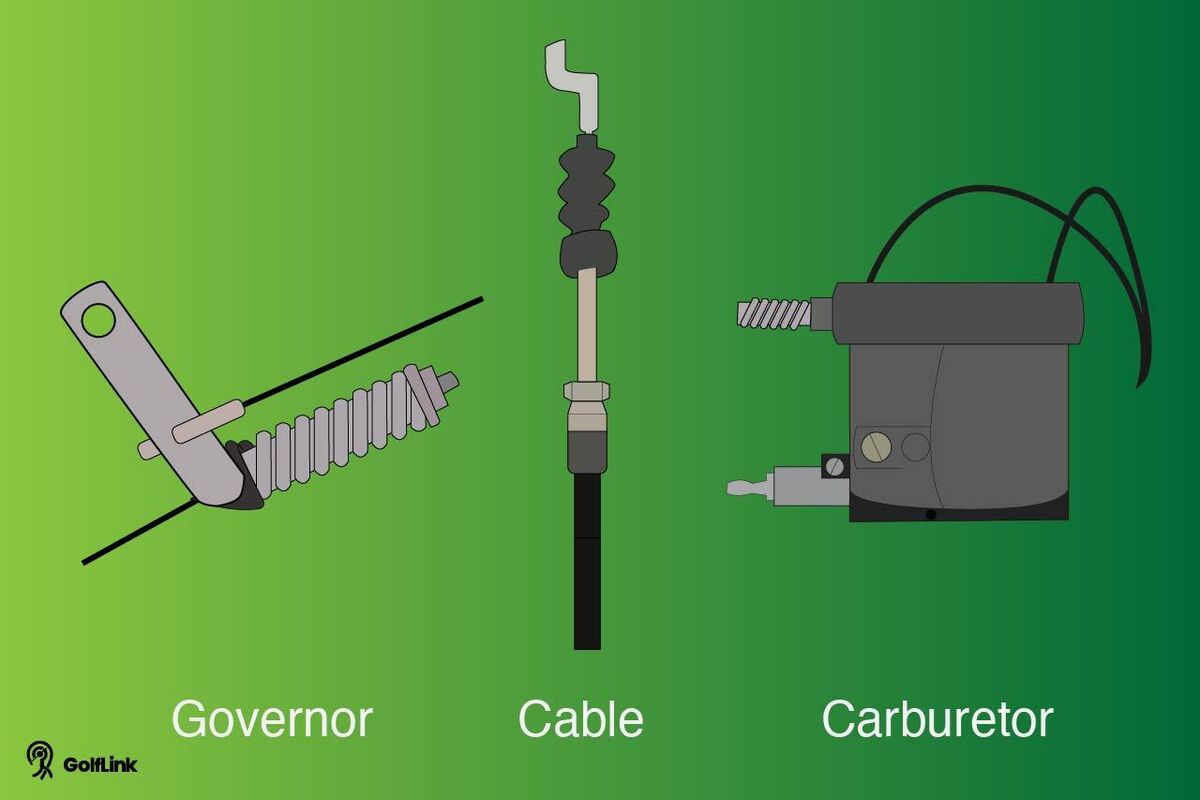
Image Source: assets.ltkcontent.com
Why Golf Carts Have Governors
Golf carts are made to go slow. They move safely on golf courses and in small areas. The governor is a key part of this design. It limits the engine or motor speed. This does many things:
- Keeps people safe: It stops the cart from going too fast and crashing.
- Protects the cart: Going too fast wears out parts like the engine, motor, and brakes faster.
- Follows rules: Many places have speed rules for golf carts. Governors help carts meet these rules.
- Saves energy: Going slower uses less gas or battery power.
Think of it like a speed limit sign for your cart that is built in. It helps the cart last longer and keeps rides safe.
Deciphering the Risks
Changing or removing the governor is a big deal. It lets your cart go faster. But faster is not always better. There are real dangers you need to know before you start.
Safety Issues
- Harder to Stop: Your cart is made to stop from its normal speed. Going faster means you need more space to stop. Your brakes might not work as well at high speeds.
- Less Control: Steering is harder when going fast. The cart might feel shaky. You could lose control and crash.
- Tipping Over: Golf carts can tip easily, especially when turning fast. Going faster makes this much more likely.
- Passenger Safety: Passengers might not be ready for faster speeds. They could fall out.
Cart Damage
- Engine/Motor Problems: Running the engine or motor too fast can cause it to break down. Parts can overheat or wear out fast. Gas golf cart speed goes up, but the engine might not handle it for long.
- Drive Train Strain: Parts like the transmission, differential, and axles are not built for high speeds. They can break.
- Brake Wear: Using brakes from higher speeds wears them out much faster.
- Suspension and Frame: Bumps hit harder at faster speeds. This can bend or break the cart’s frame or suspension.
Legal Problems
- Street Rules: Many towns have rules on how fast golf carts can go on public roads. Going faster than the limit can get you a ticket.
- Where You Can Drive: Removing the governor might mean your cart can’t be driven on certain roads or places anymore.
Voiding Warranty
- If your cart is still under warranty, changing the governor will almost certainly end the warranty. If something breaks later, the maker will not fix it for free.
Knowing these risks is important. Removing the governor should only be done if you understand these problems and are okay with them. Always think safety first.
Fathoming Governor Types
Golf carts use different ways to limit speed. It depends on if your cart runs on gas or is electric. Knowing which type you have is the first step.
Mechanical Governors (Gas Carts)
- How they work: These use moving parts connected to the engine. They often watch the engine speed or how far the throttle pedal is pushed.
- Common setup: A arm or cable is linked to the engine’s carburetor or throttle body. When the engine goes too fast, the governor system pulls this arm back. This closes the throttle a little, slowing the engine down.
- Adjusting vs. Removing: You can often adjust golf cart governor settings on these. This changes the point where it starts to slow the engine. You can also bypass golf cart governor mechanical parts, which stops them from working at all.
Electronic Governors (Electric Carts)
- How they work: These use the cart’s computer system (the controller) to limit speed. They don’t have mechanical arms or cables like gas carts.
- Common setup: The controller gets signals about how fast the motor is turning or how hard the pedal is pushed. It is programmed to not let the motor go over a certain speed. This acts as the golf cart speed limiter.
- Changing Speed: To change speed on an electric cart, you usually need to change the settings in the controller. This can mean using special tools to reprogram it or sometimes changing a simple wire connection that tells the controller something about speed. This is how you bypass golf cart governor on electric carts.
Knowing your cart type (gas or electric) tells you which governor system you have and how you need to work on it.
Getting Ready for the Task
Before you start working on your golf cart, you need to get ready. This means having the right tools and putting safety first.
Essential Tools
The exact tools depend on your cart and governor type, but here is a general list:
- Wrench set (metric and standard)
- Socket set and ratchet
- Screwdrivers (Philips and flathead)
- Wire cutters
- Wire strippers
- Electrical tape or heat shrink tubing (for electric carts)
- Needle-nose pliers
- Safety glasses
- Work gloves
- Flashlight or work light
- Zip ties (optional, for securing wires)
- A means to measure speed (like a GPS app on your phone or a speed gun)
Safety Steps Before Starting
Safety is the most important part. Do not skip these steps.
- Turn Off Cart: Make sure the key is off. Put the forward/reverse switch in the neutral position.
- Set Parking Brake: Always set the parking brake firmly so the cart does not roll.
- Disconnect Power:
- For Gas Carts: Disconnect the negative terminal on the battery. This stops the engine from accidentally starting and cuts power to most parts.
- For Electric Carts: This is VERY important. Electric carts have high voltage. Find the main battery pack disconnect or disconnect the main positive (+) battery cable. Be very careful not to touch battery terminals or wires with metal tools. Wear rubber-soled shoes.
- Let Engine Cool (Gas Carts): If the cart has been running, the engine parts will be hot. Wait until everything is cool to touch.
- Work in a Safe Place: Work in a well-lit area away from other people or pets. Make sure the ground is level.
- Read Your Manual: If you have your golf cart’s owner’s manual or service manual, look at the parts about the engine, throttle, or electrical system. This can show you where parts are and how they work on your specific cart model (like EZ-GO governor adjustment, Club Car speed adjustment, or Yamaha governor removal details).
Taking these steps helps prevent accidents and damage to you and your cart.
Grasping Mechanical Governor Work (Gas Carts)
Gas golf carts often use a mechanical system to limit speed. You can often change how this system works. This might mean a simple adjustment or a full bypass.
Finding the Mechanical Governor
The mechanical governor is usually near the engine. Look for the throttle linkage system. This is the set of arms, rods, or cables that connect the gas pedal to the carburetor (or throttle body). The governor system is built into this linkage or works with it.
- Common spots: Near the top or side of the engine, linked to the carburetor throttle shaft.
- What to look for: You’ll see springs, levers, and possibly a spinning part (sometimes inside the engine or transmission casing, but the control part is outside). The part you work on is usually outside the engine block itself.
Option 1: Adjusting the Governor (Safer)
Adjusting the governor lets the cart go faster, but keeps some speed limiting. This is often the first step people try. It’s less risky than removing it completely. This is the main way to do EZ-GO governor adjustment, Club Car speed adjustment, and similar tasks on gas carts.
This usually involves changing the tension on a spring or changing the position of a stop screw on the governor linkage.
Steps for Adjustment
- Locate the Governor Linkage: Find the governor control arm and spring connected to your throttle linkage. It might look like an arm with a spring pulling on it, limiting how far the throttle can open.
- Find the Adjustment Point:
- Look for a screw that acts as a ‘stop’ for the governor arm. Turning this screw in or out changes where the arm stops.
- Look for a spring tensioner or where the spring connects. Moving the spring to a different hole or adjusting a nut on a threaded rod changes how hard the spring pulls.
- Note: The exact method varies by cart brand (EZ-GO, Club Car, Yamaha) and year. Check your manual if you have it.
- Make Small Changes:
- To increase golf cart speed, you generally want the governor arm to move more or the spring to pull less against the throttle opening.
- If adjusting a screw: Turn it a little bit counter-clockwise (out) to allow more movement.
- If adjusting a spring connection or tensioner: Adjust it so the spring pulls with less force on the governor arm that limits speed.
- Test Carefully:
- Reconnect the battery (if disconnected).
- Start the cart.
- Drive the cart in a safe, open area. See how fast it goes.
- Does it feel stable? Does it stop okay?
- Repeat if Needed: If it’s not fast enough, disconnect the battery again and make another small adjustment. If it’s too fast or feels unsafe, adjust it back towards the original setting.
- Secure: Once you find a speed you like that still feels safe, make sure any screws or nuts you adjusted are snug (but don’t overtighten).
| Adjustment Type | Action to Increase Speed | Effect |
|---|---|---|
| Stop Screw (Example) | Turn out (counter-clockwise) | Allows governor arm to move further |
| Spring Tension (Example) | Reduce tension (less pull) | Governor reacts later/less forcefully |
| Linkage Position | Change connection point (less leverage) | Governor has less effect on throttle |
Table: Common Mechanical Governor Adjustments
Adjusting keeps the system working, just at a higher speed limit. This is often the best way to get a little more gas golf cart speed without losing all the governor’s benefits.
Option 2: Bypassing the Governor (More Risk)
To completely bypass golf cart governor mechanical systems means stopping the governor from affecting the throttle at all. This lets the engine go as fast as the pedal linkage allows.
Steps for Bypass
- Warning: Bypassing removes the speed limit completely. This puts extra strain on the engine and drivetrain and is less safe. Only do this if you accept the risks.
- Locate Governor Linkage Points: Find where the governor system connects to the main throttle linkage (from the pedal to the carburetor). There will be rods, cables, or arms that link the two.
- Identify the Limiting Piece: Figure out which part of the governor system is physically stopping the throttle from opening fully. This might be an arm hitting a stop or a spring setup that pulls against the throttle opening.
- Disconnect or Secure the Limiting Piece: The goal is to make the governor linkage unable to pull the throttle closed.
- Disconnect: You might be able to remove a rod or cable connecting the governor arm to the throttle linkage.
- Secure (Tie Off): If you can’t easily disconnect it, you might need to tie off the governor arm or spring so it can’t move to close the throttle. Use strong wire or zip ties. Make sure the governor arm is held in a position where it does not interfere with the throttle linkage moving freely to wide open.
- Remove: In some cases, you might remove the external governor arm itself, but be careful not to create engine oil leaks or leave parts exposed. Yamaha governor removal might involve taking off a plate or arm on the engine casing.
- Check Throttle Movement: After bypassing, push the gas pedal fully. Check that the throttle arm on the carburetor now opens all the way without the governor system pulling it back.
- Test Carefully:
- Reconnect the battery.
- Start the cart.
- Drive in a very safe, large, open area.
- Be ready for a sudden increase in speed. Test the brakes immediately at low speed, then test speed gradually.
- Listen to the engine. If it sounds like it’s screaming or over-revving, it’s going too fast.
Bypassing gives you maximum gas golf cart speed, but removes a key safety and durability feature. Make sure all original governor parts are secured so they don’t catch on anything while the cart is moving.
Interpreting Electronic Governor Work (Electric Carts)
Electric golf carts use the cart’s computer (controller) to set the speed limit. There’s no mechanical arm to adjust. Changing the speed means interacting with this electronic governor. This often involves bypassing a signal or changing controller settings. This is how you deal with the golf cart speed limiter on electric models.
Finding the Electronic Governor
The “governor” itself isn’t a separate box you can point to like a mechanical one. It’s code or settings inside the main controller unit. The controller is usually found under the seat or in the battery compartment.
Methods for Bypassing or Adjusting (More Complex)
Working with electronic governors is often less DIY-friendly than mechanical ones. It can involve wiring or software.
Method 1: Speed Sensor Bypass (Common for some models)
Some electric carts use a speed sensor on the motor or transaxle. This sensor tells the controller how fast the cart is going. If the controller sees the cart going too fast, it limits power. Bypassing this sensor can fool the controller.
- Locate the Speed Sensor: Look for a small sensor near the motor or where the motor connects to the rear axle/differential. It will have wires coming from it, going to the controller.
- Identify the Wires: There are usually a few wires (often 3 or 4) connected to the sensor.
- Bypass or Modify Signal:
- Simple Bypass: On some older models (like some EZ-GO DCS or PDS models), you might simply disconnect the sensor plug. The controller won’t see a speed signal and might run faster, but it can also cause error codes or put the cart into a limp mode. This is rare on newer carts.
- Signal Modification: This is more complex and involves changing the signal the sensor sends. There are aftermarket devices for some cart models that plug into the sensor wiring to change the signal. This is not a simple cut-and-paste job and requires knowing the specific cart model and sensor type.
- Adding a Resistor (EZ-GO PDS example): Some specific models like the EZ-GO PDS had a simple plug under the controller cover where adding a resistor plug could change speed settings. This is model-specific. This is an example of EZ-GO governor adjustment for electric carts.
- Insulate and Secure: If you disconnect or modify wires, use proper electrical tape or heat shrink tubing to protect the connections. Secure wires so they don’t hang or get caught.
- Test Carefully: Reconnect the battery. Test the cart in a safe area. Be aware this might cause unexpected behavior or error lights.
Method 2: Controller Reprogramming (Most Effective, Needs Tools)
The most common and best way to change speed on modern electric carts (Club Car DS/Precedent with IQ/Excel system, Yamaha, newer EZ-GOs) is to change the settings inside the controller. This is often how you get Club Car speed adjustment or change speed on newer Yamaha electric models.
- Identify Controller Type: Know the brand and model of your cart and its controller system (e.g., Club Car IQ, EZ-GO PDS/TXT 48V, Yamaha G-series electric).
- Obtain Programming Tool/Device:
- Most cart makers use special handheld programmers. These are usually expensive and meant for dealers.
- Aftermarket companies make performance controllers or devices that allow programming. These often replace the factory controller or plug into a diagnostic port.
- Note: Simply connecting a laptop won’t work without specific software and cables, which are often proprietary.
- Access Programming Menu: Connect the programming tool to the cart’s diagnostic port (often under the dash or near the controller). Follow the tool’s instructions to access the settings menu.
- Change Speed Setting: Look for a “Speed Setting,” “Performance Mode,” or “Top Speed” option. Increase this setting to a higher level. Controllers often have preset levels (e.g., Level 1, 2, 3, 4). Choosing a higher level increases the golf cart speed limiter.
- Save and Disconnect: Save the new settings using the tool. Safely disconnect the tool.
- Test Carefully: Reconnect main power if disconnected. Test the cart in a safe area. Check speed and braking.
| Electric Method | How it Works | Complexity | Risks |
|---|---|---|---|
| Speed Sensor Bypass | Fooling controller signal | Medium | Error codes, limp mode, unpredictable speed |
| Controller Reprogramming | Changing internal speed limit | High (needs tool) | Damage to controller if done wrong, void warranty |
Table: Electronic Governor Modification Methods
Working with electric cart controllers involves high voltage. Be extremely careful or get help from someone who knows electric cart systems. Simply cutting wires on an electric cart is likely to cause damage or error codes, not increase speed.
Testing Your Speed Changes
After you have adjusted or bypassed the governor, you need to test the cart safely. Do not just take it for a fast spin on a busy street.
Safe Testing Steps
- Find a Safe Area: Use a large, empty parking lot or a private road with no traffic. The area should be flat and smooth.
- Check Brakes First: Before going fast, test your brakes at a slow speed. Make sure they work well. Remember, you will need more distance to stop from higher speeds.
- Start Slow: Drive slowly at first to make sure the cart is acting normally. Listen for strange noises.
- Gradually Increase Speed: Slowly press the pedal more to reach higher speeds. See how the cart handles. Does it feel stable? Can you steer easily?
- Test Turning: At a safe speed, try gentle turns. See how the cart leans. Avoid sharp turns at high speed.
- Measure Speed (Optional but helpful): Use a GPS app on your phone or a portable speed radar gun to see the actual speed you are reaching.
- Check Engine/Motor: After running at higher speed for a short time, stop and check if the engine (gas) or motor/controller (electric) feels too hot. This is a sign of strain.
If the cart feels unsafe at any speed, slow down. You might need to adjust the governor setting back down or look for other problems. Pushing the cart too hard right after a modification can cause damage.
Other Ways to Boost Speed
Changing the governor is one way to increase golf cart speed, but it’s not the only way. Other upgrades can give you more speed and sometimes better performance overall.
For Gas Carts
- Engine Upgrades: Replacing the engine with a larger or more powerful one. This is a major change.
- Clutch Tuning: Adjusting or replacing the clutches (drive and driven clutches) can change how the engine power is sent to the wheels, affecting acceleration and top speed.
- High-Speed Gears: Changing the gears inside the rear axle can increase top speed, but might reduce power for climbing hills.
For Electric Carts
- Controller Upgrade: Replacing the factory controller with a higher-amp aftermarket one allows more power to flow to the motor, increasing speed and torque. This is a very common way to bypass the golf cart speed limiter and get more speed safely (if done right).
- Motor Upgrade: Installing a higher-speed or higher-torque electric motor.
- Battery Upgrade: Moving to higher voltage batteries (like 48V instead of 36V, if your system allows) or upgrading to lithium batteries can provide more power and range, helping maintain speed.
- Thicker Cables: Upgrading the main battery and motor cables to thicker ones reduces power loss.
These other methods often cost more money than governor adjustment, but they are sometimes safer or provide better performance results without just over-revving the engine or motor.
Wrapping Up the Process
Changing a golf cart governor can let you increase golf cart speed, but it requires care. You learned that governors are speed limiters for safety and durability. There are different types: mechanical governor for gas carts and electronic governor for electric carts.
To work on a mechanical governor, you can often adjust golf cart governor linkage or spring tension for a small speed increase. You can also bypass golf cart governor completely by disconnecting or tying off parts of the linkage, but this is riskier. Examples include EZ-GO governor adjustment, Club Car speed adjustment, and working on Yamaha governor removal areas.
For electric carts, the speed limit is in the controller, acting as the golf cart speed limiter. You might bypass a speed sensor or, more effectively, use special tools to reprogram the controller. This is often necessary for Club Car speed adjustment or changing speed on newer Yamaha electric carts.
Always get ready by gathering tools and, most importantly, following safety steps like disconnecting power (especially for electric carts due to high voltage). Test your cart slowly in a safe place after any changes.
Remember the risks: less safety, possible cart damage, legal issues, and voiding your warranty. Other options exist to increase golf cart speed, like upgrading motors or controllers, which might be better depending on your needs.
Working on your cart takes time and care. Make sure you are comfortable with the steps and the risks before you begin. Safety should always be your top priority.
Frequently Asked Questions
h4: What is the purpose of a golf cart governor?
It’s a golf cart speed limiter. It stops the cart from going faster than a speed set by the maker. This is for safety, to make parts last longer, and sometimes to meet local speed rules.
h4: How much speed can I gain by removing the governor?
It depends on the cart. Gas carts might go from 12-15 mph up to 20-25 mph. Electric carts might go from 10-15 mph up to 18-25 mph, depending on the motor, controller, and battery system. Removing the governor lets the engine or motor reach its natural top speed, which might be higher than the cart’s parts can safely handle for long.
h4: Is it legal to remove a golf cart governor?
It might be legal on private property. But if you drive the cart on public roads or paths, there are often speed limits. Removing the governor could make your cart unable to follow these rules, leading to tickets. Check your local laws.
h4: Will removing the governor hurt my golf cart?
Yes, it can. Running the engine or motor at higher speeds than it was designed for causes more wear and tear. It can lead to early failure of the engine, motor, transmission, brakes, and other parts.
h4: Is adjusting a mechanical governor safer than bypassing it?
Usually, yes. Adjusting often just raises the speed limit a bit. The governor system still works to stop the cart from over-revving completely. Bypassing removes the limit entirely, putting more stress on the cart.
h4: Can I just cut a wire to remove the speed limit on an electric cart?
Probably not safely or effectively on most modern carts. Electric carts use a controller (computer) as the electronic governor. Speed is controlled by programming or signals. Randomly cutting wires is likely to cause error codes or damage the controller, not increase speed. You usually need to change settings in the controller or modify a specific signal wire for a speed sensor.
h4: Will removing the governor void my warranty?
Almost certainly, yes. Golf cart makers set the governors to protect the cart. If you change or remove this system and something breaks, they will likely say the warranty is void because you changed the cart from its original state.
h4: Can I put the governor back if I don’t like the speed increase?
Yes, if you only adjusted it, you can usually adjust it back to the original setting. If you bypassed or removed parts, you would need to reconnect or reinstall those parts correctly. Keep track of how parts were originally connected or take pictures before you start.
h4: Are there better ways to increase golf cart speed?
Often, yes. Upgrading components like the motor, controller, or batteries (for electric carts) or clutches/gears (for gas carts) can increase speed. These methods can be more expensive but might offer better performance, safety, and durability compared to just removing the governor.
h4: Does this apply to all brands like EZ-GO, Club Car, and Yamaha?
The general principles apply (mechanical for gas, electronic for electric). However, the exact steps and parts vary greatly between brands and even different models within a brand (e.g., EZ-GO governor adjustment steps are different from Club Car speed adjustment). Always try to find specific guides or diagrams for your exact cart model.