
Unlock Speed: How To Remove A Golf Cart Governor Guide
A golf cart governor is a device. It limits your golf cart’s speed. It stops the engine from going too fast. Can you remove it? Yes, you can. But it has risks. People remove it to make their golf cart go faster. This helps increase golf cart top speed. It is a golf cart speed limiter bypass. This guide will show you how. We will cover the steps.
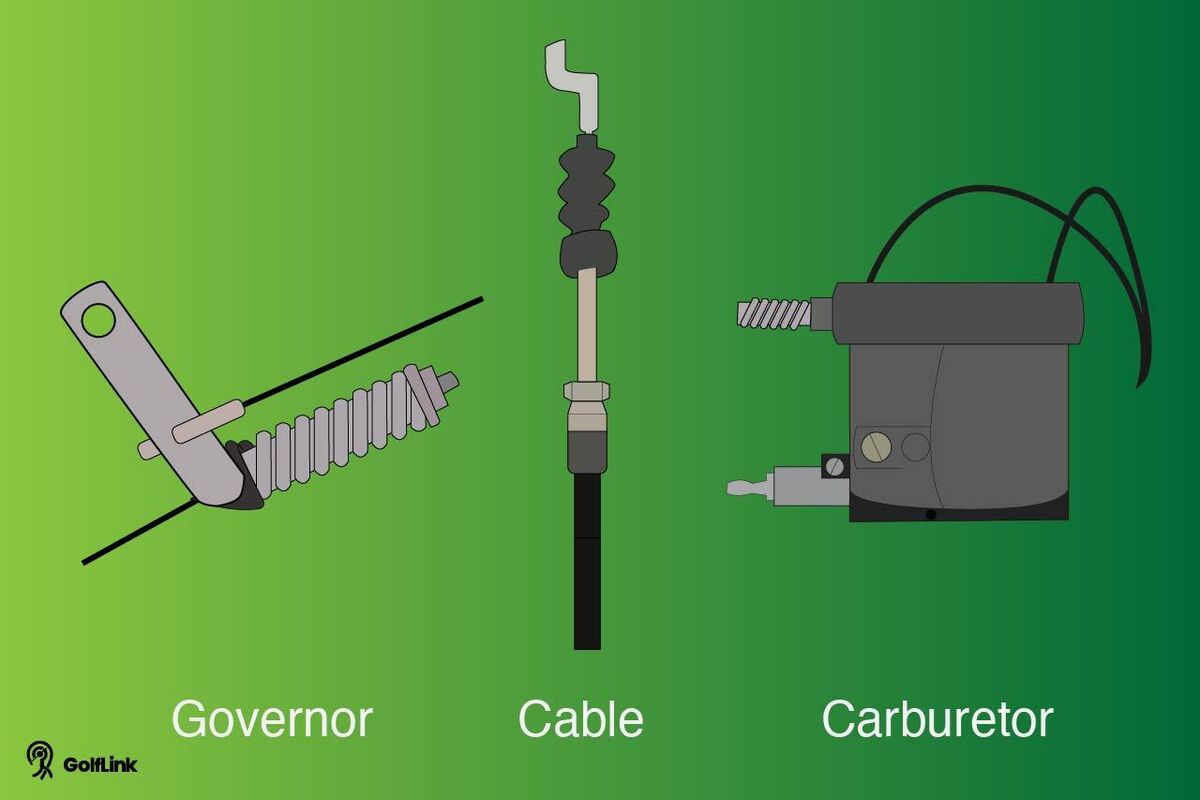
Image Source: assets.ltkcontent.com
Unlock More Speed: Deciphering Your Golf Cart’s Governor
What is a golf cart governor? It is a part of your golf cart. Its job is to control the engine’s speed. It sets an engine RPM limit golf cart. This means the engine cannot spin too fast. It helps keep you safe. It also helps your engine last longer.
Governors come in a few types. Some are mechanical. They use springs and levers. Others are electronic. They use sensors and wires. Most gas golf carts have a mechanical governor. Electric carts use electronic speed controllers. These are different. This guide is for gas carts.
Where is the golf cart governor location? For many carts, it is near the rear axle. Or it is close to the engine’s drive clutch. You will see a rod or cable. This rod or cable connects to the carburetor. It also connects to a spring. This is often the governor setup.
What is a Golf Cart Governor?
Think of a governor as a speed cop. It watches how fast your engine turns. If the engine goes too fast, the governor steps in. It pulls back the throttle. This slows the engine down. It keeps the speed at a safe level. This makes your cart last longer. It also stops engine damage. Without a governor, your engine could rev too high. This could cause big problems.
There are two main types of governors.
* Mechanical Governors: These are common on gas carts. They use weights. They spin as the engine turns. When the engine spins faster, the weights move out. This movement pulls a lever. The lever pulls on the carburetor. This closes the throttle plate. It limits fuel flow. This makes the engine slow down. You can often see a rod or cable here. It runs from the engine to the carburetor. A spring is usually part of this system. This spring tries to open the throttle. The governor tries to close it.
* Electronic Governors: Some newer gas carts have these. Most electric carts have them too. They use sensors. These sensors read the engine speed. They send signals to a control unit. The control unit then limits power. For electric carts, it limits the power to the motor. For gas carts, it might control the ignition or fuel. This guide focuses on mechanical governors.
Knowing your governor type is key. It changes how you work on it. Most older carts have mechanical ones.
Why Consider Governor Adjustment or Removal?
Many people want to make their golf cart faster. They want to increase golf cart top speed. This is the main reason to change the governor. Maybe your cart feels too slow. You might use it on a large property. Or you might drive it on hilly roads. A faster cart can be more fun. It can also be more useful.
People look for golf cart performance upgrades. Removing the governor is one such upgrade. It lets the engine rev higher. This means more power. This means more speed. For some, it is about getting more power up hills. For others, it is just about speed.
But, you must know the risks. A faster cart is not always better.
* Safety: A faster cart is harder to stop. It is harder to control. Faster speeds mean more risk of accidents.
* Engine Wear: The governor protects your engine. Without it, the engine can work too hard. This causes parts to wear out faster. Your engine might break sooner.
* Warranty: Doing this will likely void your cart’s warranty. If something breaks, the company will not fix it.
* Noise: A faster engine makes more noise. This can be annoying.
* Legal Issues: Some areas have speed limits for golf carts. Check your local laws. Breaking these laws can lead to fines.
Think about these points before you start. Do you really need more speed? Are you ready for the risks?
Safety First: Important Warnings Before You Start
Safety must always come first. This work can be dangerous. Your cart could get damaged. You could get hurt. Please read these warnings.
* No Kids or Pets: Do not let kids or pets near your workspace.
* Flat Ground: Work on a flat, level surface. The cart must not roll away.
* Park Brake: Set the park brake firmly. This keeps the cart still.
* Battery Disconnect: For electric carts, disconnect the battery. For gas carts, remove the spark plug wire. This stops the engine from starting by accident.
* Right Tools: Use the correct tools. Worn tools can slip. This can cause injury.
* Protective Gear: Wear safety glasses. Wear gloves. Protect your eyes and hands.
* No Loose Clothes: Do not wear loose clothing. It can get caught in moving parts.
* Fire Danger: Gas carts have fuel. Be careful with sparks or open flames. Keep a fire extinguisher close.
* Test Safely: Test your cart in a safe, open area. Test at low speeds first. Do not test near people or obstacles.
* Start Small: If you only need a little more speed, adjust the governor first. Do not remove it completely. This is safer.
Remember, you do this work at your own risk. If you are not sure, get help. Find a professional.
Tools You Will Need
Before you start, get your tools ready. Having the right tools makes the job easier. It also makes it safer.
* Wrench Set: You will need both open-end and box-end wrenches. Sizes will vary.
* Socket Set: A good socket set with a ratchet is very helpful.
* Screwdrivers: Flathead and Phillips head screwdrivers.
* Pliers: Needle-nose pliers are good for small parts. Regular pliers are also useful.
* Wire Cutters/Strippers: If you need to cut or strip wires (for electronic governors).
* Zip Ties or Wire: For securing cables or tying back levers.
* Lubricant (WD-40 or similar): To loosen rusted parts.
* Flashlight or Headlamp: To see in dark areas.
* Shop Rags/Towels: For cleaning up grease or spills.
* Safety Glasses: Always wear them.
* Gloves: Protect your hands.
Having these tools ready will save you time. It will make the job smoother.
Step-by-Step Guides for Popular Golf Cart Brands
Each golf cart brand has its own way. The governor is in a different spot. It works a little differently. We will cover common gas cart types. This includes EZGO, Yamaha, and Club Car. Remember, these are general guides. Your specific cart might be different. Always check your cart’s manual.
EZGO Golf Cart Governor Adjustment/Removal
EZGO carts often have a mechanical governor. It is usually found near the engine. Look for a small arm or lever. This arm connects to the throttle. It also has a spring.
Finding the Governor:
1. Lift the seat. This gives you access to the engine area.
2. Look at the rear axle. You might see a small rod or cable. This rod connects to the carburetor.
3. Follow this rod or cable back. It goes to a small lever. This lever pivots. It usually has a spring connected to it. This is your governor arm.
EZGO Golf Cart Governor Adjustment (Less Speed, Safer Option):
This method lets you adjust golf cart governor spring. It will give you a bit more speed. But it keeps some safety.
1. Find the governor spring. It connects the governor arm to a fixed point.
2. There is usually a nut on a threaded rod. This rod is part of the governor.
3. To increase speed: Tighten this nut. Use a wrench. Turn it clockwise. Tightening the nut puts more tension on the spring. This makes the engine work harder before the governor kicks in. It allows higher RPMs.
4. To decrease speed: Loosen this nut. Turn it counter-clockwise. This lessens spring tension. The governor will engage sooner.
5. Tighten the nut in small steps. Turn it a quarter turn. Then test the cart. Do not go too far at once. You want to find the right balance. This is the best way to get more speed without full removal.
EZGO Golf Cart Governor Removal (More Speed, More Risk):
This method removes the limit. It lets the engine go as fast as it can.
1. Locate the governor rod/cable: This rod goes from the governor arm to the carburetor.
2. Disconnect the rod/cable: You might need pliers. Or you might need a small wrench. Remove the rod from the governor arm. Sometimes, it is a simple clip.
3. Secure the throttle: Once the rod is off, the carburetor’s throttle will be free. It will open all the way. This is usually what gives you maximum speed. You need to secure the original throttle linkage. Make sure it still works. Sometimes, you can use a zip tie. Tie the governor arm back. This stops it from interfering.
4. Bypass the governor: Some people just tie the governor arm. They tie it in a way that it cannot pull back. This keeps the throttle open. Use a strong zip tie. Or use a piece of wire. Loop it around the governor arm. Then tie it to a fixed point. This keeps the arm from moving. This is a common golf cart speed limiter bypass.
5. Test the cart: Drive it slowly at first. Listen to the engine. Make sure nothing is rubbing. Make sure the throttle works right.
Here’s a small table for EZGO adjustments:
| Action on Governor Spring Nut | Effect on Speed |
|---|---|
| Tighten (Clockwise) | Increase |
| Loosen (Counter-clockwise) | Decrease |
Yamaha Golf Cart Governor Removal
Yamaha carts also use mechanical governors. They are often similar to EZGO. But the exact parts can differ.
Finding the Governor:
1. Open the engine bay. It is usually under the seat.
2. Look for a rod or cable from the throttle. It connects to the engine.
3. You will find a lever or arm. It often has a spring. This is the governor control. It is usually near the rear differential. Or it is near the engine’s clutch.
Yamaha Golf Cart Governor Adjustment (Less Speed, Safer Option):
Just like EZGO, you can adjust the spring tension.
1. Find the governor spring. It is connected to the governor arm.
2. There is usually a bolt or nut that controls its tension.
3. To increase speed: Tighten the nut or bolt. This makes the spring pull harder. It lets the engine rev higher.
4. To decrease speed: Loosen the nut or bolt. This makes the spring pull less. The governor acts sooner.
5. Make small adjustments. Then test your cart. This is the best way to adjust golf cart governor spring on a Yamaha.
Yamaha Golf Cart Governor Removal (More Speed, More Risk):
This fully removes the speed limit.
1. Locate the governor cable/rod: Find the cable or rod that goes from the governor to the carburetor.
2. Disconnect the cable/rod: Detach it from the governor arm. You might need pliers. Or you might need to remove a clip.
3. Secure the throttle linkage: The throttle on the carburetor will now be free. It will open all the way. This gives full speed. You need to make sure the normal throttle cable still works well. It should open the carburetor all the way.
4. Bypass the governor arm: To keep the governor from interfering, you can tie the arm back. Use a strong zip tie or wire. Pull the governor arm to its maximum open position. Then tie it to a sturdy part of the frame. This stops it from moving. This is the core of Yamaha golf cart governor removal.
5. Check all connections: Make sure everything is tight. Make sure nothing is loose.
6. Test the cart: Drive it carefully. Listen for any strange sounds. Check the steering and brakes.
Club Car Governor Bypass
Club Car models can be tricky. Some older ones have mechanical governors. Newer ones often use electronic controls. These are harder to bypass. This guide focuses on mechanical types. For electronic ones, you might need a different controller. Or you might need a speed chip.
Finding the Governor (Mechanical Club Cars):
1. Open the engine bay.
2. Look for a linkage. It connects the accelerator pedal to the engine.
3. On older Club Car models, the governor is often inside the transaxle. This makes it harder to access. It might have a small rod or cable going to the carburetor.
4. Some Club Cars have an external governor. It looks like a small box. It is usually attached to the rear differential. It has a spring and a rod.
Club Car Governor Adjustment (Less Speed, Safer Option):
If you have an external governor on your Club Car:
1. Find the governor arm and spring. It is usually on the transaxle or differential.
2. There is a bolt or nut that sets the spring tension.
3. To increase speed: Tighten this bolt or nut. This increases tension on the spring. It lets the engine rev higher.
4. To decrease speed: Loosen it.
5. Adjust it little by little. Test the cart after each change.
Club Car Governor Bypass (More Speed, More Risk):
This bypasses the mechanical governor.
1. Identify the governor linkage: Find the rod or cable that connects the governor to the carburetor.
2. Disconnect the linkage: Carefully remove this rod or cable. Sometimes it’s a simple clip or a nut.
3. Ensure full throttle: Once disconnected, the carburetor’s throttle should open fully when you press the pedal. Make sure the pedal cable still works.
4. Tie back the governor arm (if external): If your Club Car has an external governor arm, tie it back. Use a strong zip tie or wire. This stops it from activating. It prevents the throttle from closing. This is how you do a Club Car governor bypass.
5. Check for proper function: Make sure your accelerator pedal moves freely. Make sure it opens the carburetor.
6. Test with care: Drive the cart slowly first. Check brakes. Check steering. Listen to the engine.
Important Note for Club Car: Many newer Club Cars use electronic controls for speed. This is not a mechanical governor. For these, a governor bypass means different things. You might need to reprogram the controller. Or you might install a speed chip. These are more complex jobs. They often need special tools. Or they need expert help. Do not try to cut wires if you have an electronic system. You could damage the cart.
Adjusting the Governor Spring
Adjusting the governor spring is a good first step. It is safer than full removal. It lets you fine-tune your speed. You can get more speed without going too fast.
How it Works:
The governor spring pulls the throttle open. The governor mechanism tries to close it. When the engine spins fast, the governor mechanism wins. It pulls the throttle back. This limits speed.
If you tighten the spring, it pulls harder. The governor has to work harder to close the throttle. This means the engine can rev higher. It means more speed.
Steps to Adjust:
1. Find the spring: Locate the main governor spring. It connects the governor arm to the frame. Or it connects to another part of the engine.
2. Locate the adjustment point: Most springs have a threaded rod with a nut. Or they have a screw. This is how you change its tension.
3. Tighten for more speed: Turn the nut or screw clockwise. This adds tension to the spring.
4. Loosen for less speed: Turn it counter-clockwise. This takes tension off.
5. Small turns only: Make small turns. A quarter turn or half turn at a time.
6. Test after each change: Drive the cart. See how much speed you gained. If you need more, adjust again.
7. Do not over-tighten: If you tighten too much, you can break the spring. Or you can damage the governor. You can also make the cart unsafe.
This method is useful. It lets you increase golf cart top speed step by step. You can find the best speed for your needs. This is a common way to adjust golf cart governor spring. It is safer than full removal.
Beyond the Governor: Other Performance Upgrades
Removing the governor is just one way to make your golf cart faster. There are many other golf cart performance upgrades. These can add more speed. Or they can make your cart work better.
- Larger Tires: Putting bigger tires on your cart can increase top speed. Think of it like putting bigger wheels on a bicycle. Each turn of the wheel covers more ground.
- Pros: Easy to install, adds height.
- Cons: Can affect handling. Might need a lift kit. Can put more strain on the engine. Make sure they fit.
- High-Speed Gears: You can change the gears in your cart’s differential. This is a bit like changing gears in a car. High-speed gears make your cart go faster for the same engine RPM.
- Pros: Significant speed gain.
- Cons: Complex installation. Can reduce torque (less power for hills). Can put more strain on the engine.
- Clutch Tuning (Gas Carts): The clutch helps transfer power from the engine to the wheels. Adjusting it can change how the cart takes off. It can also change how it holds speed.
- Pros: Better acceleration. Can improve hill climbing.
- Cons: Needs special tools. Can be complex.
- Engine Upgrades (Gas Carts): For serious speed, you can improve the engine itself.
- Air Filter: A high-flow air filter lets more air into the engine. This can improve power.
- Spark Plug: A new, clean spark plug can help.
- Exhaust System: A less restrictive exhaust can help the engine “breathe” better. This can give more power.
- Carburetor Upgrade: A bigger carburetor can deliver more fuel/air mix. This means more power.
- Engine Swap: For extreme cases, some people put car engines into golf carts. This is very complex. It is also very expensive.
- Controller and Motor Upgrades (Electric Carts): For electric carts, the governor is usually in the controller.
- Aftermarket Controller: A new, more powerful controller can send more power to the motor. This makes the cart faster. It is a key golf cart speed limiter bypass for electric carts.
- High-Speed Motor: You can replace the motor with a stronger one. This will give more speed and power.
- Heavy-Duty Solenoid: A stronger solenoid is needed with a high-power controller.
- Battery Upgrade: Better batteries can give more consistent power. They can also extend range.
Combining these upgrades can make a golf cart much faster. But it also adds cost. It adds wear and tear. Always think about your needs. Think about your budget. And think about safety. How to make a golf cart faster is not just about the governor. It is about a whole system.
Testing Your Cart After Adjustment
You have made changes. Now you need to test your cart. This is important. It ensures safety. It also checks your work.
Steps for Safe Testing:
1. Choose a Safe Area: Find a large, open space. An empty parking lot is good. Or a large, private field. Do not test near people. Do not test near cars. Do not test near obstacles.
2. Check Basic Functions:
* Brakes: Test the brakes. Do they work well? A faster cart needs strong brakes.
* Steering: Turn the wheel. Is it smooth?
* Lights/Horn: Check that all lights and the horn work.
3. Start Slowly:
* Put the cart in neutral. Start the engine. Listen for strange noises.
* Put the cart in drive. Press the pedal gently. Move slowly at first.
* Gradually increase speed. Do not go full throttle right away.
4. Listen to the Engine:
* Does it sound smooth?
* Does it rev too high? (Over-revving sounds like a strained, high-pitched whine). This means too much engine RPM limit golf cart.
* Does it shake or vibrate too much?
5. Check for Issues:
* Does the cart pull to one side?
* Are there any strange smells (like burning rubber or oil)?
* Does the throttle stick?
6. Note the Top Speed: If you have a GPS or a speed app on your phone, use it. See your new top speed.
7. Adjust Again if Needed: If the cart is too fast, or too slow, or not right, go back. Make small adjustments to the governor spring. Or re-check your bypass.
Remember, a golf cart is not a race car. Even with upgrades, it has limits. Respect those limits.
Frequently Asked Questions (FAQ)
Q: Is it legal to remove a golf cart governor?
A: This depends on where you live. Many places have rules. They set speed limits for golf carts. They also have rules for public and private land. Removing the governor might make your cart illegal. Check your local laws before doing this.
Q: Does removing the governor damage the engine?
A: Yes, it can. The governor protects your engine. It stops it from running too fast. Without it, the engine can over-rev. This causes parts to wear out faster. It can lead to early engine failure. Think of it like redlining a car engine all the time.
Q: Will removing the governor void my golf cart’s warranty?
A: Yes, almost certainly. Most manufacturers will not cover repairs. They will not cover damage if you change the cart from its original state. This includes removing the governor.
Q: How much speed will I gain by removing the governor?
A: It varies a lot. It depends on your cart model. It depends on your engine’s condition. It depends on other factors like tire size. You might gain 3-8 mph. Some carts might gain more. Some might gain less. Full governor removal gives more speed than just adjusting the spring.
Q: What are the signs of an over-revving engine?
A: You will hear a very high-pitched whine or scream. The engine will sound like it’s struggling or straining. You might feel strong vibrations. If you hear these, slow down. You might be damaging your engine.
Q: Can I put the governor back if I change my mind?
A: Yes, usually you can. If you save all the parts you removed, you can put them back. This includes springs, rods, and clips. Reconnecting the parts will put the speed limit back on your cart.
Q: Do electric golf carts have governors?
A: Yes, but they work differently. Electric carts use an electronic speed controller. This limits the motor’s power. It acts like a governor. You can often change a setting. Or you can install a special chip. Or you can upgrade the controller for more speed. This guide focuses on gas carts.
Q: How do I know if my golf cart has a mechanical or electronic governor?
A: Most older gas carts have mechanical governors. Look for physical rods, cables, and springs connected to the carburetor or engine. Newer gas carts and all electric carts use electronic controls. If you see many wires, sensors, and a black box (controller), it is likely electronic.
Making your golf cart faster can be fun. But it needs careful thought. It needs safe practices. Always put safety first. Know the risks. Drive smart.