
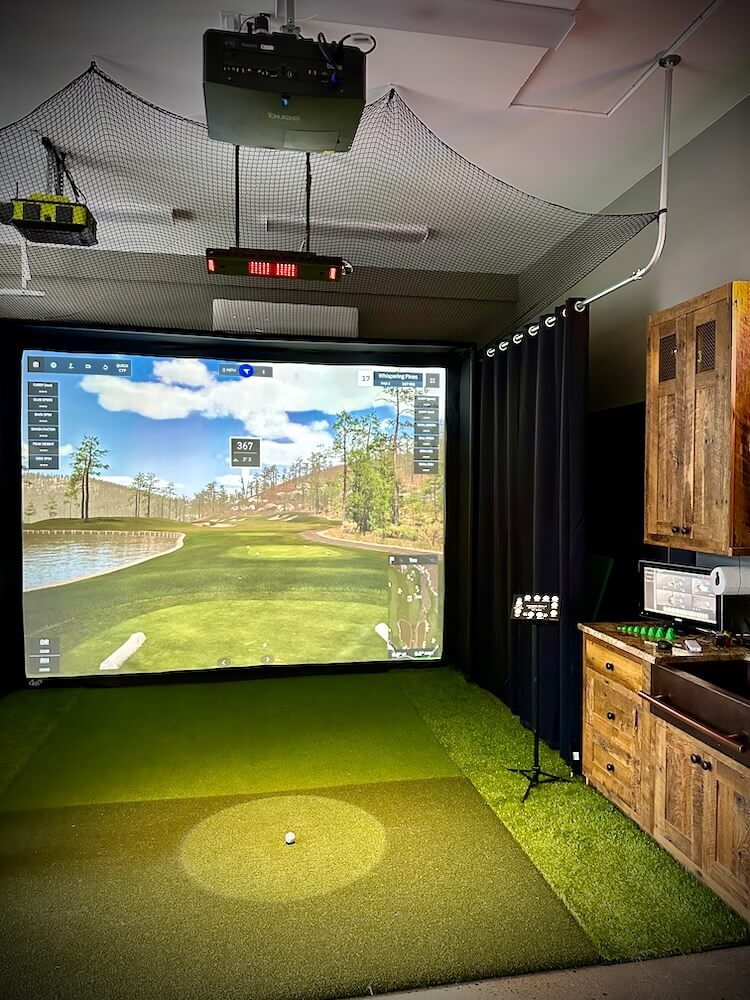
Image Source: rogueengineer.com
Guide On How To Make A Golf Simulator Setup Cheap
Can you build a golf simulator setup without spending a fortune? Yes, absolutely! Making a cheap golf simulator setup is possible if you know where to save money and are willing to do some work yourself. This guide will show you how to build a budget golf simulator setup so you can enjoy indoor golf practice setup right at home. We will look at the golf simulator components you need and how to find cheaper options for things like the launch monitor for golf simulator, golf simulator screen material, and even the golf simulator projector.
Getting Started: Planning Your Budget Golf Simulator Setup
The first step in building a home golf simulator build on a low budget is planning. You need to figure out where it will go and how much money you have to spend.
Picking Your Spot
Find a good place in your home. Garages, basements, or even a spare room can work. The most important thing is space.
You need enough room to swing your clubs safely.
Think about the height. You need enough ceiling height for your longest swing.
Think about the width and depth. You need room for your swing, the mat, the ball, the launch monitor, and space for the screen or net.
A typical space might need:
* Height: At least 9-10 feet. More is better.
* Width: At least 10-12 feet. This allows for swings without hitting walls.
* Depth: At least 10-15 feet. This allows for the ball to fly a short distance, the screen or net, and space behind it.
Even for a budget setup, getting the space right is key for safety and fun.
How Much Will It Cost?
Setting a budget is very important for a cheap setup. Golf simulators can cost thousands, even tens of thousands, of dollars. But we are aiming for a much lower number.
A very basic setup might cost under $1000 if you use simple parts and build it yourself. A slightly better one might be $1500-$3000.
You need to decide what you can afford before you start buying things.
Here’s a simple table showing where your money might go in a budget setup:
| Component | Typical Cost Range (Budget) | Notes |
|---|---|---|
| Launch Monitor | $300 – $1500 | This is often the most costly part. |
| Screen or Net | $50 – $300 | DIY screens or simple nets are cheaper. |
| Projector (if using screen) | $100 – $500 | Used or basic models save money. |
| Hitting Mat | $50 – $200 | Simple mats are enough to start. |
| Frame/Enclosure | $100 – $300 | DIY frames using pipes are budget friendly. |
| Computer/Software | $0 – $500+ | Use your own PC; look for free software. |
| Total (Estimate) | $600 – $3100+ | Can be lower or higher based on choices. |
Remember, this is just an estimate. Prices change. You can save a lot by finding used items or building things yourself.
Core Golf Simulator Components and Budget Alternatives
Let’s look at the main parts you need and how to find cheaper versions for your DIY golf simulator.
The Launch Monitor for Golf Simulator
The launch monitor is the heart of any golf simulator setup. It measures what the ball and club do when you hit. It sends this data to software to show the shot on screen.
Grasping Launch Monitor Types
There are two main types of launch monitors:
* Photometric (Camera-Based): These use cameras to take many pictures of the ball and club just after impact. They track dimples on the ball to figure out spin and speed. They usually work best indoors because they need good lighting and marked balls sometimes. Examples are SkyTrak, GCQuad (expensive), and lower-cost ones like OptiShot.
* Radar-Based: These use radar waves to track the ball’s flight. They work great outdoors because they track the actual ball path. Indoors, they need more space to track the ball before it hits the screen. Examples are Trackman (very expensive) and smaller ones like FlightScope Mevo/Mevo+.
For a cheap golf simulator setup, camera-based monitors that work indoors without needing lots of space are often easier. But some cheaper radar units can work in larger indoor spaces.
Cheaper Launch Monitor Options
Finding a low-cost launch monitor for golf simulator use is the biggest challenge. High-end ones cost thousands. But there are budget choices:
* Swing Caddie SC Series (SC200 Plus, SC300i): These are mainly practice tools. They give you numbers like ball speed, swing speed, and distance. Some connect to phones. They don’t always connect directly to simulation software for playing courses. But they are great for practice and much cheaper than full simulators.
* OptiShot 2: This uses infrared sensors in a mat. You hit off the mat. It measures club head speed and path. It comes with software and some courses. It’s much cheaper than camera systems. It doesn’t measure ball data directly, which means it’s not as accurate as systems that track the ball. But it’s a full simulation system at a low price. You can often find used OptiShot units even cheaper.
* Older or Refurbished Units: Look for older models of popular launch monitors or refurbished units from companies. Sometimes previous versions like an older SkyTrak model might be available used at a lower price.
Expect trade-offs with cheaper launch monitors. They might not track as many data points. They might be less accurate. They might not work with all simulation software. But they are a way to get started with a home golf simulator build without breaking the bank.
The Golf Simulator Screen Material (or Net)
This is what stops the ball after you hit it. You have two main choices: a net or a screen.
Choosing Between Screen and Net
- Impact Screen: This is a special piece of material you hit balls into. It’s strong enough to stop a golf ball traveling fast. If you use a projector, you can show the simulation image onto the screen, making it feel like you’re there. This gives the full golf simulator experience.
- Net: This is a simpler, cheaper option. It just catches the ball. You don’t project an image onto it. You would likely use a separate monitor or TV to see the software. A net provides a basic indoor golf practice setup just for hitting balls safely indoors and getting data from your launch monitor.
For a full simulator feel, you want a screen. For just practice, a net is fine and cheaper.
Cheap Screen Material Ideas
Buying a pre-made impact screen can be expensive. For a DIY golf simulator, you can look for cheaper alternatives for golf simulator screen material:
* Heavy-Duty Fabric: Some people use materials like heavy canvas, thick polyester, or even certain kinds of tarps. They might not last as long or give as good a picture as dedicated screens, but they are much cheaper. Look for materials that are strong and have a tight weave.
* Layering Materials: You can hang multiple layers of cheaper fabric or even netting behind a main sheet to absorb more impact.
* Bulk Fabric Stores: Buying fabric in bulk from stores can be cheaper than buying a finished screen. You will need to hem the edges yourself to stop fraying.
When choosing screen material, think about:
* Stopping Power: Will it safely stop a golf ball?
* Durability: How long will it last?
* Image Quality: If projecting, how does the picture look on it? (Cheaper materials might have wrinkles or not show colors well).
* Noise: Some materials are louder when hit than others.
You can find dedicated impact screen material from online sellers that is less expensive than major golf brands. Look for terms like “polyester impact screen” or “golf simulator fabric.” Even these will cost more than a tarp, but they are made for stopping golf balls.
Hanging the screen or net: You’ll need a way to hang it firmly but with some give. Using bungee cords or elastic ties can help absorb impact and make the material last longer.
The Golf Simulator Projector (If Using a Screen)
If you choose to use an impact screen, you will need a projector to show the course image. Projectors can also be very costly.
Finding Affordable Projectors
- Used Market: This is one of the best places to save money on a projector. Look on sites like eBay, Craigslist, or local online marketplaces. You can find used projectors for a fraction of the price of new ones.
- Older Models: Newer projectors have higher resolution (like 4K), but for a golf simulator, 720p or 1080p resolution is perfectly fine and much cheaper.
- Specs to Watch For:
- Resolution: Aim for at least 720p (HD). 1080p is better if you can find it cheaply. Avoid older, lower-resolution projectors if possible, as the image quality will be poor.
- Lumens: This is the brightness. You need enough lumens to see the image clearly, even with some room light. For indoors, look for at least 2000-3000 lumens. More is better, especially if your simulator area isn’t completely dark.
- Throw Ratio: This tells you how far the projector needs to be from the screen for a certain image size. A “short-throw” projector is best for golf simulators. These can be placed close to the screen, often just above or slightly behind the hitting area. This prevents you from casting shadows on the screen. Standard or long-throw projectors need to be much farther away, which doesn’t work in most home setups. Short-throw projectors can be more expensive, but finding a used one is a good strategy. Sometimes you can find a used “ultra-short throw” which sits very close to the screen.
Mounting the Projector
You need to mount the projector safely so it doesn’t get hit by a ball or club.
* Ceiling Mount: This is common. It keeps the projector out of the way. Make sure the mount is strong and attached to a ceiling joist.
* Floor Mount/Box: You can build a protective box for the projector on the floor, placed behind the hitting area (if using a short-throw). This is easier to set up but takes up floor space.
Protecting your golf simulator projector is a must, even in a cheap setup. A stray ball or a practice swing can easily break it.
The Hitting Mat
You need something to hit from. This protects your floor and provides a surface similar to grass.
Simple Mat Choices
- Basic Mat Sections: You can buy smaller mat sections instead of a large piece of artificial turf for the whole area. Look for mats designed for golf practice.
- DIY Mat Ideas: Some people layer artificial turf pieces or use thick rubber mats. Make sure whatever you use is stable and thick enough to absorb impact and protect your wrists and elbows. Hitting off a hard surface can lead to injury.
- Gel or Foam Layers: Adding a layer of dense foam or rubber under a simpler turf mat can make it more comfortable and safer to hit from.
A good hitting mat is important for comfort and preventing injuries. Don’t cheap out too much on this if you plan to practice a lot.
The Computer and Golf Simulator Software
You need a computer to run the simulation software. The software takes data from the launch monitor and shows the course or driving range.
Using Your Current Computer
The good news is you might already own the most expensive part here – a computer. Check the system requirements for the golf simulator software you plan to use. Many basic simulators don’t need a super powerful gaming PC.
* Minimum Specs: Software usually lists minimum needs for processor (CPU), memory (RAM), and graphics card (GPU). Make sure your computer meets these. An older laptop might not be powerful enough for detailed course graphics.
Finding Affordable Software
Golf simulator software can have ongoing costs (like subscriptions). To keep it cheap:
* Bundled Software: Some launch monitors include basic software or a few free courses. Start with what you get.
* Free or Basic Versions: Some software platforms offer free versions with limited features or courses. Use these to start.
* One-Time Purchase Options: Look for software that you buy once instead of paying a monthly fee. OptiShot comes with its own software, for example.
* Check Compatibility: Make sure the software you choose works with your specific launch monitor. Not all monitors work with all software platforms.
The golf simulator software you choose affects how realistic the experience feels and how many courses you can play. For a budget setup, you might start with limited options and upgrade later if you want more features.
Your DIY Golf Simulator Frame and Enclosure
You need a structure to hang your screen or net and protect the area around your hitting zone. Building this yourself is a great way to save money on your home golf simulator build.
Building the Frame Simply
Professional simulator enclosures are metal cages with padding, and they cost a lot. You can build a strong enough frame for much less.
Using EMT Conduit
This is a popular choice for DIY frames.
* What it is: EMT (Electrical Metallic Tubing) is a type of steel pipe used for electrical wiring. It’s light but strong.
* Why it’s good: It’s relatively cheap and easy to work with. You don’t need special tools beyond a pipe cutter and connectors.
* How to use it: You can buy EMT pipes in standard lengths (like 10 feet). You use special connectors (like angle connectors and tees) to build a cube or rectangle frame. No welding is needed.
* DIY Plans: Many people have built frames from EMT conduit and share plans online. A quick search for “EMT conduit golf simulator frame DIY” will give you ideas and step-by-step guides.
Build a frame that is slightly smaller than your space, leaving some room around the edges. Make it deep enough for your screen and a bit of space behind it.
Other Cheap Frame Materials
- PVC Pipe: This is even cheaper than EMT conduit and easier to cut (just need a saw). However, PVC is much less sturdy. A hard-hit ball could potentially damage a PVC frame, especially at the joints. It might be okay for a net, but for a screen, EMT is a safer choice.
- Wood: Wood can be used but requires more tools (saw, drill) and skill. It can also be heavy.
- Netting Enclosures: You can buy basic netting enclosures designed to catch balls. These are often cheaper than building a full frame and cover, but they don’t provide a surface for projection. They are good for a simple indoor golf practice setup.
Securing Your Home Golf Simulator Build
Once the frame is up, you need to attach the screen or net and add safety features.
* Hanging: Use ball bungees or zip ties to attach the screen or net to the frame. This allows it to flex when hit, reducing stress on the material and frame.
* Adding Padding: Pad any hard surfaces around the hitting area, especially the frame itself. Foam pipe insulation, old blankets, or foam mats can work. This protects both the frame and your clubs (and you!) from accidental contact.
* Side Netting: Consider adding netting to the sides of your enclosure. This helps catch stray shots that don’t go straight into the screen. This is a cheap but important safety addition.
Putting It All Together: The Setup Process
Once you have all your golf simulator components, it’s time to build your golf simulator setup.
Setting Up Components
- Build the Frame: Follow your DIY plan to build the EMT or PVC frame. Make sure it is stable.
- Hang the Screen/Net: Attach the screen or net to the frame using ball bungees. Make sure it is reasonably tight but still has some give. If using a screen, try to get it as flat as possible for a better image.
- Set Up the Mat: Place your hitting mat in the right spot. Check the distance needed from the screen and the launch monitor location (this varies by monitor).
- Position the Launch Monitor: Place the launch monitor in its required spot. This might be beside the mat, a few feet behind the ball, or even overhead, depending on the model. Make sure the area between the ball and the monitor (and the monitor’s view) is clear.
- Position the Projector (if used): Mount the projector or place it in its protective box. Connect it to your computer. Aim it at the screen. Adjust the zoom and focus to fill the screen area.
Installing Golf Simulator Software
- Install Software: Put the golf simulator software on your computer. Follow the instructions.
- Connect Launch Monitor: Connect the launch monitor to your computer. This might be using a USB cable, Bluetooth, or Wi-Fi.
- Calibration: Most systems need calibration. This tells the software where the screen is and where the ball is being hit from. Follow the software’s steps carefully for accurate results.
- Test Shots: Hit some test shots to make sure the system is tracking correctly and the image is showing up properly. Adjust the launch monitor position or calibration if needed.
Your basic golf simulator setup is now ready!
Maximizing Your Budget Golf Simulator Setup
Even with a cheap setup, there are ways to make it better and get the most out of your indoor golf practice setup.
Tips for Saving More Money
- Buy Used Equipment: We mentioned this for projectors and launch monitors, but it applies to mats, computers, and even frame materials (check for scrap metal or pipes).
- Wait for Sales: Keep an eye out for holiday sales or special offers from golf companies or electronics stores.
- Start Small, Upgrade Later: You don’t need everything at once. Start with a net and a basic launch monitor for practice. Later, you can add a screen, projector, or better software as your budget allows.
- DIY Everything You Can: Building the frame, sewing the screen edges, creating safety padding – doing these tasks yourself saves labor costs.
Improving Your Indoor Golf Practice Setup
- Good Lighting: Proper lighting in the hitting area helps camera-based launch monitors work better. Avoid casting shadows where the monitor needs to see.
- Fans: An oscillating fan makes the space more comfortable, especially during longer sessions.
- Side Barriers: Add side netting or padded panels. This makes the setup much safer and catches those unpredictable shots.
- Floor Protection: Put down artificial turf or mats on the floor in front of the screen/net. This protects your floor from bouncing balls or dropped clubs.
- Sound Deadening: Cheaper screen materials can be loud when hit. Hanging blankets or moving pads behind the screen can help reduce noise.
Remember safety first! Even in a budget setup, protecting yourself, others, and your home is most important. Make sure the hitting area is clear and there is no risk of hitting anything important.
Common Questions About Cheap Setups
Here are answers to questions people often ask about building a golf simulator on a low budget.
FAQ Section
How much space is really needed for a cheap golf simulator?
You need enough room to swing your longest club freely and safely. A height of 9-10 feet is often minimum. Width and depth need to be at least 10-12 feet wide and 10-15 feet deep to allow for ball flight, the screen/net, and swing space. You might be able to squeeze into slightly smaller spaces depending on the launch monitor type and how you set up your hitting point relative to the screen.
Are cheap launch monitors accurate enough for practice?
Cheaper launch monitors provide good data for basic practice (like ball speed, swing speed, distance). They might not be as precise on spin or launch angle as expensive units. For improving your swing mechanics based on key numbers, they are often good enough. If you need extremely precise data for serious game analysis or online competitive play, you might need to save up for a more accurate system. For just playing virtual rounds and getting general feedback, budget monitors work.
Can I use my regular TV instead of a projector and screen?
Yes, you can use a large monitor or TV instead of a projector and screen, especially with a net setup. This is a very cheap way to display the software. However, you cannot hit balls directly into a TV – it will break. You would need a net or screen to catch the ball and place the TV nearby to view the simulation. This setup doesn’t give the same immersive feel as projecting onto an impact screen.
How do I make my DIY golf simulator setup safe?
Safety is critical.
1. Sufficient Space: Make sure you have enough room to swing freely.
2. Strong Frame/Net: Ensure your frame is sturdy and your net or screen will stop the ball.
3. Padding: Pad any hard parts of the frame or walls near the hitting area.
4. Side Protection: Use side netting or panels to catch errant shots.
5. Clear Area: Keep people, pets, and valuable items out of the simulator space when in use.
6. Check Equipment: Regularly check your screen/net for wear and tear.
What are the ongoing costs for a budget golf simulator?
The main ongoing cost is often software subscriptions. Some software platforms require a monthly or yearly fee to access courses or features. Some cheaper systems might have one-time software purchases. Power usage for the computer, projector, and monitor is also a small ongoing cost. You might also need to replace your hitting mat insert or screen material eventually as they wear out.
Enjoying Your New Indoor Golf Practice Setup
Building a cheap golf simulator setup takes effort and some smart choices, but it is very rewarding. You get a dedicated space for indoor golf practice setup and simulation at a much lower cost than buying a pre-built system. Start with the basics, focus on the essential golf simulator components you need, and look for budget-friendly alternatives for the launch monitor for golf simulator, golf simulator screen material, and golf simulator projector. With a bit of DIY spirit, you can create a functional and fun home golf simulator build and enjoy golfing whenever you want, no matter the weather outside.