
Unlock Speed: How To Disconnect The Governor On Golf Carts
Many golf cart owners ask, “What is a golf cart governor?” and “Can I disconnect it?” A golf cart governor is a device that limits how fast your golf cart can go. It works like a speed limit for your cart. Yes, you can disconnect or adjust it, but you must know the risks. Doing so can make your cart faster, but it also carries safety and legal concerns. This guide will show you how to do it safely and what else you can do to boost speed.
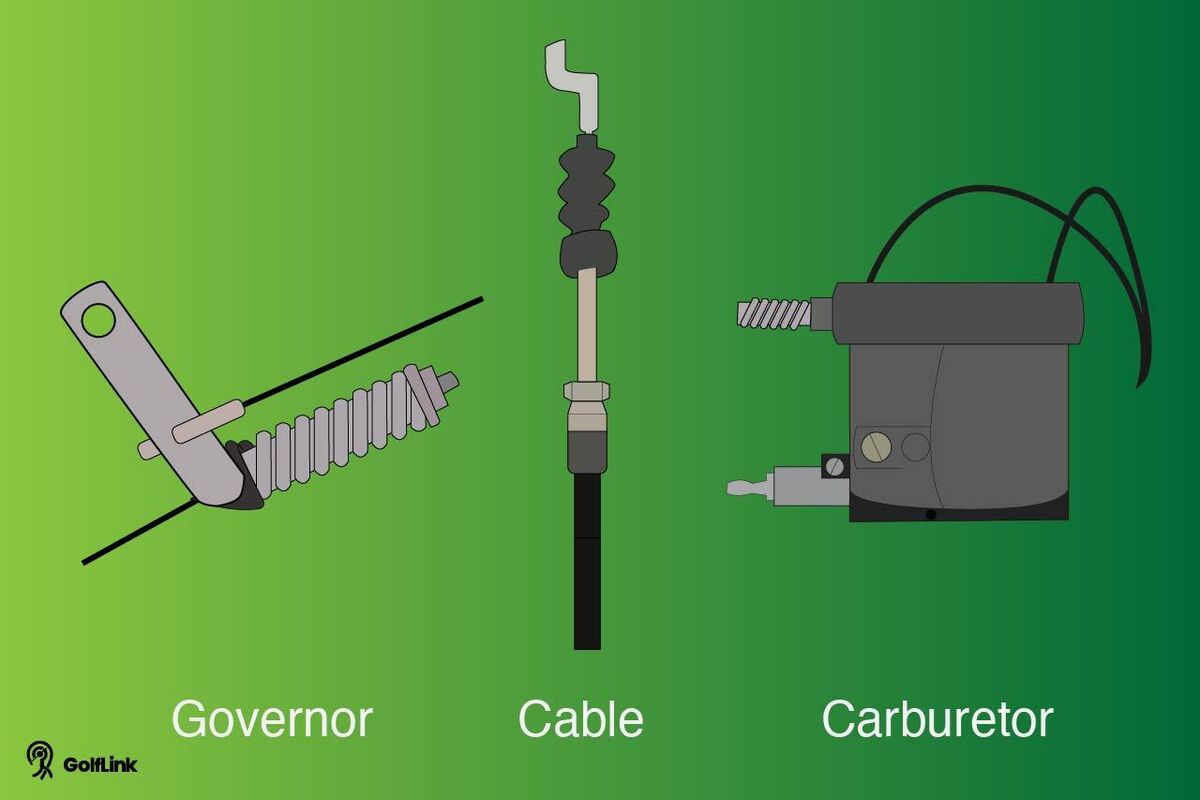
Image Source: assets.ltkcontent.com
Safety First: Weighing Risks and Rules
Before you start any work on your golf cart, it’s very important to think about safety. Making your golf cart go faster changes how it handles. It can be more dangerous. Always put safety first.
Why Golf Carts Have Governors (The Purpose)
Golf carts have governors for good reasons. They are not just there to make your cart slow.
* Safety Limits: A governor keeps the cart from going too fast. This helps prevent accidents. Fast carts are harder to stop and steer. They can flip over more easily.
* Engine Protection: The governor also protects your engine. When an engine runs too fast, it can get hot. Parts wear out quicker. A governor keeps the engine from running beyond its safe limits. This helps your engine last longer. It saves you money on repairs.
Legal Aspects and Local Rules
Changing your golf cart’s speed can affect where you can drive it.
* Where Can You Modify? Golf carts are often used on private land. This includes golf courses or large estates. On private land, rules might be loose. But if you drive your cart on public roads, laws are much stricter. Many areas have speed limits for golf carts on public roads. Going over these limits can lead to fines. It can also make your cart illegal to use.
* Insurance Impact: If you change your cart, your insurance might not cover you. If you have an accident with a modified cart, your insurance company might say you broke the rules. This means you might pay for damages yourself. Always check with your insurance company before making changes.
Key Safety Steps Before You Begin
Work smart and stay safe.
* Read the Manual: Always read your golf cart’s owner’s manual. It has important info about your specific cart model. It can tell you where the governor is. It might also have warnings.
* Have the Right Tools: Make sure you have all the tools you need. Using the wrong tools can damage parts. It can also cause injuries.
* Work in a Safe Place: Work in a well-lit area. Make sure the cart is on a flat surface. Turn off the engine. Take out the key. Set the parking brake. Block the wheels. This keeps the cart from moving by accident.
* Wear Safety Gear: Use safety glasses to protect your eyes. Wear gloves to protect your hands.
* Do Not Over-Tune: Do not push your golf cart too far. Going too fast for its design can cause serious damage. This includes engine problems, brake failure, and tire blowouts.
Grasping Your Golf Cart’s Governor System
To change your golf cart’s speed, you first need to know how its governor works. A governor is a simple device. It limits the engine’s speed. It does this by controlling how much fuel and air go into the engine. Or, it can control how far the throttle pedal can push.
Types of Governors on Gas Golf Carts
Most gas golf carts have one of two main types of governors.
* Mechanical Governor: This is the most common type. It uses a spring and a cable or rod. This setup connects the throttle pedal to the engine. When the engine spins too fast, the governor pulls back on the throttle. This slows the engine down. You can often see this system near the rear axle or directly on the engine. This is where you might perform a throttle cable governor adjustment.
* RPM-based Governor (Newer Models): Some newer golf carts use electronic governors. These watch the engine’s RPM (revolutions per minute). When the RPM hits a certain level, the computer reduces power. This is more complex. It often needs special tools or chips to change. This is related to golf cart RPM limit modification.
* Throttle Linkage Governor: This is a part of the mechanical governor. It’s a rod or cable that links the accelerator pedal to the carburetor. The governor works on this linkage to limit how much the throttle opens.
How a Governor Works (Simple explanation)
Think of the governor as a watchful eye on your engine’s speed.
* Limits Engine RPM: When your engine starts to spin too quickly, the governor steps in. For mechanical types, weights inside the governor spin out. They pull a lever. This lever then pulls back on the throttle. This reduces how much gas the engine gets.
* Limits Throttle Opening: The governor also limits how far your gas pedal can make the engine open its throttle. This means even if you press the pedal all the way down, the engine won’t get full power past a certain point. This is the main way it acts as a golf cart speed limiter bypass prevention.
Tools You Will Need
Before you start, gather your tools.
* Wrench set (metric or standard, depending on your cart)
* Socket set
* Screwdrivers (flathead and Phillips)
* Pliers
* Flashlight or work light
* Safety glasses
* Gloves
* Owner’s manual for your golf cart
| Tool Type | Specific Use |
|---|---|
| Wrench Set | Loosening/tightening nuts and bolts on cables/linkage |
| Socket Set | For fasteners in tight spots |
| Screwdrivers | Adjusting idle screws, small panels |
| Pliers | Gripping wires, pulling pins |
| Flashlight | Seeing in dark engine areas |
| Safety Gear | Protecting eyes and hands |
Step-by-Step Guide: Adjusting and Bypassing the Governor
Here’s how to increase your golf cart top speed by adjusting or bypassing the governor. Remember, these steps are for gas golf carts. Electric golf carts use different methods.
For Mechanical Governors (Cable/Rod Based)
This is the most common type for older gas golf carts.
1. Locate the Governor: Open the engine cover. Look for the engine. Near the engine, or sometimes near the rear axle, you will see a small metal box or a spring-loaded arm. This is the governor. It will have a cable or rod connected to it. This cable also connects to your throttle pedal. This is often the area for throttle cable governor adjustment.
* On Yamaha Golf Carts: Look for a spring and cable on the rear axle near the drive belt. The cable goes from the pedal to the governor.
* On EZGO Golf Carts: Find the governor arm on top of the rear axle. It’s a small plate with a spring and cable.
* On Club Car Golf Carts: The governor is often part of the transaxle. It has a spring and a rod.
-
Adjusting the Spring/Nut (Slight Speed Increase):
- Find the governor spring. It will be under tension. There’s often a nut or screw that sets this tension.
- To increase speed slightly: Loosen the nut or tension. This makes the spring less tight. This allows the engine to spin a bit faster before the governor kicks in. Turn the nut slowly, maybe a quarter turn at a time.
- Test: After each small adjustment, take the cart for a quick test run. See if the speed increases. Do not loosen too much at once. Too loose means no control.
- This is a form of adjusting golf cart governor. It gives a small speed boost.
-
Bypassing the System (More Speed Increase – Use with Caution):
- This method removes the governor’s control. It allows the engine to rev much higher.
- Find the Cable: Locate the cable that runs from the governor arm to the carburetor or throttle linkage.
- Disconnect the Cable: Carefully disconnect this cable. It might be held by a clip or a nut. Some people simply disconnect it at the governor end. Others bypass it completely.
- Reroute the Throttle: Once the governor cable is off, you need to make sure the throttle cable from the pedal goes directly to the carburetor. Sometimes, you can simply remove the governor cable and connect the throttle cable directly. For some models, you might need a longer throttle cable. This is a common method for golf cart speed limiter bypass.
- Secure the Throttle: Make sure the direct connection is secure. It should not rub against other parts. It must move freely.
- Important Note: When you bypass the governor, your engine no longer has a set speed limit. The engine can now rev very high. This increases the risk of engine damage. It also makes the cart much harder to control. This is a big step in golf cart RPM limit modification. Only do this if you understand the risks.
For RPM-Based Governors (Newer Models)
Newer carts, especially those with electronic controls, often use an RPM limiter.
1. Finding the RPM Limit Sensor: This type of governor is usually part of the engine’s control unit. It’s not a physical cable you can easily adjust. It uses sensors to read the engine’s speed.
2. Golf Cart RPM Limit Modification:
* Speed Chip/Key: For some carts, you can buy a special “speed chip” or “high-speed key.” These plug into the cart’s wiring. They tell the computer to allow higher RPMs. This is an easier, safer way for bypassing internal governor golf cart on these models. These are often part of golf cart high-speed kits.
* ECU Reprogramming: For more advanced carts, you might need to reprogram the Engine Control Unit (ECU). This needs special software and tools. It’s often done by pro shops. This is a form of golf cart engine performance tuning.
* Warning: Do not try to cut wires or guess with electronic systems. You can cause serious damage to your cart’s computer. This is expensive to fix.
Bypassing Internal Governor Golf Cart (General Steps)
Some governors are built right into the engine’s parts.
* Clutch-Based Governors: Some carts use the drive clutch to limit speed. As speed increases, the clutch engages differently to prevent faster acceleration. Changing these requires special clutch spring kits or weights. This is more advanced.
* Fuel Pump Governors: Rarely, some older models use a fuel pump to limit speed. Modifying this is very complex and not advised for beginners.
Testing Your New Speed
After any adjustment, test your cart safely.
1. Choose a Safe Area: Find a large, open, flat area. Make sure no people or objects are in the way.
2. Start Slow: Drive slowly at first. Get a feel for the cart’s new behavior.
3. Gradual Increase: Slowly increase your speed. Pay close attention to how the cart handles.
4. Check for Issues:
* Does the engine sound okay? No strange noises?
* Does it rev too high too quickly?
* Do the brakes still work well at higher speeds?
* Is the steering still easy to control?
* Listen for any sounds of the engine straining or hitting a limit.
If anything feels wrong, stop. Check your work.
Other Ways to Increase Golf Cart Top Speed
Bypassing the governor is one way to get more speed. But it’s not the only way. And often, it’s not the best or safest way. Other gas golf cart performance upgrades can give you more speed. They often come with fewer risks to your engine.
Gas Golf Cart Performance Upgrades (beyond governor)
- Bigger Tires: Putting larger tires on your golf cart can increase top speed. Each rotation of a bigger tire covers more ground. Be careful, though. Too big tires can rub. They also make your cart slower to accelerate.
- Clutch Tuning: The clutch system plays a big part in how your cart uses its power.
- Primary Clutch: This clutch is on the engine. Changing its springs or weights can make it engage differently. This can give you faster acceleration or a higher top speed.
- Secondary Clutch: This clutch is on the rear axle. Tuning it can also affect speed.
- High-Speed Gears: Some companies sell high-speed gear sets for your rear axle. These change the gear ratio. They make your wheels turn faster for the same engine RPM. This is one of the best ways to get more speed. But it needs skill to install. This is a key part of golf cart high-speed kits.
- Air Intake and Exhaust:
- Performance Air Filter: A better air filter lets more air into the engine. More air means more power.
- Performance Exhaust System: A less restrictive exhaust pipe lets engine gases out more easily. This can also boost power.
- These changes help with golf cart engine performance tuning. They allow the engine to “breathe” better.
- Engine Performance Tuning:
- Carburetor Adjustment: A mechanic can adjust your carburetor. This ensures your engine gets the right mix of fuel and air. A proper mix means more power.
- Spark Plugs and Ignition: New, high-performance spark plugs can give a stronger spark. A better ignition system can also help.
- Camshaft Upgrade: For serious speed gains, some owners change the camshaft. This alters the timing of valves. This lets the engine take in more air and fuel. This is a complex golf cart engine performance tuning step. It is for experienced mechanics.
Why a Golf Cart Speed Control Bypass is Just One Step
Think of the golf cart speed control bypass as just one piece of the puzzle. While it can make your cart faster, it often just unlocks speed that the engine was already capable of. For true, safe, and reliable speed gains, you should look at the whole system. This includes the engine, drive train, and tires. A balanced approach gives the best results. It keeps your cart running well for a long time. It also keeps you safe.
Common Issues After Governor Adjustment
Adjusting or bypassing your golf cart’s governor can lead to problems. It’s vital to know what these are.
* Engine Over-Revving: This is the biggest risk. Without a governor, your engine can spin much faster than it was made to. This can cause:
* Valve Float: Valves in the engine might not close properly. This can damage them.
* Rod Knock: Parts inside the engine can hit each other. This causes a loud knocking sound. It means big damage.
* Bearing Failure: Engine bearings can wear out fast.
* Overheating: An engine working too hard gets very hot. This can warp parts.
* Damage to Engine Parts: High RPMs cause more wear and tear. Parts like pistons, connecting rods, and the crankshaft are under more stress. This can lead to costly breakdowns.
* Poor Fuel Use: An engine running at high RPMs uses much more gas. Your cart will not go as far on a tank.
* Reduced Engine Life: Your engine will not last as long if it’s always running at its max speed.
* Brake System Failure: Your cart’s brakes are designed for its original speed. At higher speeds, they might not be able to stop the cart quickly enough. This is a huge safety risk.
* Handling Problems: Golf carts are not built for high speeds. They have a high center of gravity. They can tip over easily in turns. The suspension and steering are not made for fast driving.
Deciding If It’s Right for You
Before you make any changes, weigh the pros and cons carefully.
| Pros of Governor Adjustment/Bypass | Cons of Governor Adjustment/Bypass |
| :——————————— | :——————————— |
| Increased Top Speed: Cart goes faster. | Reduced Safety: Higher crash risk. |
| Better Performance: Feels more powerful. | Engine Damage: Risk of over-revving. |
| Simple Process (for mechanical): Can be done with basic tools. | Shorter Engine Life: Parts wear out faster. |
| Cost-Effective: Often free or low-cost if DIY. | Legal Issues: May be illegal on public roads. |
| | Insurance Problems: Coverage issues. |
| | Higher Fuel Use: Burns more gas. |
| | Poor Handling: Cart harder to control. |
| | Increased Noise: Engine runs louder. |
Consider where you drive your golf cart. If it’s only on a private golf course, a small speed boost might be okay. But if you plan to drive it faster on public roads, the risks are much higher. Think about who else drives the cart. Will they be safe with a faster cart?
For many, a small adjustment to the governor is enough. This can give a little more speed without pushing the engine too hard. For bigger speed increases, look into proper golf cart high-speed kits or professional golf cart engine performance tuning. These are often safer and more reliable ways to get the speed you want. They cost more, but they protect your cart and keep you safe.
Frequently Asked Questions (FAQ)
Q1: Is it hard to disconnect the governor on a golf cart?
A1: For many older gas golf carts with a mechanical governor, it’s fairly simple. It often involves finding a cable or spring and adjusting it. For newer carts with electronic governors, it’s much harder and often needs special tools or chips.
Q2: Will disconnecting the governor hurt my engine?
A2: Yes, it can. If you disconnect the governor, your engine can run at much higher RPMs than it was designed for. This causes more wear and tear, makes parts wear out faster, and can lead to serious engine damage or failure.
Q3: How much speed can I gain by disconnecting the governor?
A3: This depends on your cart’s model and its original top speed. You might gain 5-10 mph, or even more. But this gain comes with risks to your engine and safety.
Q4: Is it legal everywhere to disconnect the governor on a golf cart?
A4: No. Rules vary a lot. On private land, it might be fine. But on public roads, many places have strict speed limits for golf carts. Going over these limits can be illegal and lead to fines. Always check local laws.
Q5: Are there other ways to make my golf cart go faster without messing with the governor?
A5: Yes! Many ways exist. You can install bigger tires, get high-speed gears, upgrade your clutch, or improve your engine’s air intake and exhaust. These are often safer and more reliable ways to boost speed. These are part of gas golf cart performance upgrades.
Q6: What is a golf cart speed control bypass?
A6: A golf cart speed control bypass means changing or removing the system that limits your cart’s speed. This is usually the governor. It allows the cart to go faster than its original design speed.
Q7: Can a golf cart dealer tell if I changed the governor?
A7: Yes. If you have a mechanical governor and you adjusted or bypassed it, a dealer will likely see the change. For electronic governors, they might find changes during a check-up or if you installed a speed chip. Any such changes can void your warranty.