
Is your golf cart not charging? You might have a problem with your charger. This guide helps you find out if your golf cart battery charger is working right. Yes, you can often check your golf cart charger yourself. You will need a few simple tools, like a multimeter. This guide is for anyone who owns a golf cart and wants to keep it running smoothly. We will show you how to test a golf cart charger, spot common issues, and even how to make small fixes.
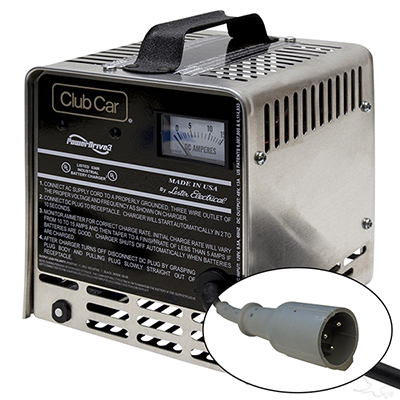
Image Source: jsgolfcarts.com
Spotting Trouble: Signs Your Charger May Be Failing
When your golf cart does not run well, the charger is a key suspect. Many things can tell you if your golf cart charger is acting up. Knowing these signs helps you fix problems quickly. This can save you from bigger headaches later.
Faulty Golf Cart Charger Symptoms
You might see one or more of these signs:
- No Charging: The most obvious sign. You plug in your cart, but the batteries do not get power. The charger may not make any sound. Or, no lights come on. This points to golf cart not charging issues.
- Slow Charging: Your cart charges, but it takes much longer than normal. What used to take a few hours now takes all night.
- Overcharging: The charger runs for too long. It does not shut off when batteries are full. This can hurt your batteries badly. They might get hot or smell bad.
- Charger Gets Too Hot: It is normal for chargers to feel warm. But if your charger is very hot to touch, something is wrong. Extreme heat is a bad sign.
- Strange Noises: Your charger might make buzzing, clicking, or grinding sounds. Good chargers are usually quiet.
- Smoke or Burning Smell: This is serious. Unplug the charger right away. Do not use it. This means major damage.
- Golf Cart Charger Light Blinking Wrong: Most chargers have lights. They tell you the charging status. If lights blink in a way that is not normal, check your manual. A wrong blink pattern often signals a problem.
- Short Run Time: Your golf cart runs for a short time after charging. This can mean the batteries are not getting a full charge. This also points to golf cart not charging issues.
If you see any of these signs, it is time to check your charger. We will walk you through how to do this safely. This helps with golf cart charger troubleshooting.
Staying Safe: Essential Safety Steps
Before you touch anything, think about safety. Working with electricity can be risky. Always be careful.
Key Safety Rules
- Unplug First: Always unplug the golf cart charger from the wall. Also, disconnect it from the golf cart. Do this before you touch any wires or parts.
- Wear Eye Protection: Use safety glasses. Batteries can sometimes spark or leak acid. Protect your eyes.
- Wear Gloves: Use rubber gloves. They protect your hands from acid and electric shocks.
- Work in a Dry Area: Never check a charger in wet conditions. Water and electricity do not mix.
- No Metal Near Batteries: Do not let metal tools touch both battery terminals at once. This can cause a spark or short circuit. It is very dangerous.
- Ventilation: If you work near batteries, make sure the area has fresh air. Batteries can give off gases when charging.
- Read Your Manual: Your golf cart and charger manuals have important safety info. Read them.
Following these steps keeps you safe. Now, let’s gather our tools.
Your Toolkit: What You Will Need
You do not need many tools to test your charger. But a few are key.
Tools for the Job
- Multimeter: This is your most important tool. It measures voltage, current, and resistance. You will use it to test golf cart charger output. A digital multimeter is best. It is easy to read.
- What to look for: A multimeter that can read DC (Direct Current) voltage. It should handle the voltage of your golf cart system (e.g., 36V, 48V).
- Safety Glasses: (Already mentioned, but worth repeating for the tools list.)
- Rubber Gloves: (Already mentioned, but worth repeating for the tools list.)
- Clean Rags or Towels: To clean battery terminals if needed.
- Wire Brush: To clean battery terminals.
- Socket Wrench Set: To tighten battery cables if needed.
- Flashlight: To see in dark spots, like under the seat.
With these tools, you are ready to start.
The Initial Check-Up: Before You Grab the Multimeter
Sometimes, the problem is not the charger itself. It could be something simple. Do these quick checks first. This can save you time. This is part of golf cart charger troubleshooting.
Step 1: Power Source Inspection
- Wall Outlet: Is the wall outlet working? Plug something else into it, like a lamp. If it does not work, the outlet is the problem, not your charger.
- Extension Cords: Are you using an extension cord? Make sure it is thick enough for the charger. Thin cords can’t carry enough power. They can also get hot. Plug the charger directly into the wall if you can.
- Circuit Breaker: Has a circuit breaker tripped in your home? Check your breaker box. Reset any tripped breakers.
Step 2: Inspecting the Charger Cable
- Cable Damage: Look closely at the charger cable. Check from the wall plug to the charger box. Then check from the charger box to the golf cart plug. Are there any cuts, frays, or smashed spots?
- Plug Damage: Look at both ends of the cable. Are the prongs bent or broken? Is the golf cart plug dirty or corroded? Damaged cables can stop power from reaching your cart.
Step 3: Battery Connection Check
- Clean Terminals: Lift your golf cart seat. Look at the battery terminals. Are they clean? Or do they have white or green crusty stuff? This is corrosion. It stops power flow. Use a wire brush and a mix of baking soda and water to clean them. Rinse with clean water. Dry well.
- Tight Connections: Are the battery cables tight? Wiggle each cable. If any are loose, tighten them with a wrench. Loose connections can prevent charging. This is a common cause of golf cart not charging issues.
- Main Connections: Pay extra attention to the main battery cables. These are the thick ones that connect to the cart’s motor and charger port.
Step 4: Observing Charger Lights
- Light Patterns: Most chargers have indicator lights. These lights tell you what the charger is doing. Does the light come on at all? Does it blink? If it blinks, what is the pattern?
- Consult Your Manual: Check your charger’s manual. It will explain what each light pattern means. A golf cart charger light blinking a certain way often tells you about a specific error. For example, some chargers blink to say the batteries are too low or there is a bad connection.
Step 5: Finding the Charger Fuse
- Charger Fuse Location: Many golf cart chargers have a fuse. This fuse protects the charger from power surges. If the fuse blows, the charger will not work. The golf cart charger fuse location varies.
- External Fuse: Some chargers have a fuse holder on the outside. It might be a small cap you twist off.
- Internal Fuse: Other chargers have an internal fuse. This means you need to open the charger case. Only do this if you are comfortable and know what you are doing. Unplug the charger first!
- Golf Cart Fuse: Sometimes the golf cart itself has a fuse that affects charging. Check your cart’s manual for its fuse box.
- Check the Fuse: If you find a fuse, take it out. Look at the small wire inside. If it is broken or burnt, the fuse is blown. Replace it with a new fuse of the exact same type and rating (amps). Never use a fuse with a higher rating. This can damage your charger or cart. This is a crucial step in golf cart charger troubleshooting.
After these initial checks, if your charger still acts up, it is time to use the multimeter.
Grasping the Basics: How a Multimeter Works
Before you test golf cart charger output, let’s learn about your multimeter. It measures electricity. For this job, we care most about DC Voltage (VDC).
What Your Multimeter Shows You
- DC Voltage (VDC): This is what you will use to measure batteries and charger output. Look for the ‘V’ with a straight line above it, or ‘DCV’.
- Amps (A): Measures current flow. Less used for simple charger checks.
- Ohms (Ω): Measures resistance. Useful for checking continuity in wires or fuses.
Setting Up Your Multimeter
- Red Probe: Plugs into the “VΩmA” or “V” port. This is for measuring voltage and resistance.
- Black Probe: Plugs into the “COM” port. This is the common or ground port.
- Dial Setting: Turn the dial to “DCV” or “VDC”. Choose a range higher than your golf cart’s total voltage. For a 36V cart, set it to 50V or 100V. For a 48V cart, set it to 60V or 100V. If your meter has “auto-ranging,” it will pick the right range for you.
You are now ready to start testing.
Fathoming the Power: Checking Your Golf Cart Batteries
A charger cannot work well if the batteries are bad. It is important to check your battery health first. This is a vital golf cart battery voltage check.
Step 1: Check Total Battery Voltage
- Fully Charged Voltage: For a 36V cart, a fully charged pack is about 38.2V. For a 48V cart, it’s about 50.9V. These are general numbers.
- Before Charging: If your cart is not charging, its voltage will be lower.
-
Process:
- Make sure the golf cart is off. Remove the key.
- Set your multimeter to the correct DCV range (e.g., 50V or 100V).
- Place the red probe on the positive (+) terminal of the main battery pack. This is usually the main positive post for the entire pack.
- Place the black probe on the negative (-) terminal of the main battery pack. This is usually the main negative post for the entire pack.
- Read the voltage on the multimeter display.
-
What to Look For:
- Very Low Voltage: If the total voltage is very low (e.g., below 30V for a 36V cart, or 40V for a 48V cart), your batteries might be too dead to accept a charge. Some chargers have a low-voltage cut-off. They will not start charging if the batteries are too low.
- Voltage Drop: If the voltage drops quickly after charging, the batteries may be old or damaged.
Step 2: Check Individual Battery Voltage (If Applicable)
- One Battery Bad? Sometimes, only one battery in the pack goes bad. This can stop the whole pack from charging right.
- Process:
- Keep the multimeter on the same DCV setting.
- Place the red probe on the positive (+) terminal of each individual battery.
- Place the black probe on the negative (-) terminal of that same individual battery.
- Read the voltage for each battery.
- What to Look For:
- Voltage Difference: For 6V batteries, fully charged is about 6.37V. For 8V batteries, it’s about 8.49V. For 12V batteries, it’s about 12.7V. All batteries in the pack should have very similar readings. If one battery is much lower than the others (e.g., 2V or 0V), it is likely dead. A single dead battery can make the whole pack seem like it is not charging.
If your batteries seem okay or are just low, the next step is to test the charger’s output.
Deciphering the Flow: Testing Your Golf Cart Charger Output
This is the main test to see if your charger is working. You will test golf cart charger output with your multimeter.
Step 1: Prepare the Charger
- Safety First: Make sure the charger is unplugged from the wall and the golf cart.
- Access Charger Output:
- Some chargers have exposed terminals where the charging cable connects inside the charger unit.
- Others require you to use the golf cart’s charging port. This is often easier and safer.
Step 2: Connect the Multimeter
-
Method 1 (Using Golf Cart Port – Charger Not Plugged into Cart):
- Plug Charger into Wall: Plug the charger’s AC cord into a working wall outlet.
- Set Multimeter: Set your multimeter to the appropriate DCV range (e.g., 50V or 100V).
- Insert Probes: Carefully place the red (positive) multimeter probe into the positive slot of the golf cart charger plug. This is the plug that normally goes into the golf cart. Place the black (negative) probe into the negative slot.
- Important Note: The charger might only turn on when it senses a battery load. Some chargers need to be connected to the golf cart to give a reading. If you get no reading with this method, proceed to Method 2.
-
Method 2 (Connected to Golf Cart Batteries – Requires Caution):
This method measures the voltage while the charger is trying to charge the batteries.- Connect Charger to Cart: Plug the charger’s DC plug into your golf cart’s charging port.
- Plug Charger into Wall: Plug the charger’s AC cord into a working wall outlet. The charger should now turn on.
- Set Multimeter: Set your multimeter to the appropriate DCV range (e.g., 50V or 100V).
- Connect Probes to Batteries: Place the red (positive) multimeter probe on the main positive (+) terminal of your golf cart battery pack. Place the black (negative) probe on the main negative (-) terminal of your golf cart battery pack.
- Read the Voltage: Watch the multimeter display.
Interpreting the Readings: What the Numbers Mean
This is where you diagnose golf cart charger issues.
When Using Method 1 (Charger Plug Out-of-Cart Test):
- Expected Reading: Most chargers will show a voltage slightly higher than your golf cart’s system voltage.
- For a 36V cart charger, you might see around 36-40V DC.
- For a 48V cart charger, you might see around 48-55V DC.
- No Reading (0V): If you get 0V, or a very low reading, the charger is likely not putting out power. This suggests a problem within the charger itself. It could be a blown fuse (internal), a bad circuit board, or bad wiring inside.
- Too Low/Too High: Readings far outside the expected range also point to a faulty charger.
When Using Method 2 (Charger Connected to Cart Batteries Test):
- Expected Reading: When a charger is working and charging, the voltage across the battery pack should rise.
- For a 36V system, you should see the voltage slowly increase, often reaching 44-46V at full charge.
- For a 48V system, you should see the voltage slowly increase, often reaching 58-60V at full charge.
- No Voltage Increase: If the voltage on the multimeter does not go up, or stays at the battery’s resting voltage, the charger is not sending power to the batteries. This means it is a faulty golf cart charger.
- Voltage Goes Up, Then Stops: If the voltage goes up a little, then stops rising, the charger might be weak or failing to complete the charge cycle.
- Charger Shuts Off Too Soon: If the charger turns off very quickly and the batteries are not full, it might have an internal fault or sensor issue.
Table: Expected Charger Output Voltage (Approximate)
| Golf Cart Voltage System | Charger Output (No Load, Approx.) | Charger Output (Charging, Approx.) | What it Means if Too Low | What it Means if Too High |
|---|---|---|---|---|
| 36 Volts (V) | 36V – 40V DC | 44V – 46V DC | Charger not working/weak | Overcharging batteries |
| 48 Volts (V) | 48V – 55V DC | 58V – 60V DC | Charger not working/weak | Overcharging batteries |
Note: These are general ranges. Always check your charger’s specific manual for exact voltages.
This multimeter golf cart charger test is a powerful way to diagnose the problem.
Common Charger Problems and Fixes: Golf Cart Charger Troubleshooting
Now that you have done the checks, let’s look at common issues and what they mean. This helps you repair golf cart battery charger problems.
Problem 1: Charger Has No Power (No Lights, No Fan)
- Causes:
- Blown Fuse: This is very common. Check the golf cart charger fuse location (internal or external).
- Bad Power Cord: The cord from the wall to the charger box might be broken.
- Bad Outlet: The wall outlet has no power.
- Internal Failure: A bad circuit board or transformer inside the charger.
- Fixes:
- Check wall outlet.
- Check and replace any blown fuses (make sure it’s the right amp rating).
- Inspect power cords for damage. Replace if needed.
- If all external checks fail, the issue is internal. You might need to repair golf cart battery charger by replacing parts or getting a new charger.
Problem 2: Golf Cart Charger Light Blinking Wrong / Stays On Wrong
- Causes:
- Low Battery Voltage: The batteries are too dead for the charger to start.
- Bad Battery Connection: Loose or corroded cables.
- Bad Charger Plug: The plug that goes into the golf cart might be dirty or damaged.
- Charger Internal Error: The charger’s smart circuits detect a problem.
- Fixes:
- Boost Batteries: If batteries are very low, try “boosting” them. You can use another charger or a car charger (with care and proper voltage matching) to give them a small charge. Just enough to get the main charger to kick on.
- Clean and tighten all battery and charger connections.
- Clean the golf cart charging port and charger plug.
- Consult your charger’s manual for specific blink codes. They are your best guide.
Problem 3: Charger Gets Very Hot
- Causes:
- Overworking: The charger is struggling to push power into bad batteries.
- Blocked Vents: The charger’s cooling vents are covered.
- Internal Component Failure: A bad part inside creating too much heat.
- Wrong Charger: Using a charger not matched to your golf cart’s voltage or battery type.
- Fixes:
- Check your batteries first. If they are failing, they can make the charger work too hard.
- Make sure the charger has clear space around it for air flow. Never cover it.
- If it is very hot and none of the above, it likely needs repair or replacement.
Problem 4: Charger Runs, But Batteries Don’t Fully Charge
- Causes:
- Weak Charger Output: The charger is not putting out enough voltage or current. This is what the test golf cart charger output found.
- Bad Batteries: One or more batteries are weak or dead. They cannot hold a full charge.
- Charger Not Shutting Off: The charger never finishes its cycle or overcharges, but batteries are still not full.
- Fixes:
- Test Batteries: Perform the golf cart battery voltage check again, focusing on individual batteries. Replace any bad ones.
- Test Charger Output: Use your multimeter to check the charger’s voltage and current output. If it is low, the charger is weak.
- Charger Repair/Replace: A weak charger usually needs parts replaced or the whole unit swapped out. This is a common faulty golf cart charger symptom.
When to Consider Repair or Replacement
Knowing when to fix and when to replace is important.
Repairing Your Charger
- Simple Fixes:
- Replacing a blown fuse.
- Cleaning or replacing a bad cable.
- Tightening connections.
- Internal Parts: Some parts, like rectifier diodes or circuit board components, can be replaced. This often needs a skilled technician. Repairing golf cart battery charger parts yourself without experience can be risky.
- Cost vs. New: Think about the cost of repair. If parts and labor are almost as much as a new charger, buying new is better.
Replacing Your Charger
- Major Internal Failure: If the main transformer or circuit board is bad, a new charger is usually the best choice.
- Old Charger: Chargers, like any electronic device, wear out. If your charger is very old and causing constant problems, a new, more efficient model can save you trouble and power.
- Safety Concerns: If the charger is sparking, smoking, or has damaged casing, replace it immediately. Safety is first.
A new charger might seem like a big cost. But it can save you from replacing expensive golf cart batteries sooner. It also gives you peace of mind.
Keeping It Running: Charger Maintenance Tips
Good care makes your charger last longer.
Tips for a Healthy Charger
- Keep it Clean: Wipe down the charger often. Keep dust, dirt, and debris out of the cooling vents.
- Store in a Dry Place: Always keep your charger in a dry, cool place. Away from rain, sprinklers, or very humid spots.
- Proper Ventilation: Never put the charger under blankets or in tight spaces when charging. Give it plenty of room to breathe.
- Check Cables Often: Before each charge, quickly look at the cables and plugs for damage. Fix or replace damaged parts at once.
- Charge Regularly: Even if your cart sits, plug it in every few weeks. This keeps batteries healthy and ready to accept a charge.
- Use the Right Charger: Always use a charger that matches your golf cart’s voltage and battery type. Using the wrong charger can harm both the batteries and the charger.
By following these steps, you can avoid many golf cart not charging issues. You will keep your golf cart ready for the green.
Frequently Asked Questions (FAQ)
Here are some common questions about golf cart chargers.
Q1: My charger hums, but the lights don’t come on. What does that mean?
A hum usually means the charger is getting power. But if no lights come on, it could mean:
* The charger cannot “see” the battery.
* The battery voltage is too low for the charger to start.
* There’s an internal fault or a blown internal fuse.
* Action: First, do a golf cart battery voltage check. If batteries are very low, try a brief boost. Clean connections. If still no luck, it’s likely an internal charger issue.
Q2: How long should a golf cart charger last?
A good quality golf cart charger can last 5 to 10 years or even longer. How long it lasts depends on how often you use it, how well you care for it, and the quality of the charger itself. Proper maintenance greatly extends its life.
Q3: Can a bad charger damage my golf cart batteries?
Yes, absolutely. An overcharging charger can boil off battery water, cause overheating, and lead to premature battery failure. A charger that does not fully charge batteries can lead to undercharged batteries, which also shortens their life. This is why testing golf cart charger output is so important.
Q4: My golf cart charger light is blinking but the cart isn’t charging. Is this normal?
It depends on the charger. Some chargers have blink codes to tell you about problems, such as a golf cart charger light blinking to indicate low battery voltage, a bad connection, or an internal fault. Check your charger’s manual. If it is blinking outside of a normal charging cycle, it usually means there’s an issue.
Q5: Can I use a car battery charger for my golf cart?
You can sometimes use a 12V car charger to “boost” a single, very low 12V golf cart battery for a short time. However, you cannot use a car charger to charge your entire golf cart battery pack (36V or 48V). This is very dangerous and can damage your cart and batteries. Always use a golf cart charger specifically designed for your cart’s voltage system.
Q6: Where is the golf cart charger fuse location often found?
The fuse might be in a few places:
* On the charger unit itself: Sometimes an external cap or a fuse holder.
* Inside the charger: You might need to open the case (unplug first!).
* In the golf cart’s main power system: Check your golf cart’s manual for its fuse box.
It’s wise to check all these spots if you suspect a blown fuse.
Q7: Should the charger fan always be on?
Most modern chargers have a fan that kicks on when charging starts, or when the charger gets warm. It helps cool the unit. If your fan never comes on, and the charger gets hot, the fan might be faulty. If your fan runs all the time, even when the charger is cool, it might also point to a problem.
Conclusion
Keeping your golf cart running well means paying attention to its power source. Knowing how to check your golf cart battery charger is a key skill. You learned how to spot problems, use a multimeter, and perform essential golf cart charger troubleshooting. Remember, safety always comes first. By regularly checking your charger and batteries, you can extend their life and enjoy many more rounds on the course. If in doubt, or if problems persist, consider seeking help from a golf cart service professional.