
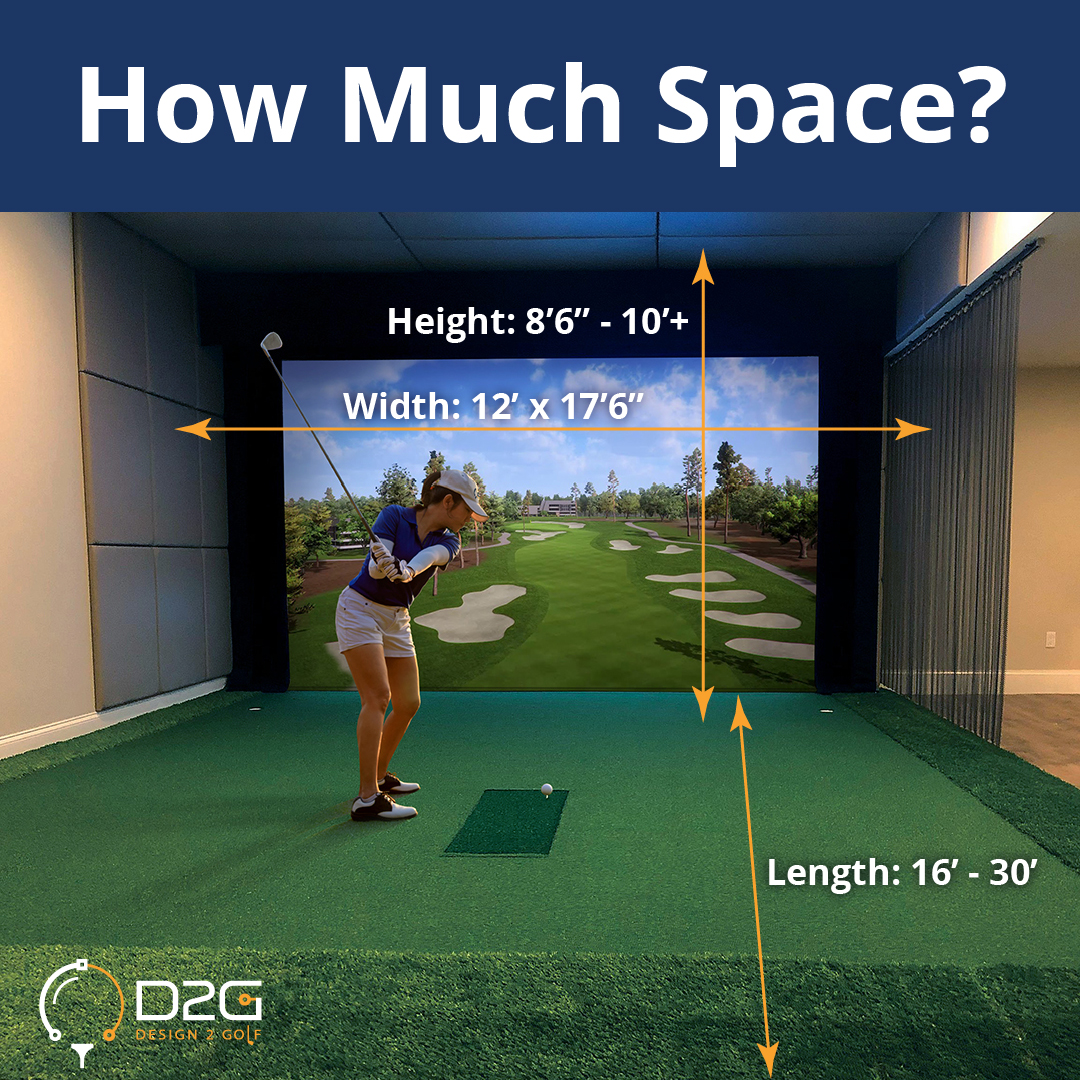
Image Source: www.design2golf.com
Space Guide: How Much Room Do You Need For Golf Simulator?
You ask, “How much room do you need for a golf simulator?” For a basic setup, you need a room at least 10 feet wide, 10 feet long, and 9 feet high. This is the bare minimum. You also wonder, “Can I fit a golf simulator in a small room?” Yes, it is possible. Small room golf simulator setups are real. You just need to pick the right gear and plan carefully. Getting the golf simulator room size right is key for fun, safety, and a good swing. This guide will show you how to find the perfect space for your indoor golf dreams.
Finding Your Space Needs
Setting up a golf simulator at home is exciting. But before you buy anything, you must measure your space. The right indoor golf simulator space requirements depend on many things. These include your swing, the type of golf simulator enclosure dimensions you pick, and your budget.
Grasping Key Measurements
Knowing your space means more than just length and width. You need to think about every angle.
Minimum Golf Simulator Dimensions
What is the smallest space you can use? Most people aim for these numbers:
- Width: At least 10 feet (3 meters). This allows you to swing a club without hitting walls. It also gives room for your hitting mat and a screen.
- Length: At least 10 feet (3 meters). This length makes sure the ball has enough room to fly before hitting the screen. It also lets your launch monitor read your shots well.
- Height: At least 9 feet (2.75 meters). This is very important. You need to be able to swing your longest club (like a driver) fully. Your club should not hit the ceiling.
These are starting points. More room is always better for comfort and safety.
Ideal Golf Simulator Room Size
What size room is best? For a truly great experience, aim for these measurements:
- Width: 15 feet (4.5 meters) or more. This extra width means more comfort. You can stand further from the screen. It helps when you hit a shot and gives your friends room to watch.
- Length: 20 feet (6 meters) or more. A longer room gives a bigger buffer area. It means less chance of hitting walls behind you. It also lets you use certain projector distance golf simulator setups easily.
- Height: 10 feet (3 meters) or more. This extra height is a big plus. It makes sure even very tall golfers can swing freely. It also gives more options for projector mounting.
Think about a bigger space if you want to add seating, a mini-fridge, or other fun things.
Golf Sim Ceiling Height: A Crucial Factor
The height of your ceiling is often the biggest limit. Even if you have a wide and long room, a low ceiling can stop your plans.
- Checking Your Swing: Grab your longest club, usually a driver. Stand in your planned sim area. Make a full practice swing. Do not hit the ceiling. If you touch it, your ceiling is too low.
- Tall Golfers Need More: If you are a tall person, you might need more height. A 9-foot ceiling might be fine for some, but a 10-foot ceiling is safer for most.
- Launch Monitor Needs: Some launch monitors sit on the floor. Others hang from the ceiling. If you use a ceiling-mounted unit, make sure it has room. It should also be at the right height for good readings.
| Measurement Type | Minimum Recommended | Ideal Recommended | Why It Matters |
|---|---|---|---|
| Width | 10 feet (3 m) | 15+ feet (4.5+ m) | Swing clearance, hitting area, viewing comfort. |
| Length | 10 feet (3 m) | 20+ feet (6+ m) | Ball flight, launch monitor space, backswing room. |
| Height | 9 feet (2.75 m) | 10+ feet (3+ m) | Full club swing (especially driver), projector mounting. |
Golf Simulator Width and Length: Deeper Dive
Let’s look more closely at width and length. These greatly shape your setup.
Width for Safety and Comfort
The width of your space needs to cover a few things:
- Your Swing: You need space for your full swing. This means the club head and shaft should not hit the walls.
- Hitting Area: Your hitting mat needs space. It is usually 4 to 5 feet wide.
- Enclosure: Your golf simulator enclosure dimensions are a big part of the width. Most enclosures are 10 to 13 feet wide.
- Side Netting/Padding: You might want nets or padding on the sides. This catches errant shots. Add a few extra feet for these.
- Left-Handed Play: If both right-handed and left-handed golfers will play, extra width is a must. You need to center the hitting mat for each player. This means the total width needs to be much more than 10 feet. For two-way play, aim for 15 feet or more.
Length for Ball Flight and Gear
The length of your room affects your game in these ways:
- Screen Distance: The main goal is to stop your ball on the impact screen. You need enough room from your hitting mat to the screen.
- Launch Monitor Setup:
- Behind You: Some launch monitors sit behind you. These need about 7 to 10 feet of space behind the hitting mat.
- Next to You: Some sit next to the hitting mat. They need less room behind you.
- In Front: A few sit near the screen.
- Projector Distance: Your projector needs a certain distance from the screen. This makes the image fit the screen. A short room might mean using a short-throw projector. We will cover projector distance golf simulator needs in more detail later.
- Swing Room: Even with a launch monitor in front, you still need room for your backswing. This is usually not an issue if you have enough space for the ball to fly.
Component-Specific Space Guides
Each part of your golf simulator setup needs its own space. Knowing these needs helps you plan.
Golf Simulator Enclosure Dimensions
The enclosure is often the largest piece. It holds the impact screen and protects your room.
- Common Sizes: Enclosures come in standard widths like 10 feet, 12 feet, or 13 feet. They are usually 8 to 10 feet high. The depth is often 5 feet.
- Depth: The depth of the enclosure itself is usually around 5 feet. This is the space from the screen to the back wall of the enclosure. You hit the ball into the screen, which is part of the enclosure.
- Custom Builds: You can also build your own enclosure. This gives you more control over the size. But it takes more planning.
- Netting vs. Enclosure: Some people use a simple net. This needs less space in terms of depth. But an enclosure gives a better, more immersive feel. It also gives more protection to your room.
Projector Distance Golf Simulator Needs
The projector shows the course on your screen. Its placement is important.
- Throw Ratio: Every projector has a “throw ratio.” This tells you how far the projector needs to be from the screen for a certain image size.
- Standard Throw: A projector with a throw ratio of 1.5:1 means it needs to be 1.5 feet away for every 1 foot of screen width. For a 10-foot wide screen, it needs to be 15 feet away.
- Short Throw: A short-throw projector has a ratio like 0.5:1. This means it needs to be 0.5 feet away for every 1 foot of screen width. For a 10-foot wide screen, it only needs to be 5 feet away.
- Mounting:
- Ceiling Mount: Most people mount the projector on the ceiling. This keeps it safe and out of the way. Make sure your ceiling height allows for this. The projector must be high enough to avoid being hit by a club. It also needs to be placed so your shadow does not fall on the screen.
- Floor Mount: Some projectors can sit on the floor in a special case. This is good for lower ceilings.
- Shadows: The goal is to place the projector so your body does not block the image. For right-handed players, placing the projector slightly to the left side of the hitting area often works best. For left-handed players, place it to the right.
Hitting Mat Space Requirements
The hitting mat is where you stand. It needs to be stable and big enough.
- Size: Most hitting mats are at least 4 feet by 5 feet. Some are bigger.
- Placement: The mat must be centered within your hitting area. This means you need clearance on both sides of the mat.
- Level Ground: Your mat needs to sit on a flat, even surface. This is vital for safety and accurate shots. You can build a raised platform to make the mat flush with your floor. This creates a flat area for walking and standing.
Launch Monitor Placement
Different launch monitors need different space.
- Floor-Based: Some monitors sit on the floor. These include units like Foresight Sports GCQuad or Bushnell Launch Pro. They usually sit next to the hitting mat, a few feet from the ball. They need a flat surface and clear view of the ball and club.
- Rear-Based: Others sit behind you. These include units like FlightScope Mevo+ or Uneekor EYE XO. They usually need 7 to 10 feet of space behind the hitting mat. They need a clear view of your swing and the ball.
- Ceiling-Mounted: Some high-end units mount to the ceiling, like Uneekor EYE XO or GOLFZON simulators. They are great for saving floor space. But they need precise ceiling height and placement.
Fitting a Sim into Smaller Spaces
Even with minimum golf simulator dimensions, fitting a full setup can be tricky. But a small room golf simulator setup is possible with smart choices.
Tips for Tight Spaces
- Focus on Height: If your room is small, height is even more critical. Make sure you can swing freely. If not, a simulator might not be safe.
- Use a Short-Throw Projector: This is a must for short rooms. It lets you place the projector close to the screen.
- Choose the Right Launch Monitor: A floor-based or ceiling-mounted launch monitor is often best for small rooms. Rear-based units need more length behind you.
- Compact Enclosures: Look for enclosures designed for smaller spaces. Some are only 4 feet deep.
- Wall Protection: If you cannot fit a full enclosure, use heavy-duty nets or padding on walls near the hitting area.
- Retractable Screens: These screens pull up and down. This lets you use the room for other things when not golfing. They save space when not in use.
- No Fanciness: Skip the extra seating, putting green, or snack bar. Focus only on the core golf setup.
Example: Small Room Golf Simulator Setup
Let’s say you have a room that is exactly 10 feet wide, 10 feet long, and 9 feet high.
- Enclosure: A 10-foot wide, 8-foot high, 5-foot deep enclosure fits the width and height.
- Hitting Mat: A 4×5 foot hitting mat fits well. Place it 7 feet from the screen. This leaves 3 feet behind you.
- Launch Monitor: Use a floor-based unit next to the mat. Or use a ceiling-mounted unit. A rear-based unit would be hard to fit with only 3 feet behind you.
- Projector: You need a short-throw projector. Mount it 5-7 feet from the screen. Adjust its throw ratio to fill the 10-foot screen.
- Safety: Add foam padding on the side walls if your swing is wide.
This small room golf simulator setup works. But it will feel snug.
Planning Your Setup
Planning is key to a great indoor golf simulator space.
Measuring Your Space Accurately
Do not guess. Get a tape measure.
- Measure Width: Measure from wall to wall. Do this in a few spots to check for uneven walls.
- Measure Length: Measure from wall to wall. Again, check in a few spots.
- Measure Height: Measure from floor to ceiling. Check all around the planned hitting area. Remember, floors or ceilings might not be perfectly flat. Use the lowest point for your planning.
- Note Obstacles: Are there windows, doors, vents, or light fixtures? Mark them down. They can get in the way.
- Think About Power: Where are the power outlets? You will need power for the projector, launch monitor, and computer.
Choosing Components Based on Room Size
Once you have your measurements, you can pick your gear.
- Launch Monitor First: Decide on your launch monitor. This will affect where you stand and how much length you need.
- Screen/Enclosure Next: Pick an enclosure that fits your width and height. Remember to leave space for framework and side protection. Golf simulator enclosure dimensions are fixed.
- Projector Match: Select a projector based on your room length and screen size. Short room = short-throw projector.
- Matting: Pick a hitting mat that fits comfortably in your space. Make sure you have enough hitting mat space requirements.
Setting Up for Success
Think about more than just golf.
- Lighting: Good lighting helps the projector image. But avoid bright lights that shine on the screen. Natural light from windows can also wash out the image.
- Flooring: A flat floor is best. Carpet helps with sound. Putting turf is also a good option.
- Ventilation: Swinging a golf club is a workout. Good airflow can make your space more comfortable. A fan is a good idea.
- Sound: Consider soundproofing if your sim is near bedrooms. Impact screens can be loud.
Safety First in Your Sim Area
Safety is a big part of indoor golf simulator space requirements. You are swinging a fast, hard object in a small space.
Clearance Around Your Swing
- Side Clearance: Make sure your club does not hit side walls. This is why golf simulator room size width is so important. A few feet of extra space on each side of your hitting mat is ideal. This is especially true if you or others have wide swings.
- Rear Clearance: Your backswing needs room. Make sure you are not hitting anything behind you. This is part of the golf simulator width and length needs.
- Forward Clearance: The impact screen is key here. Make sure the ball hits the screen and not the wall behind it. The enclosure depth handles this.
Protecting Walls and Ceilings
- Enclosures: The best protection is a full enclosure. It has walls, a ceiling, and a screen. It stops all balls.
- Nets: If you cannot fit a full enclosure, use side nets. These catch shanks or slices.
- Padding: Use foam padding or thick blankets on walls behind the screen or around the hitting area. This protects your walls from mis-hits. It also dampens sound.
- Ceiling Protection: If your golf sim ceiling height is just 9 feet, consider ceiling netting or foam tiles above the hitting area. Even small misses can hit the ceiling.
Proper Lighting and Wiring
- Clear Paths: Make sure no wires are loose on the floor. Someone could trip.
- Adequate Light: Ensure your room is bright enough for general movement. But make sure the projector image is clear.
- Fire Safety: Do not overload electrical outlets. Use power strips with surge protection.
Care and Smart Use
Once your golf simulator room size is set and everything is built, smart use keeps it safe and fun.
Keeping the Space Clean
- Dust Control: Use a vacuum often. Dust can build up on equipment.
- Screen Care: Follow the maker’s guide for cleaning your impact screen. Dirt can affect image quality.
- Mat Cleaning: Clean your hitting mat often. Bits of turf can come off.
Optimizing for Comfort
- Seating: If space allows, add comfy chairs. This makes the experience better for you and guests.
- Fans: A good fan helps with airflow. Golfing can be hot work!
- Snacks and Drinks: A small table or fridge can be a nice touch.
- Sound System: Good speakers add a lot to the immersive feel.
Common Questions
How important is ceiling height for a golf simulator?
Ceiling height is extremely important. It is often the biggest limit. You must be able to swing your longest club (like a driver) fully without hitting the ceiling. For most golfers, this means a minimum of 9 feet, but 10 feet or more is better, especially for tall players.
Can I use a garage for a golf simulator?
Yes, garages are very common places for golf simulator setups. They usually offer good golf sim ceiling height and width. You might need to manage temperature swings and make sure the floor is level. Garages are great because they often have enough space for indoor golf simulator space requirements.
What if my room isn’t perfectly square or has obstacles?
Many rooms are not perfect. Measure around obstacles like windows, doors, or support beams. Plan your setup around them. You might need custom golf simulator enclosure dimensions or flexible netting to work around tricky spots.
Do I need special flooring for a golf simulator?
No, you do not need special flooring. A flat, level floor is most important. Carpet helps with sound and comfort. You can also use putting turf or a raised platform to make your hitting mat flush with the floor.
How close can the projector be to the screen?
This depends on your projector’s “throw ratio.” A short-throw projector can be very close, sometimes just 5 feet from a 10-foot wide screen. A standard projector needs to be much farther away, possibly 15 feet or more. Check the projector’s specs.
Is a 10-foot wide room enough for a golf simulator?
A 10-foot wide room is the minimum golf simulator dimensions. It can work, but it will feel snug. It leaves little room for error on side shots. If you have both right-handed and left-handed players, a 10-foot width is very tight. Aim for 12-15 feet if you can.
What’s the ideal distance from the hitting mat to the screen?
This varies. Most people place the hitting mat 7 to 10 feet from the impact screen. This distance gives the ball enough room to travel and register accurately with the launch monitor before hitting the screen.
Do I need to protect my walls if I have an enclosure?
A full golf simulator enclosure usually protects all walls and the ceiling inside its frame. However, you might want extra padding on the outside walls right next to the enclosure if your swing is wide or if there’s any chance of a wild shot missing the enclosure entirely.
Building your own home golf simulator is a rewarding project. By carefully planning your golf simulator room size and space, you will create a safe, fun, and top-notch golf spot. Take your time, measure everything, and choose the right gear for your space. Enjoy your virtual rounds!