
Building a golf simulator at home can cost anywhere from under $500 for a basic setup to over $75,000 for a high-end, custom-built system. The price changes a lot based on the parts you choose. Key factors like the type of launch monitor, screen quality, projector, and software fees make a big difference in the final home golf simulator price. Many people ask, “Can I build a golf simulator on a tight golf simulator budget?” The answer is yes, you can. There are many affordable golf simulator options available if you plan carefully and choose wisely.
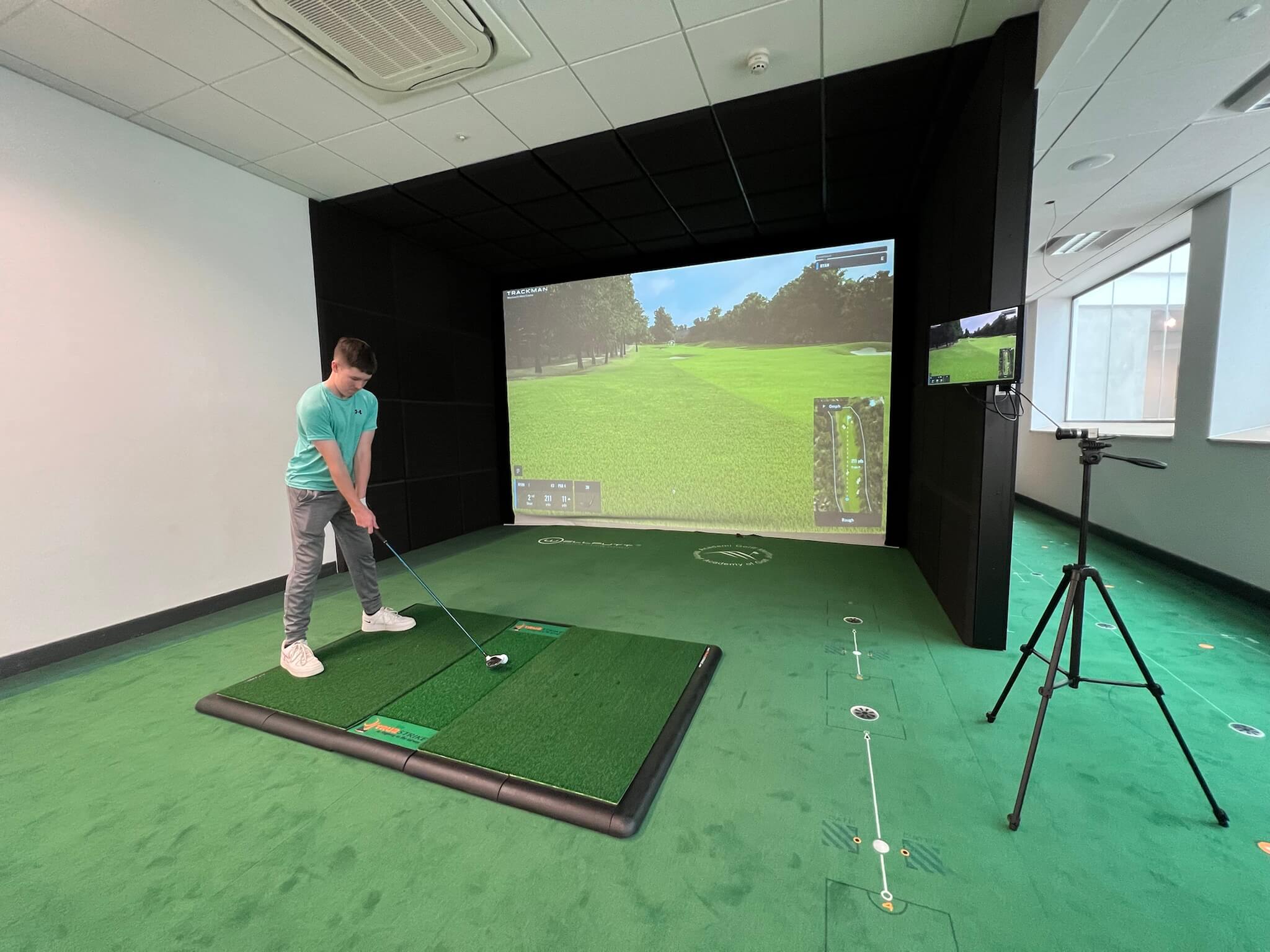
Image Source: www.golfswingsystems.com
Components of a Golf Simulator
A golf simulator brings the golf course to your home. It lets you play and practice year-round, no matter the weather. To build one, you need a few main parts. Each part has its own cost. We will look at what each piece does and what it might cost.
The Brain: Launch Monitor Cost
The launch monitor is the most important part of any golf simulator. It measures your swing and the ball’s flight. It sends this data to the software. This data then shows your shot on the screen. Launch monitor cost can be a big part of your overall golf simulator budget.
There are different types of launch monitors, each with different price points and features:
- Basic Portable Units (Under $2,000): These are good for beginners or those with a small golf simulator budget. They offer key data points like ball speed, launch angle, and spin. They work well for practice and casual play.
- Examples: Garmin Approach R10, FlightScope Mevo+, Swing Caddie SC300i, OptiShot 2.
- Features: Often connect to a phone or tablet. May have limited course options.
- Mid-Range Units ($2,000 – $15,000): These offer more accurate data and advanced features. They are great for serious golfers who want better feedback. Many connect to PCs for better graphics and more courses.
- Examples: Bushnell Launch Pro, SkyTrak, Uneekor EYE XO.
- Features: High-speed cameras or radar for precise data. Access to a wider range of courses and practice modes.
- High-End Professional Units ($15,000 – $30,000+): These are top-tier systems used by golf pros and instructors. They give the most accurate and detailed data. They also provide the most immersive golf experience.
- Examples: Foresight Sports GCQuad, Trackman, Uneekor QED.
- Features: Extremely accurate club and ball data. High frame rate cameras. Used for fitting and analysis.
Here is a table showing typical launch monitor cost ranges:
| Launch Monitor Type | Price Range (USD) | Key Features |
|---|---|---|
| Basic Portable | $200 – $2,000 | Ball speed, launch angle, carry distance. Portable. Good for casual play. |
| Mid-Range | $2,000 – $15,000 | More accurate ball and club data. Connects to PC. Many courses. |
| High-End Professional | $15,000 – $30,000+ | Very accurate ball and club data. Used by pros. Advanced analysis. |
The Canvas: Impact Screen Price
The impact screen is where you hit the ball. It shows the image from the projector. It must be strong enough to handle fast golf balls. The impact screen price depends on its size, material, and how it is made.
- Hitting Nets (Under $500): If your golf simulator budget is small, a hitting net is an option. You hit balls into it, but it does not show the image from a projector. It is good for just practicing shots.
- Features: Simple, portable, takes up less space.
- Basic Impact Screens ($300 – $1,000): These are usually made from polyester or similar materials. They are good for home use. They can withstand many hits.
- Features: Good durability, decent image quality.
- Premium Impact Screens ($1,000 – $3,000+): These screens use special materials for better image quality and longer life. They are quieter when hit. They also help reduce ball bounce-back.
- Features: High durability, excellent image clarity, low noise, safer.
Choosing the right screen depends on your room size and how often you will use it. It also depends on how important a clear picture is to you.
| Impact Screen Type | Price Range (USD) | Key Features |
|---|---|---|
| Basic Hitting Net | $50 – $500 | For practice only. No projection. Portable. |
| Standard Impact Screen | $300 – $1,000 | Good durability. Decent image. |
| Premium Impact Screen | $1,000 – $3,000+ | High durability. Great image quality. Quieter. Safer. |
The View: Projector Costs
You need a projector to show the golf course image onto the impact screen. The projector type and features affect the cost.
- Resolution: This is about how clear the image is.
- 720p: Basic, but works. (Less than $500)
- 1080p (Full HD): Common choice, clear image. ($500 – $1,500)
- 4K (Ultra HD): Best clarity, but more expensive. ($1,500 – $5,000+)
- Lumens (Brightness): This is how bright the image is.
- You need enough lumens for a clear picture in your room. If your room is bright, you need more lumens.
- 2,000-4,000 lumens are usually enough for a home setup.
- Short-Throw vs. Standard:
- Short-throw projectors can be placed very close to the screen. This is good for small spaces. It also means you won’t cast a shadow on the screen when you swing. They often cost a bit more.
- Standard projectors need more distance from the screen.
- Mounting: You will also need a mount for the projector, which adds about $50-$200.
Here are typical projector cost ranges:
| Projector Type | Price Range (USD) | Key Features |
|---|---|---|
| Basic (720p, Standard Throw) | $300 – $800 | Entry-level visuals. |
| Mid-Range (1080p, Short-Throw) | $800 – $2,000 | Good clarity. Saves space. No shadows. |
| High-End (4K, Short-Throw) | $2,000 – $5,000+ | Best visuals. Very clear and bright. For top setups. |
The Experience: Golf Simulator Software Fees
The software is what runs your simulator. It takes data from the launch monitor and creates the golf course visuals. Golf simulator software fees can be one-time buys or yearly payments.
- Basic Software (Often Free with Launch Monitor or $100-$500 one-time): Some launch monitors come with basic software. This might have a few courses or practice ranges.
- Subscription Models ($100 – $1,000+ per year): Many popular golf simulator software platforms use yearly subscriptions. These give you access to many courses, advanced game modes, and updated features. This is a recurring cost.
- Examples: E6 Connect, The Golf Club (TGC) 2019, GSPro, FSX Play/Pro.
- One-Time Purchase ($500 – $3,000+): Some software titles can be bought outright. This avoids yearly fees, but the initial cost is higher.
Make sure the software works with your chosen launch monitor. Check what features are included with each plan. Some plans offer more courses or detailed swing analysis.
| Software Cost Model | Price Range (USD) | Key Features |
|---|---|---|
| Basic/Included | $0 – $500 (one-time) | Limited courses. Practice ranges. May come with launch monitor. |
| Subscription | $100 – $1,000+ (yearly) | Access to many courses. Regular updates. Advanced features. |
| One-Time Purchase | $500 – $3,000+ (one-time) | No recurring fees. All features unlocked. |
The Frame: Enclosure or Hitting Bay
An enclosure creates a safe and dark space for your simulator. It holds the screen and helps contain the ball. You can buy a pre-built enclosure or make one yourself. This choice impacts your DIY golf simulator expenses or full golf simulator package cost.
- DIY Enclosures ($500 – $2,000): You can build a frame using metal conduit, PVC pipes, or wood. Then, you hang your impact screen and side netting. This is a good way to save money if you are handy.
- Costs: Frame materials, netting, screen, foam padding for safety.
- Pre-Built Basic Enclosures ($2,000 – $5,000): These are kits you put together. They include the frame, screen, and side/top panels. They are easier to set up than DIY.
- Features: Standard sizes, simple frame, easy assembly.
- Premium Custom Enclosures ($5,000 – $15,000+): These are made to fit your exact space. They use strong materials and often include soundproofing and built-in lighting. They give a very polished look.
- Features: Custom fit, sturdy, quiet, professional finish.
Considering a full golf simulator package cost often means you get a pre-built enclosure. This simplifies the buying process.
| Enclosure Type | Price Range (USD) | Key Features |
|---|---|---|
| DIY Build | $500 – $2,000 | Build it yourself. Saves money. Requires tools and effort. |
| Pre-Built Basic Kit | $2,000 – $5,000 | Easy to assemble. Standard sizes. Convenient. |
| Premium Custom Solution | $5,000 – $15,000+ | Custom fit. High-quality materials. Professional look. |
The Ground: Hitting Mat
You need a good hitting mat to protect your clubs and your body. A cheap mat can cause discomfort or even injury.
- Basic Hitting Mats ($100 – $300): These are small and often thin. They work for occasional use. They might not feel like real turf.
- Mid-Range Hitting Mats ($300 – $700): These offer a better feel and are thicker. They are more durable and help absorb impact.
- Premium Hitting Mats ($700 – $1,500+): These mats feel very much like real grass. They are thick and durable. Some have gel pads to reduce shock on your joints. These are a good investment for frequent play.
A full mat can also be a good option if you want to stand on the same surface as you hit from. This can add to the indoor golf setup cost.
| Hitting Mat Type | Price Range (USD) | Key Features |
|---|---|---|
| Basic Mat | $100 – $300 | Thin, small, good for occasional practice. |
| Mid-Range Mat | $300 – $700 | Thicker, more durable, better feel. |
| Premium Mat (Gel, Stance) | $700 – $1,500+ | Very realistic feel. Durable. Protects joints. |
The Control Center: Computer or Device
You need a computer or device to run the golf simulator software. Your choice affects the graphics and speed of the system.
- Tablets/Phones (Under $1,000): Basic launch monitors can connect to your existing phone or tablet. This is the cheapest option. It works well for simple setups.
- Gaming Laptops ($1,000 – $2,500): A good gaming laptop can run most simulator software smoothly. Look for strong graphics cards.
- Desktop PCs ($1,500 – $4,000+): A custom-built desktop PC gives the best performance. You can choose powerful parts for the best graphics and speed. This is often needed for high-end simulators.
Check the software’s system needs before you buy a computer. This makes sure everything works well together.
| Computer/Device Type | Price Range (USD) | Key Features |
|---|---|---|
| Existing Phone/Tablet | $0 | Cheapest. Limited graphics. For basic launch monitors. |
| Gaming Laptop | $1,000 – $2,500 | Portable. Can run most software. Good graphics. |
| Custom Desktop PC | $1,500 – $4,000+ | Best performance. High-end graphics. For top simulators. |
Other Important Costs to Consider
When planning your golf simulator budget, do not forget these extra costs. They can add up.
Preparing Your Space
Before you set up, you might need to prepare your room. This adds to the overall indoor golf setup cost.
- Flooring: You might want to protect your floor. Options include artificial turf, interlocking foam tiles, or carpet. This can cost $200 – $2,000+.
- Lighting: Proper lighting is key for good camera tracking in some launch monitors. You might need to add lights or change existing ones. This can cost $100 – $500.
- Soundproofing: If you worry about noise, you might add sound-absorbing panels. This can range from $200 to $1,000+.
- Electrical Outlets: You may need more outlets for your devices. An electrician can add these for $100 – $500.
Accessories and Comfort
Once the main parts are in place, you might want extra items for a better experience.
- Golf Balls: Special indoor balls or regular golf balls. (Costs vary)
- Ball Tray: To hold your golf balls. ($20 – $100)
- Club Rack: To keep your clubs organized. ($50 – $200)
- Seating: Chairs or a couch for comfort. (Varies widely)
- Fans: To keep you cool during play. ($50 – $200)
- HDMI Cables/Power Strips: Essential connections. ($50 – $150)
Installation: Golf Simulator Installation Price
- DIY Installation (Free – $500+): If you install it yourself, you save on labor. But you might need tools you do not own. You also need time and effort. DIY golf simulator expenses here are mostly your time.
- Professional Installation ($1,000 – $5,000+): Some companies offer full installation services. This is easier but adds a lot to the golf simulator installation price. It is a good choice if you are not handy or want a perfect setup. For high-end, complex systems, professional help is often needed.
Maintenance
Like any electronic setup, a golf simulator needs some upkeep.
- Projector Bulb Replacement: Bulbs wear out. A new one can cost $100 – $300.
- Impact Screen Replacement: Screens can wear down over time, especially with heavy use. Replacing it costs similar to the initial screen purchase.
- Software Updates/Subscriptions: These are ongoing golf simulator software fees.
Knowing Your Golf Simulator Budget: Price Tiers
Let’s break down the home golf simulator price into different levels. This helps you see what you can get at each price point.
Affordable Golf Simulator Options (Under $5,000)
If you have a tight golf simulator budget, you can still get a good setup.
- Launch Monitor: Garmin Approach R10, FlightScope Mevo+, Swing Caddie (around $200 – $700).
- Impact Solution: A strong hitting net or a basic impact screen with a simple frame (DIY frame) (around $200 – $1,000).
- Projector: A basic 720p or entry-level 1080p projector ($300 – $800).
- Software: Often comes with basic software. You might add a low-cost yearly subscription ($0 – $300 yearly).
- Mat: A small, simple hitting mat ($100 – $300).
-
Computer: Use your existing phone, tablet, or a budget laptop.
-
Total for Affordable Options: $800 – $3,500 (plus potential yearly software fees)
This level is great for casual play, practice, and basic data. It is a fantastic way to start without spending too much. These affordable golf simulator options prioritize function over luxury.
Mid-Range Golf Simulator Setup ($5,000 – $20,000)
This range offers a much better experience. You get more accurate data and clearer visuals. This is where most serious home golfers will land for their golf simulator budget.
- Launch Monitor: SkyTrak, Bushnell Launch Pro, Uneekor EYE MINI (around $2,000 – $10,000).
- Impact Solution: A good quality pre-built enclosure kit or a custom DIY setup with a premium screen ($2,000 – $5,000).
- Projector: A strong 1080p short-throw projector ($800 – $2,000).
- Software: A yearly subscription to a popular platform like E6 Connect or GSPro ($300 – $800 yearly).
- Mat: A larger, quality hitting mat ($300 – $700).
- Computer: A gaming laptop or a capable desktop PC ($1,000 – $2,500).
-
Installation: Mostly DIY, but perhaps some help with specific tasks.
-
Total for Mid-Range Options: $6,000 – $20,000 (plus yearly software fees)
This level gives a great balance of performance and price. You get very good accuracy and an immersive experience. The home golf simulator price at this level is a solid investment for passionate golfers.
High-End Golf Simulator System ($20,000 – $75,000+)
This is for those who want the best. You get top-tier accuracy, amazing graphics, and a truly immersive golf experience. This represents a significant indoor golf setup cost.
- Launch Monitor: Foresight Sports GCQuad, Trackman, Uneekor EYE XO2 ($15,000 – $30,000+).
- Impact Solution: A large, custom-built enclosure with a premium screen. Often includes soundproofing and integrated lighting ($5,000 – $20,000+).
- Projector: A 4K short-throw projector with high lumens ($2,000 – $5,000+).
- Software: Full access to all courses and features, sometimes a perpetual license or top-tier subscription ($500 – $3,000+ yearly/one-time).
- Mat: A large, multi-surface premium hitting mat or full-floor turf ($700 – $2,000+).
- Computer: A high-performance gaming desktop PC ($2,000 – $4,000+).
-
Installation: Often includes professional golf simulator installation price ($1,000 – $5,000+).
-
Total for High-End Options: $25,000 – $75,000+ (plus potential yearly software fees)
This level delivers a professional-grade simulator. It is like having your own golf course in your home. The full golf simulator package cost at this level often includes everything for a turnkey solution.
DIY vs. Pre-Built Packages: Weighing the Options
Deciding between building it yourself or buying a complete package is a big choice. It affects your golf simulator budget and how much work you do.
DIY Golf Simulator Expenses
- Pros:
- Cost Savings: This is the biggest benefit. You can save thousands by sourcing parts yourself and building the frame. This is key for affordable golf simulator options.
- Customization: You can make it fit your exact space and needs. You choose each part.
- Learning Experience: You learn how each part works.
-
Cons:
- Time and Effort: It takes many hours to research, buy, and build.
- Technical Skill: You need some basic building and tech skills.
- Risk of Errors: Mistakes can be costly or delay your setup.
- Warranty Issues: You deal with warranties for each part separately.
-
Typical Savings: Up to 30-50% on the enclosure and installation costs.
Full Golf Simulator Package Cost
- Pros:
- Convenience: Everything comes together. One order, one delivery.
- Guaranteed Compatibility: All parts are made to work together.
- Professional Look: Often looks very clean and finished.
- Support: One company to call for support or issues.
- Warranty: Often a single warranty for the whole system.
-
Cons:
- Higher Cost: You pay for the convenience, design, and assembly. This increases the home golf simulator price.
- Less Customization: You choose from fixed sizes and options.
- Shipping Costs: Large packages can have high shipping fees.
-
Typical Added Cost: 10-30% more than a similar DIY setup.
For those focused on DIY golf simulator expenses, building it yourself is the way to go. For people who value ease and a clean look, a full golf simulator package cost is worth it.
Major Factors Affecting Your Total Cost
Beyond the components, several things shape the final price.
- Size of Your Space: Larger spaces allow for bigger screens and more immersive setups. But bigger screens and enclosures cost more. This directly impacts indoor golf setup cost.
- Desired Accuracy: If you want very precise data on every shot, you need a high-end launch monitor. These are much more expensive.
- Graphics Quality: Better graphics need a better projector and a more powerful computer. This raises costs.
- Number of Users: A system for just one person might be simpler. A system for many friends might need more durable parts.
- Future Upgrades: Plan for future needs. If you start small, can you upgrade parts later? This impacts your initial golf simulator budget.
Getting the Most from Your Golf Simulator Budget
Here are tips to make your money go further.
- Prioritize the Launch Monitor: This is the heart of your system. Do not go too cheap here if accuracy matters. You can upgrade other parts later.
- Do It Yourself (DIY) Where You Can: Building your own enclosure or installing parts saves a lot on DIY golf simulator expenses.
- Look for Sales and Used Equipment: Black Friday, Cyber Monday, or end-of-season sales can save you money. Check online marketplaces for used launch monitors or projectors.
- Start Small and Upgrade: Begin with a basic launch monitor and a net. Then, add a screen, projector, and enclosure as your golf simulator budget grows. This is one of the best affordable golf simulator options.
- Consider Bundles: Sometimes buying a bundle from a simulator company offers a small discount over buying each piece separately. This is a mini full golf simulator package cost option.
Total Cost Summary
Here is a summary of the general home golf simulator price ranges based on common setups.
| Component | Entry-Level ($) | Mid-Range ($) | High-End ($) |
|---|---|---|---|
| Launch Monitor Cost | $200 – $700 | $2,000 – $10,000 | $15,000 – $30,000+ |
| Impact Screen Price | $200 – $800 | $1,000 – $3,000 | $3,000 – $10,000+ |
| Projector | $300 – $800 | $800 – $2,000 | $2,000 – $5,000+ |
| Golf Simulator Software Fees | $0 – $300 (yearly) | $300 – $800 (yearly) | $500 – $3,000+ (yearly/one-time) |
| Enclosure/Frame | $300 – $1,500 (DIY) | $2,000 – $5,000 | $5,000 – $15,000+ |
| Hitting Mat | $100 – $300 | $300 – $700 | $700 – $1,500+ |
| Computer/Device | $0 – $1,000 | $1,000 – $2,500 | $2,000 – $4,000+ |
| Room Prep & Accessories | $100 – $500 | $500 – $2,000 | $1,000 – $5,000+ |
| Installation Price | $0 (DIY) | $0 – $1,000 (DIY/Partial) | $1,000 – $5,000+ |
| Estimated Total Range | $800 – $3,500 | $6,000 – $20,000 | $25,000 – $75,000+ |
Note: These are general ranges. Actual costs can vary based on specific brands, sales, and your choices.
Conclusion
Building a golf simulator is a big step for any golf lover. The cost varies a lot based on your goals, space, and golf simulator budget. From simple, affordable golf simulator options under $3,500 to luxury setups over $75,000, there is a system for everyone.
By carefully choosing each part—from the launch monitor cost to the impact screen price and golf simulator software fees—you can create an amazing practice space. Whether you manage DIY golf simulator expenses or opt for a convenient full golf simulator package cost, a home simulator is an investment. It will help your golf game all year long. The joy of playing indoors often makes the indoor golf setup cost feel worthwhile.
Frequently Asked Questions (FAQ)
Q: How much space do I need for a golf simulator?
A: You need at least 10 feet of width, 10 feet of height, and 12-15 feet of depth. This ensures enough room for your swing and a safe setup. More space is always better for comfort and safety.
Q: Can I use my own golf clubs in a simulator?
A: Yes, you use your own golf clubs. The simulator tracks the ball or club movement, letting you use your own gear.
Q: Is building a golf simulator worth the cost?
A: For many golf lovers, yes. It gives you year-round practice, saves money on driving range visits, and improves your game. It also provides fun entertainment for family and friends. The value depends on how much you play and how important improving your game is to you.
Q: Can I put a golf simulator outdoors?
A: Some portable launch monitors can work outdoors. But a full setup with an impact screen and projector is best indoors. Sun can wash out the projector image. Weather can damage equipment.
Q: How long does it take to set up a golf simulator?
A: This depends on the complexity. A basic net and portable launch monitor can be set up in minutes. A DIY enclosure might take a few days of work. A full pre-built package can take a few hours to a day to assemble. Professional installation can be done in a single day.