
As an Amazon Associate I earn from qualifying purchases.
If you searched for Keyboard Games, you probably want a board that makes PC gaming more comfortable, responsive, or affordable. The right choice depends on your layout preferences, connection needs, noise tolerance, and whether you need accessories too.
Mechanical and magnetic-switch models offer more customisation, while full-size boards keep familiar navigation and number-pad keys. Wireless connectivity, backlighting, anti-ghosting, spill resistance, and quiet operation can matter just as much as switch design.
These five picks were selected from the supplied products because they serve clearly different use cases. The shortlist includes customisable wireless keyboards, compact enthusiast models, quiet full-size options, straightforward gaming boards, and a complete accessory bundle.
Use the quick comparison to narrow your options, then check the detailed angles and buying guidance before choosing the keyboard that fits your desk and play style.
Our Top 5 Keyboard Games Picks at a Glance
| Product | ||
|---|---|---|
 |
AULA F75 Pro Wireless Mechanical Keyboard Customising wireless setups |
Check Price |
 |
ATTACK SHARK X68HE RT Mechanical Keyboard Competitive keyboard enthusiasts |
Check Price |
 |
TECKNET Wired RGB Gaming Keyboard Quiet gaming and office use |
Check Price |
 |
Redragon K521 Rainbow LED Gaming Keyboard Entry-level full-size gaming |
Check Price |
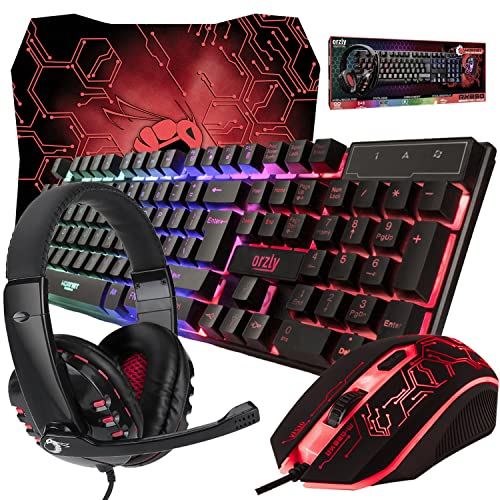 |
Orzly RX250 4-in-1 Gaming Bundle Complete starter gaming setup |
Check Price |
Top 5 Keyboard Games: Detailed Reviews
1. AULA F75 Pro Wireless Mechanical Keyboard
For Keyboard Games, the AULA F75 Pro offers a compact 75% layout aimed at customisers who want flexibility without building a keyboard from scratch. Its tri-mode connectivity supports Bluetooth 5.0, 2.4GHz wireless and USB wired use, with up to five devices connected. The hot-swap PCB accepts 3-pin or 5-pin switches, so you can change switches without soldering. Pre-lubed Reaper switches come fitted, while the control knob handles brightness and switches between gaming and office modes. RGB lighting provides 16 preset effects and music-reactive options.
What We Like:
- Tri-mode connectivity suits wireless desks and wired fallback use.
- Hot-swap support makes switch changes accessible to beginners.
- The 75% layout saves space while retaining a practical key arrangement.
- The knob provides quick control over brightness and modes.
- PBT keycaps and pre-lubed switches add useful out-of-box customisation appeal.
What Could Be Improved:
- The 75% layout sacrifices some keys compared with a full-size keyboard.
- The feature list does not specify battery life for wireless use.
- Its many lighting effects may matter less if you prefer a restrained setup.
Buy it if you want a customisable wireless keyboard for competitive gaming, with easy switch swapping and flexible device connections. Skip it if you need a full-size layout, require confirmed battery figures before buying, or prefer a simpler keyboard without extensive RGB controls and mode features.
2. ATTACK SHARK X68HE RT Mechanical Keyboard
For Keyboard Games, the ATTACK SHARK X68HE RT is aimed at competitive players who want magnetic-switch control in a compact wired board. Its Hall Effect switches support adjustable actuation, so you can set how far keys press before registering, while Rapid Trigger is designed for quick repeated inputs. The 8KHz polling rate targets fast response. You also get a programmable 66-key layout, NKRO, remapping and macros through a web driver, plus RGB lighting, PBT keycaps, a top-mounted design and a curved wrist rest.
What We Like:
- Adjustable actuation lets you tailor key sensitivity.
- Rapid Trigger suits fast, repeated competitive inputs.
- The compact layout retains separate arrow keys.
- Web-based controls support remapping, macros and lighting changes without installed software.
- NKRO helps the keyboard register multiple simultaneous key presses.
What Could Be Improved:
- It is wired, so it does not suit wireless gaming setups.
- The compact 60% layout may feel restrictive if you rely on a full-size keyboard.
- Its specialist magnetic-switch features may be unnecessary for casual gaming or office typing.
Buy it if you want a compact competitive keyboard with adjustable Hall Effect switches, Rapid Trigger and an 8KHz polling rate. It makes most sense for enthusiasts who will use those controls. Skip it if you need wireless freedom, a full-size layout or a simpler everyday keyboard.
3. TECKNET Wired RGB Gaming Keyboard
The TECKNET Wired Gaming Keyboard is a practical choice for Keyboard Games in shared rooms, offices, or quieter gaming setups. Its whisper-quiet switches reduce typing noise, while the metal panel design and ergonomic 7-degree angle support regular use. Fifteen-zone RGB lighting offers seven modes and four brightness levels, so you can keep keys visible or tone the effect down. IP32 spill resistance and four drainage holes in the wrist rest help with minor accidents and cleaning. You also get 25-key anti-ghosting and 12 multimedia keys for responsive controls and media access.
What We Like:
- Whisper-quiet switches make gaming and typing less disruptive in shared spaces.
- 15-zone RGB lighting provides seven modes and four brightness levels for flexible illumination.
- IP32 spill resistance and four wrist-rest drainage holes offer useful protection from minor spills.
- The ergonomic 7-degree angle and stepped key layout support a more comfortable typing position.
- 25-key anti-ghosting helps maintain responsive input during busy game controls.
What Could Be Improved:
- The wired design limits placement flexibility compared with a wireless keyboard.
- The RGB options are limited to the listed modes and brightness controls, with no stated advanced customisation features.
- Its 25-key anti-ghosting may not suit players who want broader simultaneous-key coverage.
Buy it if you want a quiet, straightforward keyboard for gaming, office work, or a shared setup, especially if spill resistance and adjustable RGB matter. Skip it if you need wireless connectivity or advanced lighting customisation. Competitive players wanting the broadest input features may prefer a more specialised keyboard.
4. Redragon K521 Rainbow LED Gaming Keyboard
For Keyboard Games, the Redragon K521 focuses on useful basics rather than extensive customisation. Its full-size 104-key layout gives you a familiar desktop arrangement, while the mechanical-feeling keys are designed for quick tapping. Anti-ghosting across 19 keys helps key combinations register accurately during play, and 12 multimedia combinations add convenience for gaming and office tasks. The wired, plug-and-play design works with Windows, PlayStation, Xbox and macOS without drivers. One-touch lighting controls, adjustable breathing modes and rainbow backlighting add visual appeal without complicating setup.
What We Like:
- The 104-key layout includes a full number pad and familiar desktop controls.
- Mechanical-feeling keys support quick tapping without requiring a complicated setup.
- 19-key anti-ghosting helps common gaming combinations register accurately.
- Twelve multimedia combinations make volume and media controls more convenient.
- Plug-and-play compatibility supports Windows, PlayStation, Xbox and macOS.
What Could Be Improved:
- The wired connection limits flexibility if you prefer a cleaner or more mobile setup.
- The keys are described as mechanical-feeling rather than as true mechanical switches.
- Lighting control is convenient, but the listed features focus on presets and adjustments rather than deep customisation.
Buy the K521 if you want an affordable-feeling full-size gaming keyboard with straightforward lighting, multimedia controls and broad compatibility. It suits entry-level PC gaming and mixed gaming-office use. Skip it if you specifically want wireless freedom, genuine mechanical switches or extensive lighting and key customisation.
5. Orzly RX250 4-in-1 Gaming Bundle
The Orzly RX250 4-in-1 bundle gives you a full-size 104-key wired membrane keyboard, mouse, pad, and stereo headset in one purchase. For Keyboard Games, its 19-key rollover and anti-ghosting help register multiple inputs during busy play, while the ambidextrous 90g mouse offers four DPI settings from 1200 to 3200. The headset uses a lightweight aluminium frame and suspended headband for a comfortable fit, with deep bass and crisp highs. It works with PC, Xbox, and PS4, making setup straightforward.
What We Like:
- You get the core gaming peripherals together, reducing setup decisions.
- The 104-key layout suits gaming, typing, and everyday productivity.
- Anti-ghosting and 19-key rollover support complex simultaneous inputs.
- The ambidextrous mouse accommodates left- and right-handed players.
- The lightweight headset frame and suspended headband should feel comfortable during longer sessions.
What Could Be Improved:
- The keyboard uses a membrane design, so it will not suit you if you specifically want mechanical-switch feedback.
- The wired design limits cable-free desk setups.
- The mouse provides four preset DPI levels rather than a broader range of adjustment.
Buy the Orzly RX250 if you want an immediate, complete starter setup for PC, Xbox, or PS4 gaming without choosing each accessory separately. It also suits mixed gaming and office use. Skip it if you already own quality peripherals or specifically want a mechanical keyboard and wireless setup.
How to Choose Among These Gaming Keyboards
The right Keyboard Games setup starts with how you play, where you play, and what you need beyond gaming. A keyboard that suits fast competitive matches may not be the best choice for quiet work, shared spaces, or a desk where cable clutter matters. Decide which compromises you can accept before comparing models.
Choose the connection that suits your desk
Wireless keyboards give you a cleaner setup and more freedom to position the board, but you must consider charging, connection management, and whether you want another device to maintain. Wired models keep the setup simple and avoid battery concerns, although the cable can restrict placement and add to desk clutter. If you regularly switch between gaming locations, wireless flexibility may matter more than minimal maintenance.
Match the layout to your games and tasks
Full-size keyboards include a number pad, which helps with data entry and everyday office work but takes up more desk space. Compact layouts leave extra room for mouse movement, a useful consideration for games that demand broad, quick movements. Think about the keys you use outside games, too; saving space is less helpful if you constantly miss a dedicated key or rely on awkward shortcuts.
Consider feel, noise, and control
Mechanical keyboards can offer a distinct key feel and clear feedback, but the sound and resistance may not suit every room or user. Quieter designs are more practical in shared spaces and offices, while a more pronounced typing feel can appeal to players who want deliberate feedback. Look for controls and customisation options that genuinely match your habits rather than paying for functions you will rarely use.
Set a sensible budget and check what is included
A standalone keyboard lets you focus your budget on the input device, while a bundle can make sense if you are building a setup from scratch. Check whether the included equipment matches your needs before choosing convenience over individual quality. Also consider lighting, build preferences, and warranty or return terms, since a lower upfront cost is not useful if the layout or feel quickly proves unsuitable.
Which Keyboard Games Pick Should You Choose?
The AULA F75 Pro Wireless Mechanical Keyboard is the best overall pick for a flexible, customisable gaming setup, especially if you value a tidy desk and wireless freedom. The ATTACK SHARK X68HE RT Mechanical Keyboard is the best alternative for competitive keyboard enthusiasts who want a more focused choice. If you need a complete starter setup instead, the Orzly RX250 4-in-1 Gaming Bundle offers the most convenient route into PC gaming.