
As an Amazon Associate I earn from qualifying purchases.
Choosing an Audio Interface For Streaming can get complicated quickly. You may need clean microphone input, control over game and chat audio, or a setup that handles podcasts and music without unnecessary extras.
Focus on the inputs and controls you will actually use. A single XLR input suits solo creators, while dual inputs help with guests or two microphones. Loopback, sound effects, Bluetooth, mute controls, and monitoring can also matter more for live content than recording resolution alone.
These five products were selected from the supplied options because they serve clearly different streaming setups. The list includes all-in-one production hardware, compact interfaces for music and voice, and mixers designed around gaming or podcast controls.
Each pick explains who it suits and what separates it from the others, followed by a practical buying guide to help you narrow down the right setup.
Our Top 5 Audio Interface For Streaming Picks At A Glance
| Product | ||
|---|---|---|
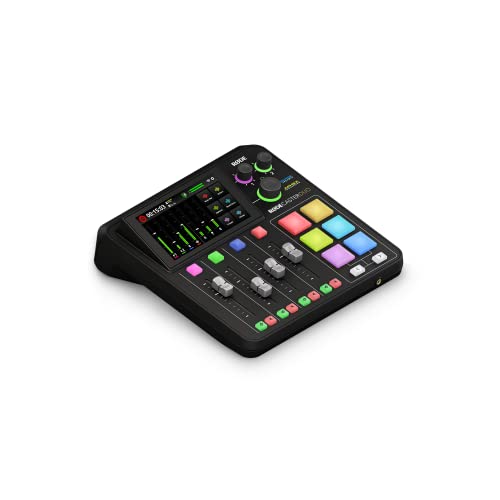 |
RØDE RØDECaster Duo All-in-one podcast and streaming control |
Check Price |
 |
Focusrite Scarlett 2i2 4th Gen Two-microphone recording and streaming |
Check Price |
 |
Focusrite Scarlett Solo 4th Gen Solo vocals, guitar, and streaming |
Check Price |
 |
MAONO E2 Gen2 Podcast Mixer Podcasters needing built-in show controls |
Check Price |
 |
FIFINE Ampligame SC3 Mixer Gaming streams with quick controls |
Check Price |
Top 5 Audio Interface For Streaming: Detailed Reviews
1. RØDE RØDECaster Duo
The RØDE RØDECaster Duo is an Audio Interface For Streaming that combines recording, mixing, monitoring, and production controls in one compact studio. Its two Neutrik combo inputs accept microphones or instruments, while Revolution Preamps provide up to 76dB of gain with ultra-low noise. Four broadcast-quality faders give you hands-on level control, and the touchscreen with haptic feedback makes navigation more direct. Six SMART pads trigger sounds or actions, while APHEX effects add vocal processing. A 3.5mm TRRS connection also supports headset monitoring and recording.
What We Like:
- Two combo inputs let you connect microphones or instruments.
- Four faders make live level adjustments quick and tactile.
- The touchscreen with haptic feedback gives you direct control over settings.
- Six SMART pads support sound triggers and other production actions.
- APHEX effects, including Aural Exciter and Big Bottom, add studio-style processing.
What Could Be Improved:
- The two-input design may not suit shows that require more than two microphone or instrument connections.
- The many controls, effects, and SMART pad functions may take time to learn.
- Its broad production feature set may be more than you need for simple solo streaming.
Buy the RØDECaster Duo if you want one production studio for podcasting, streaming, music, and content creation, with physical faders and quick-access controls. It suits creators who value hands-on mixing and built-in effects. Skip it if you only need a basic interface for one microphone or a minimal recording setup.
2. Focusrite Scarlett 2i2 4th Gen
The Focusrite Scarlett 2i2 4th Gen is an Audio Interface For Streaming that suits two-microphone podcasts, interviews, music recording, and gaming setups. Its two mic preamps and two Hi-Z instrument inputs let you connect microphones, guitar, or other instruments directly. Auto Gain helps set levels, while Clip Safe reduces the risk of clipping during recording. Air mode adds presence and harmonic drive to vocals and guitars. You also get 24-bit/192kHz recording, 120dB dynamic range, and a substantial software bundle for recording, mixing, and mastering.
What We Like:
- Two mic preamps make two-person podcasts and interviews straightforward.
- Two Hi-Z instrument inputs accommodate guitar and other direct-connected instruments.
- Auto Gain helps you establish a usable level without constant manual adjustment.
- Clip Safe helps protect recordings from unwanted clipping.
- Air mode can add presence to vocals and guitars.
What Could Be Improved:
- Its two-input design may not suit larger podcast groups or multi-guest setups.
- It focuses on core recording and streaming connections rather than dedicated show-control features.
- The included software collection may be more than you need if you already have a recording setup.
Buy it if you need a practical two-microphone interface for podcasting, vocals, guitar, or gaming, especially if automatic level help matters. Skip it if you need more than two connected sources or want built-in buttons and controls for launching podcast or stream effects.
3. Focusrite Scarlett Solo 4th Gen
The Focusrite Scarlett Solo 4th Gen is a compact Audio Interface For Streaming, solo vocals, and guitar. Its single XLR mic preamp handles one microphone, while the Hi-Z instrument input lets you connect a guitar directly, keeping your desk and setup simple. A 120dB dynamic range and 24-bit/192kHz recording support are designed for detailed sound. Air mode adds presence and harmonic drive to vocals and guitars, which can help them stand out. You also get Pro Tools Intro+, Ableton Live Lite, Cubase LE, and Hitmaker Expansion for recording and production.
What We Like:
- One mic preamp and one Hi-Z input keep solo recording straightforward.
- The 120dB dynamic range supports detailed, studio-quality sound.
- Air mode can give vocals and guitars more presence.
- USB-C connectivity suits a modern compact setup.
- The included software provides tools for recording, mixing, and mastering.
What Could Be Improved:
- The single mic preamp limits you to one microphone at a time.
- With one Hi-Z input, you cannot connect multiple instruments simultaneously.
- Its solo-focused design is less suitable for co-hosted podcasts or multi-person streams.
Buy it if you stream or record alone and want a compact interface for one microphone, guitar, or both. The simple layout should suit solo creators who value focused setup and included software. Skip it if you need multiple mic inputs or a mixer with built-in show controls.
4. MAONO E2 Gen2 Podcast Mixer
The MAONO E2 Gen2 is an Audio Interface For Streaming built for podcasters and creators who want hands-on control. Its dual low-noise XLR preamps provide up to 60dB of gain, supporting microphones that need extra input level. Loopback helps combine computer audio with your microphone, while Bluetooth adds background music without another source. Eight customizable sound-effect buttons let you trigger intros or clips, and one-touch mute handles interruptions quickly. Pitch-changing effects, monitoring controls, and multiple input/output options give you useful flexibility for podcast recording and live streams.
What We Like:
- Dual XLR inputs let you connect two microphones for interviews or co-hosted shows.
- Loopback makes it easier to combine computer audio with your microphone in a stream.
- Bluetooth provides a convenient way to add background music.
- Eight customizable sound buttons give you quick access to intros and other clips.
- One-touch mute helps you handle coughs, interruptions, or off-mic conversations.
What Could Be Improved:
- The control-rich design may be more than you need for simple solo recording.
- Custom sound effects require setup and content selection before they become useful.
- Pitch-changing effects and multiple controls can add complexity to an otherwise straightforward setup.
Buy the MAONO E2 Gen2 if you host interviews, produce podcasts, or stream and want dual-microphone support plus quick show controls. It suits creators who will use loopback, Bluetooth, and custom effects. Skip it if you only need a basic interface for one microphone and simple recording.
5. FIFINE Ampligame SC3 Mixer
The FIFINE Ampligame SC3 is an Audio Interface For Streaming built for gaming setups that need hands-on control. Its single XLR microphone input supports an upgrade from a basic mic, while the individual fader lets you adjust your mic level quickly. Front-facing mute and monitor buttons keep key controls within reach. You also get four customizable sound-effect buttons, six voice-changing modes, USB plug-and-play use, and RGB lighting. Support for two PC setups or audio mixing helps you balance game, music, and other audio sources.
What We Like:
- The XLR input gives you a practical path to better microphone hardware.
- The individual fader makes live mic adjustments fast and precise.
- Front mute and monitor buttons are easy to reach during a stream.
- Four customizable sound-effect buttons add quick audio cues without post-production.
- Two-PC support and audio mixing suit more involved gaming setups.
What Could Be Improved:
- The single XLR input limits the mixer to one microphone recording setup.
- Four sound-effect buttons may feel restrictive if you need many recurring audio cues.
- The RGB lighting adds visual customization but may be unnecessary if you prefer a simpler desk setup.
Buy it if you game-stream with one XLR microphone and want quick physical control over volume, muting, monitoring, and sound effects. Skip it if you need multiple microphone inputs, a larger production mixer, or minimal visual features. Its strengths are convenience and immediate control rather than extensive expansion.
How To Choose The Right Streaming Audio Interface
Choosing an Audio Interface For Streaming starts with matching the hardware to the way you speak, record, and play. A simple setup for one person has different needs from a shared podcast, a gaming stream with live effects, or a show that needs several sources under quick control. Decide what you need to connect and manage before you compare features.
Inputs and the people on your show
Count your microphones first, then consider whether you will connect instruments, a phone, or other audio sources. If you host with another person, two microphone inputs can prevent awkward workarounds and make shared recording more practical. A solo creator may prefer a simpler interface, especially if you do not expect your setup to grow.
Controls that suit your workflow
Physical controls matter during a live broadcast because you may need to adjust a microphone, music source, or headphone level without opening software. Look for the controls you will actually use rather than choosing a long feature list. Built-in show controls can help with repeatable streaming tasks, while a more conventional interface may suit you if you prefer handling routing and processing on a computer.
Sound monitoring and communication
Headphone monitoring helps you hear your voice and other sources before they reach your audience. Check how many people need to monitor the broadcast and whether the interface supports the connections your headphones use. A mute control, separate level adjustments, or direct monitoring can also reduce distractions while you speak, record, or play.
Space, software, and future changes
Think about where the unit will sit and whether you need quick access to its controls. A compact interface may be easier to keep beside a keyboard, while a larger mixer-style design can make live adjustments more visible. Also consider your computer setup and the software you already use; a device is more useful when it fits your existing workflow without adding unnecessary complexity.
Finally, leave room for your plans. If you may add a co-host, guest, instrument, or extra audio source, buying only for today can force another purchase later. If your setup will remain simple, paying for unused inputs and controls may add cost and clutter without improving your broadcasts.
Which Streaming Audio Interface Should You Choose?
The RØDE RØDECaster Duo is the best overall pick here for creators who want an all-in-one podcast and streaming control setup. The Focusrite Scarlett 2i2 4th Gen is the best alternative if your priority is recording and streaming with two microphones. Choose the Solo 4th Gen for a one-person setup, while the MAONO and FIFINE mixers make more sense when built-in show or gaming controls matter most.