
Does that familiar ache in your wrist slow you down during work or gaming? You are not alone. Many people feel this pain every day from using a regular mouse for hours.
Finding the right ergonomic mouse to ease this discomfort can feel like a maze. You see so many shapes and sizes, and it’s hard to know which one truly supports your hand and wrist the best. You want relief, but you don’t want to waste money on a mouse that doesn’t work.
This post cuts through the confusion. We will explore what makes an ergonomic mouse a game-changer for wrist pain. You will learn exactly what features to look for and how to match a mouse to your specific needs, bringing you closer to pain-free clicking.
Ready to say goodbye to wrist strain? Let’s dive into the best ways an ergonomic mouse can improve your comfort and productivity.
Top Ergo Mouse For Wrist Pain Recommendations
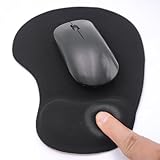
- EFFECTIVE RELIEF OF WRIST STRAIN: This is a wrist support mouse pad with a unique comfort gel padded cushion that moulds to the wrist for maximum comfort and support. Featuring an ergonomic design, it effectively relieves wrist fatigue from prolonged mouse use and reduces wrist pressure and discomfort.
- MOVE THE MOUSE WITH SILLKY SMOOTHNESS: The surface of the mousepad is made of soft lycra fabric, which feels delicate and smooth, you can hardly feel any friction when moving the mouse, and move the mouse accurately and smoothly, and this smooth operation will undoubtedly greatly improve your work efficiency and gaming experience!
- NON-SLIP AND STABLE: The bottom of the computer mouse pad is made of non-slip PU material, even when operating the mouse in the most intense and frequent games, our ergonomic mouse pad can firmly grasp the desktop is not easy to slide.
- DURABLE WITHOUT CRACKING: The wrist support of the mouse pad is filled with high quality silicone, which is not easy to deform after long time use. The sides are made of high quality adhesive to ensure that it will remain stable and not easy to crack during use. This mouse pad with wrist support is especially suitable for office use!
- RELIABLE AFTER-SALES SERVIVE: If you are not satisfied with our products after purchase, please contact us at the first time, our after-sales service is online 24 hours a day, unconditionally provide you with return and exchange services to solve your worries.

- Massaging ErgoBeads: Cushions and massages to support wrist pain relief and blood circulation
- Supportive Mouse Wrist Rest: Supports against long-term repetitive stress injuries like carpal tunnel
- Ergonomic Design: Designed by an orthopedic surgeon for ergonomic support for your hand and wrist
- Cooling Cushion: Mouse wrist rest uniquely designed with ergo beads you can freeze for extra relief
- Universal Design: Orthopedic pillow for the wrist with ergo beads that contour with any mouse

- 【PRODUCT MATERIALS】Manufactured from Premium Medical-grade Slow Bounce-back Memory Foam Gels and top-graded silky smooth LYCRA fabric, offers comfortable touch just like human skin; Quality Memory Foam Padding guarantees the mouse wrist pad won't be out of shape during long-term use.
- 【ERGONOMIC DESIGN】Innovative ergonomical wrist-shape groove and massaging holes design, perfectly fits to wrist and palm when put your wrist on the mice wrist support cushion, feel comfortable to rub your wrist and palm against to them.
- 【STEADY NON-SLIP SUPPORT】Benefit from the rubbery PU materials on the back base, the computer mice wrist rest is Skid-proof, feel easy and secure to continuous operating mice; Measuring: Mouse support pad: L 5.1” x W 3.1“ x 0.8”, suitable for all sizes of office and gaming computer mouses;
- 【ARTISTIC & SLEEK LOOK】Makes your desk look professional, It is also an excellent gift choice for mother’s day, father’s day, Teacher appreciation week, birthday, graduation, promotion gift
- The mouse wrist cushion is fit for office work and casual PC gaming, 2-year replacement & 24/7 customer service will be provided;

- Comfortable Gel Cushioning: The ergonomic wrist rest contains soft gel to provide soothing comfort and effective support, helping reduce wrist strain and the risk of repetitive motion disorders. Encased in premium Lycra fabric, the gel pad remains smooth and non-sticky for consistent comfort.
- Smooth and Comfortable Surface: The premium Lycra cloth surface provides a silky-smooth, comfortable feel for your wrist and hand while moving the mouse. Its finely textured design ensures precise and accurate cursor control, compatible with wired, wireless, optical, and mechanical mice for seamless performance across all devices.
- Firm Desktop Grip: The soft, non-skid PU base keeps the mouse pad firmly in place on your desktop, preventing slipping and ensuring stable mouse control during work or gaming. Move freely without interruptions for a smooth and reliable experience.
- Optimal Size and Ergonomic Shape: Designed to provide a comfortable fit at your desk, this mouse pad offers the ideal size and ergonomic shape for all-day use. Reinforced edges prevent fraying and wear, ensuring long-lasting durability.
- Buy Risk-Free: If you experience any compatibility issues, gel leaks, or wrist support concerns, simply reach out to us. Enjoy peace of mind with our 18-month after-sales service.

- REDUCE THE RISK: Carpio 2.0 is an ergonomic accessory that boosts your productivity while reducing the risk of developing strain injuries. It is a perfect solution for long hours behind the computer. CARPIO20
- DESIGNED WITH EXPERTS: With a team of medical experts specialising in reconstructive surgery, we found the ideal contoured ergonomic shape for Carpio 2.0 that reduces harmful extensions of the wrist
- HIGH QUALITY MATERIALS: Silicon pads offer a balance between comfort and stability. While the PTFE feet don’t constrain your wrist motion and enable Carpio to seamlessly glide together with the hand
- DESIGN: Available in three color variants and designed both, for the right-handed and left-handed people, Carpio enables every user to work comfortably using a keyboard and mousepad at the same time
- FOR EVERYONE: Carpio 2.0 supports your wrists whenever you use any computer mouse or keyboard: during the long working hours, late gaming sessions or just casual web browsing

- 【Wrist Joint Care】The slope with raised massage points design conforms to ergonomic curves. Adjustable wrist joint angle during work, disperses pressure, relieves wrist pain, improves carpal tunnel syndrome (CTS), and keeps your wrist in a relaxed state.
- 【Full of Memory Foam】Filled with super thick integrated memory foam, it is not easy to deform, super soft and rebounds slowly, providing a soothing and relaxing support for the wrist.
- 【High Spun Glossy Fabric】Professional silky Lycra fabric not only provides smooth sliding for the mouse, but also ensures synchronous tracking and precise positioning of the cursor.
- 【Diversified Use】11.8x7.9x1.2in (300x200x30mm), suitable for both large and small hands, suitable for left-handed and right-handed users, compatible with wireless mice, vertical mice, ergonomic mice, and various other free occasions.
- 【Stickiness PU Base】Wrist rest mouse pad base is made of PU, which has higher adhesion and stability than the rubber base, effectively preventing accidental sliding and falling of the mouse pad.

- EFFECTIVE RELIEF OF WRIST STRAIN: This is a wrist support mouse pad with a unique comfort gel padded cushion that moulds to the wrist for maximum comfort and support. Featuring an ergonomic design, it effectively relieves wrist fatigue from prolonged mouse use and reduces wrist pressure and discomfort.
- MOVE THE MOUSE WITH SILLKY SMOOTHNESS: The surface of the mousepad is made of soft lycra fabric, which feels delicate and smooth, you can hardly feel any friction when moving the mouse, and move the mouse accurately and smoothly, and this smooth operation will undoubtedly greatly improve your work efficiency and gaming experience!
- NON-SLIP AND STABLE: The bottom of the computer mouse pad is made of non-slip PU material, even when operating the mouse in the most intense and frequent games, our ergonomic mouse pad can firmly grasp the desktop is not easy to slide.
- DURABLE WITHOUT CRACKING: The wrist support of the mouse pad is filled with high quality silicone, which is not easy to deform after long time use. The sides are made of high quality adhesive to ensure that it will remain stable and not easy to crack during use. This mouse pad with wrist support is especially suitable for office use!
- RELIABLE AFTER-SALES SERVIVE: If you are not satisfied with our products after purchase, please contact us at the first time, our after-sales service is online 24 hours a day, unconditionally provide you with return and exchange services to solve your worries.

- 【Ergonomic Slop】The ergonomic 8-degree massage slope design can improve carpal tunnel syndrome, alleviate wrist pain, and keep the wrist in the most comfortable state.
- 【Cursor Positioning】Lycra fabric has a smooth surface without pilling and accurate positioning, allowing everyone to work comfortably. Suitable for wireless mice and other types of mice.
- 【Massage Rebound】High quality integrated molding with slow rebound memory foam, not easily deformed. The massage raised slope design enhances air circulation between the wrist and mouse pad, preventing sweating.
- 【 Size 】 11.8x7.9x1.2 inches (300x200x30mm), with a larger sliding area and all-round wrist support, perfect for right-hand or left-hand use.
- 【Strong Adsorption】The super strong PU adsorption base firmly holds the mouse pad in place during use and is not easy to slide.
Choosing the Right Ergo Mouse for Wrist Pain: A Buyer’s Guide
Do you feel a nagging ache in your wrist after a long day of computer work? An ergonomic (ergo) mouse can be your best friend. These special mice help your hand and wrist rest in a more natural position. This guide will help you pick the perfect one to ease your pain.
Key Features to Look For
When shopping for an ergo mouse, certain features make a big difference in comfort and usability.
1. Vertical or Angled Design
Most traditional mice force your forearm to twist. Vertical mice hold your hand like a handshake. This keeps your wrist straight. Look for a mouse that lets your hand rest naturally. Some mice use a “tilted” angle instead of fully vertical.
2. Size and Fit
Your hand size matters! A mouse that is too big or too small will cause strain. Check the product description for size guides. Some models offer adjustable sizes. A good fit is crucial for long-term comfort.
3. Thumb Rest and Grip
A comfortable thumb rest prevents your thumb from dragging. The grip texture should feel secure but soft. Silicone or textured rubber grips often feel better than smooth plastic.
4. Button Placement and Click Force
Are the buttons easy to reach without stretching your fingers? Try to find a mouse where the clicks require light pressure. Heavy clicking adds unnecessary strain to your fingers.
Important Materials and Build Quality
The materials used affect both durability and feel.
Surface Material
Look for soft-touch matte finishes. These materials resist slipping when your hands get warm. Avoid glossy plastics. They often feel slippery and cheap.
Internal Components
High-quality sensors (like optical or laser) ensure smooth tracking. Poor sensors make you move the mouse more to get the cursor where you want it. This defeats the purpose of an ergo mouse.
Factors That Improve or Reduce Quality
Not all ergo mice perform the same. Pay attention to these details.
Features That Improve Comfort:
- Adjustable DPI Settings: This lets you control cursor speed. Lower DPI means less physical movement is needed.
- Wireless Connectivity: Wires can tug or restrict movement. A reliable wireless connection offers better freedom.
- Rechargeable Battery: Constantly buying batteries is annoying. A good rechargeable battery lasts for weeks.
Features That Reduce Quality:
- Poor Balance: If the mouse feels top-heavy or unstable when you move it, it will require more control from your wrist.
- Stiff Scroll Wheel: A hard-to-turn scroll wheel tires out your index finger quickly.
- Proprietary Software: Overly complicated setup software can frustrate users. Simplicity often equals better quality in this area.
User Experience and Use Cases
Consider how you spend your time at the computer.
Office Work vs. Creative Tasks
If you do mostly typing and basic navigation, a simpler vertical mouse works well. If you need high precision for graphic design or gaming, you need an ergonomic mouse with adjustable sensitivity (DPI) and programmable buttons. These specialized models usually cost more.
Learning Curve
Switching from a standard mouse takes time. Your brain and hand need to adjust to the new angle. Be patient for the first week. If you still feel pain after two weeks, the mouse might not be the right shape for you.
Frequently Asked Questions (FAQ)
Q: How quickly will an ergo mouse relieve my wrist pain?
A: Most people start feeling relief within a few days. Full adjustment and maximum comfort usually take one to two weeks. Consistency is key.
Q: Are vertical mice good for gaming?
A: Some high-end vertical mice offer good performance. However, traditional flat mice often still offer faster, more precise movements required for competitive gaming. They are best for office or general use.
Q: Can I use an ergo mouse with a standard mousepad?
A: Yes, you can. However, some users find that the larger size of vertical mice works better on a larger desk space or a specialized wrist rest pad.
Q: What is DPI, and why does it matter for wrist pain?
A: DPI stands for Dots Per Inch. It measures how sensitive the mouse is. A higher DPI means a tiny hand movement moves the cursor a long way across the screen. Lower DPI means you move your hand more, but the cursor moves less. Adjusting DPI helps you find the movement level that strains your wrist the least.
Q: Should I choose a wired or wireless ergo mouse?
A: Wireless offers freedom and a cleaner desk. Wired mice eliminate battery worries and often have zero lag. For most users, modern wireless connectivity is reliable enough.
Q: What if the vertical angle feels too extreme?
A: Look for “tilted” or “semi-vertical” mice. These models do not stand straight up but offer a comfortable angle, usually between 45 and 60 degrees, providing a good middle ground.
Q: Do these mice require special drivers?
A: Basic functions usually work immediately with standard computer drivers. Advanced features, like button remapping, often require downloading software from the manufacturer’s website.
Q: Are ergo mice generally more expensive than standard mice?
A: Yes, they often are. You are paying for specialized design and engineering to promote better posture, which usually increases the price.
Q: How do I clean my new ergonomic mouse?
A: Always turn the mouse off or unplug it first. Use a slightly damp cloth (water only, or a mild electronics cleaner) to wipe down the surface. Pay special attention to the grips where oils build up.
Q: Can an ergo mouse fix Carpal Tunnel Syndrome (CTS)?
A: An ergo mouse helps prevent strain and can relieve mild CTS symptoms by promoting better posture. However, it is a tool, not a cure. If your pain is severe, you must consult a doctor or physical therapist.