
Ever notice how most computer screens are dark and black? It’s the standard look for years. But what if you want something different for your desk? White monitors offer a fresh, bright look that can totally change your workspace vibe. They pop against the usual tech clutter, bringing a clean, modern feel to your setup.
Finding the perfect white monitor isn’t always easy, though. You might worry about yellowing over time, or maybe you can’t find the right size or features in white. Many people feel stuck between wanting that cool aesthetic and needing top performance. It’s frustrating when style clashes with function, leaving you scrolling through endless pages hoping for the right match.
This guide cuts through the confusion. We break down everything you need to know about choosing a fantastic white monitor. You will learn about the best brands, what features matter most, and how to keep that brilliant white finish looking new for years. Get ready to discover the perfect bright screen for your needs.
Top White Monitors Recommendations

- MSI's 24-inch Full HD IPS monitor (1920×1080) delivers a 1500:1 contrast ratio with wide 178°/178° viewing angles — producing deeper blacks, brighter highlights, and accurate colors from virtually any position for gaming and productivity.
- TÜV Rheinland certified Flicker Free and Low Blue Light — eliminating the ~200Hz screen flicker common on standard monitors and reducing harmful blue light exposure to minimize eye strain during extended gaming or work sessions.
- 144Hz high refresh rate delivers ultra-smooth motion and sharper tracking versus standard 60Hz or 75Hz monitors — keeping every frame fluid and responsive for fast-paced FPS, racing, and action games without screen tearing or stuttering.
- MSI's built-in Eye-Q Check provides a vision assessment tool to help optimize display settings for healthier long-term viewing — designed for professionals and students spending extended hours in front of a Full HD IPS screen.
- Tilt-adjustable stand (-5°~20°) for comfortable viewing at any desk setup, with VESA 100×100mm wall mount compatibility for monitor arms, brackets, and multi-monitor arrangements — reducing neck strain during long gaming or work sessions.

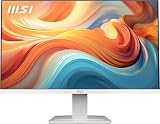
- MSI's 27-inch Full HD IPS gaming monitor (1920×1080) delivers a 1500:1 contrast ratio with wide 178°/178° viewing angles — producing deeper blacks, brighter highlights, and accurate colors from virtually any position for gaming and productivity.
- TÜV Rheinland certified Flicker Free and Low Blue Light — eliminating the ~200Hz screen flicker common on standard monitors and reducing harmful blue light exposure to minimize eye strain and fatigue during extended gaming or work sessions.
- 144Hz high refresh rate delivers ultra-smooth motion and sharper tracking versus standard 60Hz or 75Hz monitors — keeping every frame fluid and responsive for fast-paced FPS, racing, and action games without screen tearing or stuttering.
- MSI's built-in Eye-Q Check provides a vision assessment tool to help optimize display settings for healthier long-term viewing — designed for professionals and students spending extended hours in front of a Full HD IPS screen.
- Tilt-adjustable stand (-5°~20°) for comfortable viewing at any desk setup, with VESA 100×100mm wall mount compatibility for monitor arms, brackets, and multi-monitor arrangements — reducing neck strain during extended gaming or work sessions.

- Elevated entertainment: The FHD resolution and 1500:1 contrast ratio bring clarity, while a 144Hz refresh rate, and 1ms Moving Picture Response Time (MPRT) deliver a smooth, tear-free viewing experience.
- Hear the audio difference: Immerse yourself in sound with integrated dual 3W speakers delivering a wider range of frequencies.
- Eye comfort: Prioritize visual comfort with this 4-star TÜV-certified display. Reduce harmful blue light emissions while maintaining stunning image quality without compromising colors.
- Designed for comfort: Adjust your monitor to suit your preference throughout the day.
- Dell Display and Peripheral Manager: Experience Dell’s singular, innovative application to optimize the performance of your entire Dell PC workspace*. *Based on Dell internal analysis, December 2024.

- 100HZ Monitor Refresh Rate: 27 inch FHD white curved monitor, high resolution and ultra-fast 100HZ refresh rate, which dramatically reduces motion blur, picture stuttering, and ghosting. With a fast response time of just 5ms, you can enjoy a smooth and steady visual experience, making gaming more exciting than ever before. Flicker-free and Filtering blue light technology minimizes blue light to protect your eyes from damage
- 1800R Curvature: The curved design of the 1800R professional curved monitor surrounds your field of vision,providing a more uniform visual focus, reducing eye fatigue and discomfort,and creating a more immersive viewing experience for you.With the narrow bezel design on three sides, it is easy to use multiple displays side by side.Wide-range tilt adjustment up and down -5°~15° (±2°) allows you to maximize viewing comfort
- Vivid image quality: Experience an immersive viewing experience with the CRUA curved white computer monitors! 120% sRGB professional color gamut, 250cd/m² brightness, and 3000:1 static contrast ratio provide 16.7 million color gamut and color accuracy. Get ready to enjoy finer details, lifelike colors, and an enhanced viewing experience for your favorite TV shows, movies, and games
- Multiple Scenario Connections: The 27" curved monitor comes equipped with HDMI 1.4, VGA ports, allowing you to easily connect to a wide range of devices, including laptops, desktops, Xbox, PS4/5 and Switch etc, easily switch between office, study, and games. It also supports 100X100mm wall-mounted installation, offering practical space management and enhancing the aesthetics of your setup
- Assurances: We provide high-quality computer monitors and premium services. If you have any questions, please feel free to contact us, we will serve you wholeheartedly and solve all your problems

- Thips: This product only has a 3000R curvature, which is classified as a micro-curvature display.
- Curved White Design & Easy Assemble: Elevate your office or business workspace with a sleek 24 inch curved white monitor, featuring a minimalist finish and a stable V-shaped base. The 1080p display delivers smooth visuals for daily tasks, while the quick-release mechanism enables hassle-free, tool-free assembly right out of the box. Engineered for white-collar professionals and home office setups, blending modern aesthetics with practical productivity.
- Silky Smooth 100Hz Refresh Rate: Upgrade your workflow from standard 60Hz displays. The 100Hz refresh rate reduces motion blur and screen lag during fast web scrolling or video editing. Combined with AMD FreeSync technology, it ensures tear-free visuals for seamless multitasking and casual gaming. Engineered for smooth performance in spreadsheets, presentations, and daily office work.
- Frameless & Ergonomic Design: Maximize your desktop real estate with an elegant edge-to-edge profile. This modern design suits seamless dual or multi-monitor setups. Adjust the screen from -5° to 15° tilt to reduce neck strain during long office hours. Suited for space-conscious workstations, creative studios and multi-monitor.
- Vivid Colors with HDR10 and 98% sRGB: With HDR10 support, 16.7 million colors, and 98% sRGB color coverage, this computer monitor brings richer color performance for games, videos, work documents, and everyday entertainment.

- Elevated entertainment: The FHD resolution and 1500:1 contrast ratio bring clarity, while a 144Hz refresh rate, and 1ms Moving Picture Response Time (MPRT) deliver a smooth, tear-free viewing experience.
- Hear the audio difference: Immerse yourself in sound with integrated dual 3W speakers delivering a wider range of frequencies.
- Eye comfort: Prioritize visual comfort with this 4-star TÜV-certified display. Reduce harmful blue light emissions while maintaining stunning image quality without compromising colors.
- Designed for comfort: Adjust your monitor to suit your preference throughout the day.
- Dell Display and Peripheral Manager: Experience Dell’s singular, innovative application to optimize the performance of your entire Dell PC workspace*. *Based on Dell internal analysis, December 2024.

- TÜV Rheinland certified Flicker Free and Low Blue Light — eliminating the ~200Hz screen flicker common on standard monitors and reducing harmful blue light exposure to minimize eye strain and fatigue during extended ultrawide gaming or work sessions.
- 120Hz high refresh rate delivers noticeably smoother motion across the full 34-inch UWQHD ultrawide panel — reducing screen tearing and stuttering for more fluid gameplay, seamless multitasking, and immersive content consumption versus standard 60Hz or 75Hz monitors.
- Tilt-adjustable stand (-5°~20°) for comfortable viewing at any desk setup, with VESA 100×100mm wall mount compatibility for monitor arms, brackets, and multi-monitor arrangements — reducing neck strain during extended ultrawide gaming or productivity sessions.
- Adaptive Sync (FreeSync compatible) dynamically matches the monitor's refresh rate to your GPU's frame output — eliminating screen tearing, stuttering, and input lag for consistently smooth, tear-free gameplay across the full 34-inch UWQHD ultrawide panel at 120Hz.
- HDMI 2.0b with HDMI-CEC enables seamless single-remote device control across compatible displays and source devices. DisplayPort 1.4a delivers high-bandwidth output supporting UWQHD 3440×1440 at 120Hz — giving you reliable, high-performance connectivity for any setup.

- MSI's 27-inch WQHD IPS gaming monitor (2560×1440) delivers a 1500:1 contrast ratio with wide 178°/178° viewing angles — producing 78% more pixels than Full HD for sharper detail, deeper blacks, and more accurate colors across gaming, productivity, and creative workflows.
- TÜV Rheinland certified Flicker Free and Low Blue Light — eliminating the ~200Hz screen flicker common on standard monitors and reducing harmful blue light exposure to minimize eye strain and fatigue during extended gaming or work sessions.
- 144Hz high refresh rate delivers ultra-smooth motion and sharper tracking versus standard 60Hz or 75Hz monitors — keeping every frame fluid and responsive for fast-paced FPS, racing, and action games at WQHD 2560×1440 resolution without screen tearing or stuttering.
- MSI's built-in Eye-Q Check provides a vision assessment tool to help optimize display settings for healthier long-term viewing — designed for professionals and students spending extended hours in front of a 27-inch WQHD IPS screen.
- Tilt-adjustable stand (-5°~20°) for comfortable viewing at any desk setup, with VESA 100×100mm wall mount compatibility for monitor arms, brackets, and multi-monitor arrangements — reducing neck strain during extended WQHD gaming or productivity sessions.
The Ultimate Buying Guide: Choosing Your Perfect White Monitor
White monitors bring a fresh, clean look to any desk setup. They stand out from the usual black screens. Buying the right one involves looking at a few important things. This guide helps you pick the best white monitor for your needs.
Key Features to Look For
When shopping for a white monitor, several features really matter. These decide how good the screen looks and how long it lasts.
Screen Quality and Resolution
- Resolution: Look for at least 1080p (Full HD) for everyday tasks. If you do detailed work or gaming, aim for 1440p (QHD) or 4K (UHD). Higher resolution means sharper pictures.
- Panel Type: IPS panels offer the best color accuracy and wide viewing angles. VA panels give great contrast, making blacks look deeper. TN panels are the fastest for competitive gaming but have worse colors.
- Refresh Rate: This is how many times the screen updates per second. 60Hz is fine for office work. Gamers should choose 144Hz or higher for smoother motion.
Connectivity and Ergonomics
- Ports: Make sure the monitor has the ports you need, like HDMI or DisplayPort. USB-C is great if you want to connect your laptop with just one cable.
- Adjustability: Can you move the stand? Good monitors let you tilt, swivel, and adjust the height. This helps prevent neck strain.
Important Materials and Build Quality
The materials used affect both the look and the durability of your white monitor.
The Casing and Stand
Most white monitors use high-quality plastic for the casing. Check reviews to see if the plastic feels sturdy or cheap. A metal stand usually offers better stability than a plastic one. Good build quality means the screen won’t wobble when you touch it.
Screen Finish
Most modern monitors have an anti-glare (matte) finish. This cuts down on reflections from windows or lights. Glossy screens offer punchier colors but show every reflection. Decide which finish works best for your room lighting.
Factors That Improve or Reduce Quality
Not all white monitors perform the same. Some factors significantly boost or hurt the viewing experience.
Improving Quality
- Color Gamut: A wider color gamut (like 99% sRGB or DCI-P3 coverage) means the monitor displays more accurate and vibrant colors. This is important for designers and photo editors.
- HDR Support: High Dynamic Range (HDR) makes bright parts brighter and dark parts darker, adding depth to the image.
Reducing Quality
- Backlight Bleed: This happens when light leaks unevenly from the edges of the screen, making dark areas look gray. Good quality control reduces this issue.
- Poor Viewing Angles: If the colors shift drastically when you look at the screen from the side, the quality is reduced, often pointing to a lower-quality panel type.
User Experience and Use Cases
Think about what you will use the monitor for most often. This helps narrow down your choices.
For Office Work and Studying
If you type documents or browse the web, you need good text clarity. A 24-inch or 27-inch monitor with 1080p or 1440p resolution works well. Eye-care features, like low blue light modes, are highly recommended for long sessions.
For Gaming
Gamers must prioritize a high refresh rate (144Hz+) and low response time (1ms is ideal). A white aesthetic often pairs well with RGB lighting on gaming peripherals.
For Creative Professionals
Color accuracy is king here. Look for factory calibration reports and high color coverage. A larger screen size (27 inches or more) helps fit more tools on the screen at once.
10 Frequently Asked Questions (FAQ) About White Monitors
Q: Is a white monitor harder to clean than a black one?
A: No, cleaning is about the same. However, dust and smudges might show up more easily on a white surface compared to a dark one.
Q: Do white monitors cost more than black ones?
A: Usually, the color itself does not change the price much. Sometimes, specific white models are part of a premium line, making them slightly pricier.
Q: Will the white plastic turn yellow over time?
A: Older, cheaper plastics sometimes yellowed due to UV light exposure. Modern, high-quality plastics resist this change much better. Look for reviews confirming long-term color stability.
Q: Are white monitors good for competitive gaming?
A: Yes, as long as the internal specs (refresh rate, response time) meet gaming standards. The outer color does not affect in-game performance.
Q: What size white monitor is best for a small desk?
A: A 24-inch monitor is a great size for smaller spaces. It gives you enough screen real estate without overwhelming the area.
Q: Should I get a curved or flat white monitor?
A: Flat screens are better for precise work like graphic design. Curved screens offer a more immersive experience for movies and some types of gaming.
Q: How do I ensure the white color matches across my setup?
A: Monitor manufacturers often use slightly different shades of white. Check product photos carefully, or look for setups where users show their monitors side-by-side.
Q: What is ‘bezel’ and why does it matter on a white monitor?
A: The bezel is the frame around the screen. Thin bezels make the monitor look sleeker and are essential if you plan to use multiple monitors side-by-side.
Q: Does the white casing generate more heat?
A: No, the color of the exterior casing does not significantly affect the internal operating temperature of the electronics.
Q: Are there many options for white monitors with high resolutions (4K)?
A: Yes, many major brands offer their flagship 4K models in white or silver finishes, though the selection is generally smaller than for standard black models.