
Remember that satisfying ‘click’ as you slotted your GameCube memory card into the console? Those small blocks held entire worlds! But finding the right one today can feel like a quest in itself. Do you need a tiny 59 block card, or should you splurge on a massive 1019 block giant? Choosing the wrong one means you might lose your Metroid Prime progress or not have space for that crucial Animal Crossing save file.
The sheer variety—official Nintendo, third-party clones, and different capacities—makes picking a reliable card a real headache for collectors and new players alike. You want a card that works every time without corrupting your precious saves.
This guide cuts through the confusion. We will break down exactly what those block numbers mean, explain the differences between brands, and tell you which memory card will keep your GameCube adventures safe. Get ready to secure your save data perfectly. Let’s dive into the essential details of GameCube memory cards!
Top Gamecube Memory Card Recommendations

- KEEP THE PROGRESS YOU WORKED FOR: This memory card stores game saves for GameCube, so you can return to your saved progress instead of starting again. It also fits the memory-card slots for Wii RVL-001 when playing supported games for GameCube.
- SPACE FOR A GROWING SAVE COLLECTION: Keep saves from multiple compatible games on a card with a nominal total of 1024MB and 16344 noncompressed blocks. The capacity is divided into eight 128MB banks, each holding 2043 blocks, rather than one continuous save area.
- CHOOSE THE SAVES FOR TODAY'S GAME: The button on the card switches between eight banks, letting you keep different games or players in separate sections. Select the bank containing the saves you want to use for the next session.
- A COMPACT CARD FOR YOUR CONSOLE: The orange plastic shell is approximately 1.77 x 1.38 x 0.28in (4.5 x 3.5 x 0.7cm), making the card easy to store with your gaming accessories. One memory card is included.
- POWER OFF BEFORE CHANGING CARDS: Insert or remove the memory card only while the console is off. Use it for games for GameCube in a compatible memory-card slot for GameCube or for Wii RVL-001. Consoles without those memory-card slots are not supported.

- ★Universal GameCube & Wii Compatibility★This high-quality Gamecube memory card seamlessly works with Nintendo GameCube (NGC) and Wii consoles (RVL-001 model). Designed as a plug-and-play third-party accessory, it replaces bulky original cards while maintaining full compatibility with classic games
- ✔16MB Massive Storage (251 Blocks)✔Never delete saves again! With a Memory card gamecube capacity of 16MB (251 blocks), store hundreds of game files from Super Smash Bros. to Zelda. Perfect for collectors needing reliable Game cube memory cards to preserve hard-earned progress
- ⚡High-Speed & Crash-Proof Design⚡Engineered for durability, this Ngc memory card features rapid data transfer to prevent lag during saves. The shock-resistant build protects your files from accidental drops or power outages—essential for marathon gaming sessions
- ✨Third-Party Reliability, First-Party Performance✨A budget-friendly Gamecube memory card for Wii/GC that outperforms aging OEM cards. The streamlined profile fits snugly in any console slot, eliminating the "card wobble" issue common in generic alternatives
- ▲Wii RVL-001 Model Exclusive Support▲Note: This Gamecube memory card for wii is ONLY compatible with Wii RVL-001 (launch edition). Verify your console’s model before purchase to ensure flawless game data transfers between NGC and legacy Wii systems
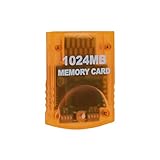
- KEEP YOUR CLASSIC GAME PROGRESS: This memory card stores game saves for GameCube, letting you return to the progress you have made. It fits consoles for GameCube and compatible consoles for Wii RVL-001 that have the required memory-card slots. It stores game saves for GameCube on those systems, not game saves for Wii.
- KEEP DIFFERENT SAVE SETS ON ONE CARD: Eight selectable 128MB banks provide 1024MB of total storage, letting you separate save sets without carrying a different memory card for each set. Press the physical button on the card to choose a bank.
- MOVE SUPPORTED SAVES THROUGH THE CONSOLE MENU: With the source card and this card in the two compatible slots, the console memory-card management screen can copy supported save data between them. This gives you a way to keep a second copy through the console menu. Follow the console prompts and wait until the transfer finishes.
- A COMPACT CARD FOR THE DEDICATED SLOT: The wear-resistant plastic shell is about 1.77 x 1.38 x 0.28 in (4.5 x 3.5 x 0.7cm), making the card easy to carry with your games. It plugs into the memory-card slot without a driver. It is not SD or CompactFlash and cannot use USB instead. It is not designed for Wii Mini or RVL-101 systems, which lack the required slots.
- POWER OFF BEFORE INSERTING OR REMOVING THE CARD: Turn off the console before inserting or removing the card, and never remove it while a save operation is running. Some games may not recognize large-capacity cards. Keep a smaller compatible card available for a title that refuses to save. The package contains one memory card. Console and games are not included.

- CHECK YOUR CONSOLE MODEL: This memory card works only for Wii consoles with model number RVL-001 and for GameCube consoles. It is not supported on other models for Wii or on consoles for Wii U, so check the model number on your console before you order.
- FOUR 128MB AREAS: The 512MB memory card is split into four 128MB areas, and each area saves 2043 blocks. Press the area button on the card to move to the next area, and the matching light on the card shows which of the four areas is active.
- PLUG AND PLAY: The card needs no setup and is ready to save as soon as it is inserted. Insert or remove the memory card only while the console is turned off, and if a save seems to be missing, change areas first because the console reads one area at a time.
- ROOM FOR A BIG LIBRARY: The four areas add up to 8172 usable blocks of non-compressed save space, so one memory card can hold saves from a large collection of games without deleting older files.
- TRANSLUCENT BLUE WITH AREA LIGHTS: The memory card has a translucent blue shell with the 512MB label on the front, and four small lights on the card show which 128MB area is active, so you can see the current area before you start a game.

- EIGHT STORAGE AREAS, AND THE CONSOLE READS ONE OF THEM AT A TIME: The card holds 16344 real uncompressed blocks in total, divided into eight independent 128MB areas of 2043 blocks each. Press the button on the front to move to the next area, and the eight indicator lights show which one is live. Expect one area of saves on screen rather than all eight at once, which is how every card of this capacity works.
- REAL BLOCKS, NOT COMPRESSED ONES: The 16344 figure is uncompressed, which is the distinction that matters in this category. Cards that reach a high block count by compressing what they store can fall out with certain titles, and the two are easy to confuse because both print a large number on the shell.
- BUILT FOR GAMECUBE CONSOLES AND FOR THE ORIGINAL WII, MODEL RVL-001: Read the model number on the underside before you order. The Family Edition and the Mini dropped the memory card slot altogether and the successor console was never part of this family, so none of those three will take this card. If the slot sits on the top of your console next to the controller ports, you have the right one.
- SAVES FOR GAMECUBE DISCS, AND NOT FOR WII TITLES: The card lives in the memory card slot and keeps the files written by a disc made for GameCube, whether that disc runs on a GameCube deck or on the original console. Other titles keep their own saves in internal memory or on an SD card, and the SD slot is a separate thing entirely.
- ONE ORANGE TRANSLUCENT CARD, MADE BY A THIRD PARTY: There is no official card at this capacity, so every 1024MB option is third party by definition. Power the console fully down before the card goes in or comes out, because that one habit is what keeps a save file intact on any card of this kind.

- High-Speed & Reliable: Experience seamless gameplay with our High Speed Game Memory Card. Enjoy quick saves, fast loads, and efficient management of your game data.
- Massive 256MB with Dual Banks: This powerful GameCube memory card offers generous storage split into two independent 128MB sections. Simply press the button to switch between banks, with individual LEDs showing the active section. It’s the ultimate organization tool for your saves.
- Broad Compatibility: Designed specifically as a memory card for GameCube and Wii Console (Model RVL-001).
- Safe & Easy to Use: Designed for plug-and-play convenience. For the safest operation and to prevent data loss, please insert or remove the card only when the console is powered off.
- Important Note: This card is NOT compatible with the Wii U console.

- 1024MB of storage with 16,344 blocks split across 8 partitioned memory banks, giving you far more room for save data, characters, and progress than the original OEM cards ever offered.
- Instantly flip between all 8 memory banks with the built-in Quick Switch button, so you can organize saves by game without swapping cards in and out.
- Works with both Nintendo GameCube and Wii consoles (via GameCube compatibility mode); simple plug-and-play operation with no setup, drivers, or formatting required.
- Multi-region support means it works with imported titles from any region, and the high-speed, stable data transmission keeps save and load times fast.
- Built to standard GameCube memory card specs in a durable translucent orange housing, a dependable, affordable alternative as original cards grow scarce and expensive.


- Compatible with GC and Wii consoles. Plug and play.
- 4 storage areas for 512MB memory card. Each storage area is given slots of 2043 blocks.
- Press the button on the memory card to switch the storage areas.
- Only Wii consoles with model number RVL001 and GC consoles are compatible.
- Third party products.
The Ultimate GameCube Memory Card Buying Guide
The Nintendo GameCube is a classic console. To save your game progress, you need a memory card. This guide helps you pick the right one. Don’t lose your hard-earned levels! Let’s dive into what makes a great GameCube memory card.
Key Features to Look For
When shopping, check these important features first:
- Storage Capacity: GameCube memory cards come in different sizes. The standard card holds 59 blocks. More blocks mean you can save more games or larger save files. Bigger cards are better if you play many games.
- Official Nintendo vs. Third-Party: Official Nintendo cards usually work perfectly every time. Third-party (aftermarket) cards can save money, but their reliability varies.
- Compatibility: All genuine GameCube memory cards work with all GameCube models. Make sure the card you buy is specifically for the GameCube, not the Wii (though some Wii consoles can use GC memory cards).
Important Materials and Build Quality
The memory card’s quality affects how long it lasts. Good materials matter.
- Plastic Casing: The outer shell should feel sturdy. Cheap, thin plastic breaks easily if dropped. Look for firm, durable plastic.
- Internal Components: The actual memory chips inside must be reliable. Official Nintendo cards used high-quality components. If buying third-party, read reviews about whether the data corruption happens often.
Factors That Improve or Reduce Quality
What makes one card better than another?
Factors That Improve Quality (Boost Your Experience)
- Official Branding: Original Nintendo cards offer the best peace of mind. They rarely fail or corrupt saves.
- High Block Count: Cards offering 128 or even 256 blocks let you save everything without deleting old games.
- Write/Read Speed: Faster cards load your saved games quicker. While most cards are similar, newer or official cards sometimes feel slightly snappier when saving or loading.
Factors That Reduce Quality (Watch Out For These)
- Data Corruption: This is the biggest risk with cheap, unbranded cards. Your save file suddenly disappears or won’t load.
- Poor Connection: If the card doesn’t sit snugly in the slot, it might disconnect during a save, causing an error.
- Fake Capacity: Some very cheap cards claim huge storage but only work for a fraction of the advertised space.
User Experience and Use Cases
How will you use your memory card?
The Casual Gamer: If you only play one or two games, like Super Mario Sunshine, a basic 59-block card is fine. You won’t need much space.
The Collector/Power User: If you own many GameCube games (like Zelda: The Wind Waker, Metroid Prime, etc.), you need multiple cards or one very large one. Many serious players use two official 59-block cards—one for main saves and one for backups or specific game profiles.
Travel Use: A memory card is small and light. It easily fits in your pocket or a small game case, making it perfect for taking your progress to a friend’s house.
Tip: Always back up your most important saves! If you have a favorite card, consider buying a second one just for emergency copies.
10 Frequently Asked Questions (FAQ) about GameCube Memory Cards
Q: How many blocks are on a standard GameCube memory card?
A: A standard, official GameCube memory card holds 59 blocks of save data.
Q: Can I use a Wii memory card in my GameCube?
A: Yes, most Wii consoles have GameCube controller ports and memory card slots. The Wii can read standard GameCube memory cards perfectly.
Q: Do I need a memory card for every GameCube game?
A: You only need a memory card if the game requires saving progress. Some games, like Animal Crossing, require the card to be in a specific slot to function at all.
Q: What happens if my memory card gets corrupted?
A: If the card is corrupted, the game will not load that specific save file. You will lose all progress saved on that file. This is why high-quality cards are important.
Q: Can I use a third-party memory card safely?
A: Yes, many third-party cards work fine, but quality varies greatly. Look for brands with good user reviews to reduce the risk of corruption.
Q: How do I check how many blocks I have left?
A: You check the blocks by inserting the card into the GameCube, navigating to the Memory Card Management screen from the main console menu, or by checking the save menu within the game itself.
Q: Are the official Nintendo memory cards still being made?
A: No, Nintendo stopped making official accessories long ago. You must buy new, unused stock from resellers or purchase used official cards.
Q: Can I use more than one memory card at a time?
A: Yes, the GameCube has two memory card slots (Slot A and Slot B). You can use two cards simultaneously.
Q: Does the memory card use batteries?
A: No, GameCube memory cards do not require batteries to store data. The data is held electronically.
Q: Which slot (A or B) should I use first?
A: Most games default to saving data to Slot A. It is best practice to keep your primary save card in Slot A unless a game specifically tells you to use Slot B.