
You might wonder, “How much space do I need for a golf simulator?” The simple answer is that it depends on a few key things, but there are basic sizes you need to know to make it work. You need enough room to swing freely, hit the ball safely, and set up your equipment like the screen and projector. There isn’t just one perfect size, but there are minimums and ideal amounts of space to aim for when planning your setup.
Getting the right amount of space is the most important step for a good golf simulator. Too little space means you can’t swing normally, which is bad for your game and could be unsafe. This guide will help you figure out how much space you really need. We will look at the smallest space that works and what a better, more comfortable space looks like.
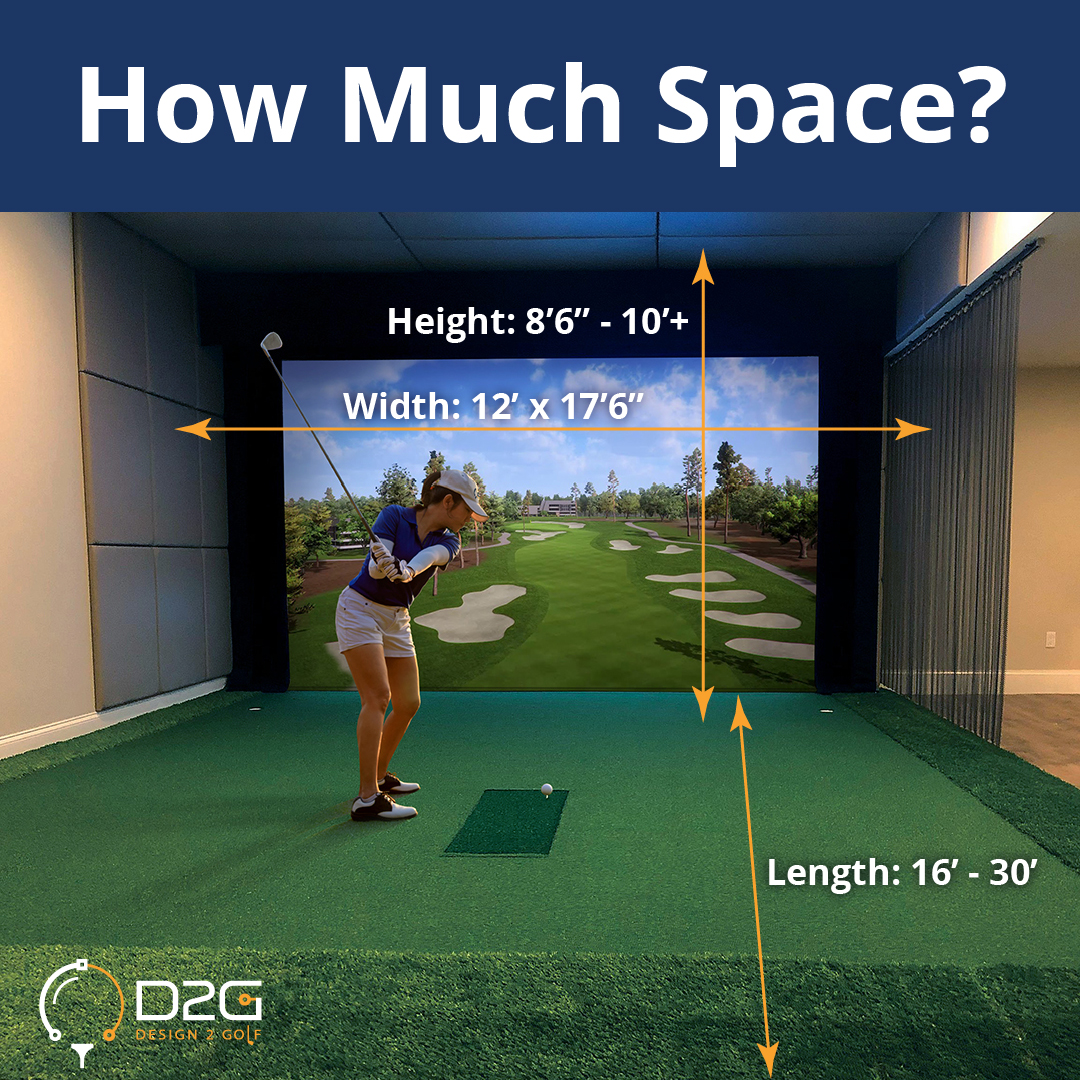
Image Source: www.design2golf.com
Deciphering the Basics of Space
Every golf simulator setup needs three main measurements: height, width, and depth. These three numbers decide if you can even swing a club indoors and if the equipment will fit and work right. Knowing these golf simulator room dimensions is the first step.
Let’s look at the minimum space for golf simulator setups. Think of this as the tightest fit possible. It might not be the most comfortable, but it can still let you practice and play.
Grasping Ceiling Height
Ceiling height is often the trickiest part. You need enough room above you to swing your driver without hitting the ceiling. This is the number one deal-breaker for many people.
- Why it matters: When you swing a golf club, especially a driver, the club head goes up quite high behind you and then again after you hit the ball. If the ceiling is too low, you will hit it. This is dangerous and stops you from making a full, natural swing.
- Minimum height: Most people find they need at least 9 feet of ceiling height. Some shorter people or those with flatter swings might get away with 8.5 feet, but it’s risky. Taller players or those with steeper swings will need more.
- Better height: 10 feet or more is much better. This gives most golfers plenty of room for a full swing with any club. This extra height makes the setup much more enjoyable and safe.
Always measure the lowest point in your chosen space. Check for things like lights, ceiling fans (remove them!), beams, or pipes. These can lower the usable height in spots.
Calculating Required Width
The width of your space is also very important. It needs to be wide enough for your swing and for safety.
- Why it matters: You need room for the club head and shaft to move on both sides of your body during the swing. You also need space to stand far enough from the side walls or anything else nearby. Safety is key here to avoid hitting anything (or anyone) on the sides.
- Minimum width: A common minimum width is 10 feet. This lets many golfers swing, especially if they stand in the middle of the width.
- Better width: 12 feet or wider is much better. This gives you more space on either side, which feels safer and more open. If you have both left-handed and right-handed players using the simulator, more width is needed or you need to plan for them to hit from the exact center. Standing off-center in a narrow space is dangerous.
Think about your swing path. Some golfers have swings that go more out to the sides. More width gives you room for this without worry.
Figuring Out Depth
The depth of your space is the distance from where you stand to the screen or net, and then some space behind the screen for safety or equipment.
- Why it matters: You need space for the ball to travel after you hit it before it hits the screen or net. You also need space for the screen or net itself, and room to stand comfortably. Some launch monitors need space behind the hitting mat. Projectors need distance to show a picture on the screen.
- Minimum depth: A typical minimum depth is 12 feet. This usually allows just enough space for standing, ball flight, and a basic enclosure.
- Better depth: 15 feet or more is much better. This extra depth gives you more room to stand back from the screen, allows for better projector placement (more on that later), and can fit launch monitors that need space behind the ball. It also makes the area feel less cramped.
Depth is a mix of where you stand, where the screen is, and where other equipment needs to be.
Why Each Dimension Matters
Let’s break down in more detail why height, width, and depth are so important for your swing and the equipment.
Interpreting Swing Clearance Needed for Golf Simulator
This is directly tied to height and width. Swing clearance means having enough empty space for your club to move through its full arc without hitting anything.
- Height Clearance: Your swing is a circle. The club head goes up over your shoulder. For a driver, this highest point can be well over 8 feet off the ground for many people. After hitting the ball, the club continues up in front of you. Both the backswing and follow-through need clear space above. If you hit the ceiling, you could damage your club, the ceiling, or even hurt yourself. It completely ruins the feel of a normal swing.
- Width Clearance: Your swing also moves horizontally. The club swings out to the sides of your body. The shaft and club head need room away from walls. Also, if your hitting mat isn’t perfectly centered in the room’s width, you need extra space on one side. For example, if you stand 3 feet from the left wall, you need at least 7-9 feet of clear space to your right for a typical swing. Many setups place the hitting mat slightly off-center to give more room for the swing on the dominant side (right side for a right-handed golfer). This requires checking the
swing clearance needed for golf simulatorcarefully based on where you stand.
Fathoming Ball Flight and Screen Placement
Depth is key for the ball. After you hit it, it flies forward very fast, even over a short distance.
- Ball Flight Distance: The ball needs a certain distance to fly from the tee or mat to the impact screen or net. This is usually only 8 to 10 feet for most simulator setups. This distance allows the launch monitor to read the ball’s speed and spin accurately.
- Screen/Net Position: The
golf simulator screen sizeandgolf simulator enclosure sizetake up space. The screen itself is usually set up a little way in front of the back wall of the space. The enclosure adds structure around the screen. This uses up some of your total depth. - Space Behind Screen: You usually need a foot or two of space behind the impact screen or net. This allows the screen to absorb the ball’s impact without hitting the hard wall behind it. This is part of the total depth needed.
Components and Their Space Needs
Your golf simulator is made of different parts. Each part needs space.
Screen or Net Area
This is where the ball hits. It’s the main visual part of many simulators.
- Impact Screen: If you use a projector, you need a special impact screen. These screens are strong enough to be hit by a golf ball and also serve as a projection surface. They come in many sizes (
golf simulator screen size). Common sizes are 10ft wide x 8ft high, 12ft wide x 9ft high, etc. The screen size you choose will affect the required width and required height of your space, as the screen needs to fit and be centered. - Impact Net: A net is simpler and needs less space behind it. It just catches the ball. Nets don’t need a projector. They still need enough width and height to catch shots that aren’t perfectly straight.
- Space in Front: You stand a certain distance in front of the screen/net. This distance is usually 8-10 feet, depending on the launch monitor. This is a big part of the required depth.
The Enclosure
Many simulator setups use an enclosure (golf simulator enclosure size). This is a frame with sides, a top, and the impact screen at the front.
- Safety: Enclosures add padded walls and a top to catch errant shots (shanks!). This makes the setup much safer.
- Darkness: They block out light, making the projected image brighter and clearer.
- Space Used: An enclosure takes up a fixed amount of space. If you buy a 10ft wide x 8ft high x 10ft deep enclosure (
golf simulator enclosure size), your minimum space must be at least that big inside, plus room for you to stand outside the enclosure structure if needed (though many setups hit from inside). The size of the enclosure dictates a large part of thegolf simulator room dimensions.
Hitting Mat Location
Where you stand to hit the ball takes up space, but it also defines where the swing happens and where the ball starts.
- Mat Size: Mats vary, but typically are 3×5 feet or 4×6 feet. This size isn’t the main space factor.
- Placement: Where you put the mat within your space is key.
- Depth: The mat is usually placed 8-10 feet from the screen. This distance is critical for launch monitors.
- Width: You need enough width to stand on the mat and swing without hitting side walls or supports. Many people put the mat slightly off-center to give more room on one side for their backswing/follow-through. This requires careful planning based on the total room width and
swing clearance needed for golf simulator. - Launch Monitor Needs: Some launch monitors sit on the mat or right next to it. Others sit behind you.
Launch Monitor Placement
The launch monitor reads your swing and the ball. Its type affects space needs.
- Photometric (Camera-based): Examples include SkyTrak, Foresight GC2/GC3/Hawk, TrackMan (though also radar). These often sit beside the ball or slightly behind it. They need a clear view of the ball and club face. This doesn’t add much to overall room size but requires precise placement within the hitting zone.
- Radar-based: Examples include FlightScope Mevo/Mevo+, TrackMan. These sit behind the hitting mat. They need space to “see” the club head speed and ball flight before it hits the screen. Mevo+ often needs 7-8 feet behind the ball and then 8-10 feet to the screen, totaling 15-18 feet of depth just for ball/club tracking. This significantly impacts the required
golf simulator room dimensionsandminimum space for golf simulator. - Overhead Systems: Examples include SkyTrak+, Foresight GC Hawk/Falcon. These are mounted to the ceiling above the hitting area. They need sufficient
golf simulator ceiling heightfor installation and a clear view down at the ball. They don’t add to depth needs but require a solid ceiling and precise mounting.
Projector Setup
If you’re using an impact screen, you need a projector to show the image.
- Projector Distance: Projectors need a certain distance (called “throw distance”) to fill the screen size you have (
golf simulator projector distance).- Standard Throw: These need a good amount of distance, maybe 10-15+ feet, to fill a 10ft wide screen. This adds to your depth requirement.
- Short Throw: These can fill a large screen from much closer, maybe 4-8 feet away. This is great for shorter rooms.
- Ultra-Short Throw: These sit very close to the screen, sometimes mounted directly above it. They need minimal depth but can be tricky to set up perfectly.
- Mounting: Projectors are usually mounted on the ceiling. This needs sufficient
golf simulator ceiling heightand a solid mounting point. The projector needs to be high enough not to be hit by swings.
What’s Minimum vs. What’s Best?
Let’s make it clear: the minimum space for golf simulator is what you can get away with, while the ideal golf simulator room size is what you want for comfort, safety, and the best experience.
Minimum Space
- Height: 9 feet (absolute minimum for most)
- Width: 10 feet (allows centered hitting for one golfer)
- Depth: 12 feet (just enough for screen, ball flight, and standing)
- Experience: Can feel cramped. May require compromises on swing (less aggressive) or club choice (avoid driver). Limited room for guests. Often uses a basic net or a smaller screen. Projector might have to be mounted awkwardly or use short throw. Launch monitor choice might be limited. This is often the
minimum space for golf simulatoryou’ll see discussed.
Ideal Space
- Height: 10 feet or more
- Width: 12 feet or more
- Depth: 15 feet or more
- Experience: Plenty of room for a full, natural swing with any club. Feels safe and open. Allows for centered hitting that works for both left and right-handed golfers (or easy repositioning). More options for launch monitor placement (including radar behind the mat). Easier
golf simulator projector distancesetup. Room for comfortable seating, a computer station off to the side, maybe a fridge. This is closer to theideal golf simulator room size.
Here is a simple table summarizing the ranges:
| Dimension | Minimum Recommended | Ideal Recommended |
|---|---|---|
| Height | 9 feet | 10+ feet |
| Width | 10 feet | 12+ feet |
| Depth | 12 feet | 15+ feet |
Note: These are general guidelines. Your specific height, swing, and equipment choices can change these numbers.
Choosing Your Spot
Where will you put your golf simulator? Different locations offer different pros and cons related to space.
Basement Golf Simulator Space
Basements are a popular choice.
- Pros:
- Often have concrete floors, which are stable.
- Can sometimes have higher ceilings than other rooms in a house, especially unfinished areas.
- Usually dark, which is great for projector use.
- Less likely to disturb others with noise if soundproofed slightly.
- Cons:
- Ceiling height can be limited by ductwork, pipes, or beams. Checking the lowest point is crucial for
basement golf simulator space. - Can be damp or cold, needing climate control.
- May require work to finish walls/floors if unfinished.
- Getting large
golf simulator enclosure sizepieces downstairs might be hard.
- Ceiling height can be limited by ductwork, pipes, or beams. Checking the lowest point is crucial for
Garage Golf Simulator Setup
Garages are also common.
- Pros:
- Often have good width and depth.
- Ceiling height can be good, especially near the garage door opener mechanism (though the mechanism itself can be an obstacle).
- Concrete floor is good.
- Easy access for equipment delivery.
- Cons:
- Ceiling height might be limited by beams or garage door tracks/opener. Check the usable height carefully.
- Temperature is often not controlled, making it hot in summer and cold in winter.
- Floor might slope towards the door for drainage.
- Needs space for cars/storage removed. A
garage golf simulator setupmeans giving up parking space. - Can be dusty or dirty.
Spare Room or Other Spaces
- An unused bedroom, office, or bonus room.
- Pros: Can be a ready-made, finished space.
- Cons: Often have standard 8-foot ceilings, making them too low for comfortable swinging with a driver. Width and depth might also be too small.
Dedicated Building
- Building a small structure just for the simulator.
- Pros: You can design it with the perfect height (10+ ft), width (12+ ft), and depth (15+ ft). Can add insulation, power, and design it for the best experience.
- Cons: Most expensive option. Requires permits and construction.
Checking Your Available Area
Before you buy any equipment, measure your chosen space very carefully. Don’t guess.
- Measure Height: Use a tape measure. Measure from the floor to the ceiling at several points. Look for any hanging objects, beams, pipes, or lights. The lowest point is your maximum usable height for swinging. Write this number down.
- Measure Width: Measure wall to wall. Note where doors or windows are. Decide where your screen/enclosure will go and measure the usable width in that specific area. Remember that angled ceilings or walls reduce usable width for high shots. Write this number down.
- Measure Depth: Measure wall to wall. Decide which wall the screen/net will be closest to. Your usable depth runs from the wall behind the screen all the way out into the room. Write this number down.
It helps to draw a simple picture of your space and mark down the dimensions and any obstacles. This gives you a clear picture of your golf simulator room dimensions.
Planning Your Layout
Once you have your measurements, you can plan where everything goes.
- Screen/Net Position: This usually goes at one end of the room, centered on the width if possible. Remember the space needed behind it.
- Hitting Mat Position: Place this 8-10 feet in front of the screen. Mark this spot. This is where your swing needs to happen.
- Centering: For safety and best results, many recommend hitting from the exact center of your room’s width. This means you have equal space for your swing on both sides. If you have 12 feet of width, the center is 6 feet from either wall. Stand here when checking your swing clearance. If the room is narrower (e.g., 10 feet), you might need to stand slightly off-center (e.g., 4 feet from one wall, 6 feet from the other) to give more room for your dominant swing side. Measure the
swing clearance needed for golf simulatoron both sides from your planned hitting position. - Launch Monitor Position: Place according to its requirements (beside ball, behind ball, overhead). Make sure it has a clear view and is protected from stray shots.
- Projector Position: Figure out the
golf simulator projector distanceneeded for your chosen screen size. This tells you how far from the screen the projector needs to be. Check if this distance fits within your room’s depth. Also, check the mounting height needed to fill the screen correctly and be safe from swings.
Making it Safe and Comfortable
Space planning isn’t just about swinging. It’s also about the feel and safety of the area.
- Padding: Consider adding foam or padding to walls or the ceiling, especially in tighter spaces. This protects your space and equipment if you hit something outside the screen/enclosure. This doesn’t take up much space but adds safety.
- Flooring: A comfortable, level floor is important. Interlocking foam tiles or artificial turf can work.
- Lighting: While enclosures make the screen look good, good lighting outside the enclosure is needed for setup and moving around. Make sure lights are not in your swing path (ceiling lights are common obstacles).
- Ventilation: Simulators can get warm, especially with physical activity and electronics. Make sure the space has airflow.
Solving Space Challenges
What if your space isn’t perfect? Here are some common problems and possible solutions related to golf simulator room dimensions.
Low Ceiling Height
This is the hardest problem.
- Solution 1: Check Your Swing: Some golfers with very flat swings might work in 8.5-9 feet, but test carefully (maybe swing slowly with foam pool noodles attached to your club).
- Solution 2: Use Shorter Clubs: You might only be able to use irons or wedges. Drivers and woods have the highest swing arc. This limits practice but is safer.
- Solution 3: Net System: A net takes up less height than a full enclosure structure, but you still need swing height clearance.
- Solution 4: Different Launch Monitor: Some launch monitors are better for limited height, but none can magically create swing room you don’t have. Overhead systems still need you to be able to swing under them.
- Solution 5: Find a New Space: Sometimes, a space just doesn’t have the
golf simulator ceiling heightneeded. It’s better to find a different location than risk injury or damage.
Narrow Room Width
- Solution 1: Hit from Center: Make sure your hitting mat is exactly in the middle of the room’s width. This gives equal space on both sides.
- Solution 2: Use an Enclosure: An enclosure (
golf simulator enclosure size) acts as a safety barrier on the sides. If you hit the side wall of the enclosure, it’s padded. You still need room for your swing inside the enclosure, but it adds a layer of safety outside the swing path. - Solution 3: Be Mindful of Swing: Be aware of your swing path, especially if you have a wide takeaway or follow-through.
- Solution 4: Add Side Netting: If not using an enclosure, add safety netting extending from the screen sides to catch hooks or slices.
Short Room Depth
- Solution 1: Choose the Right Launch Monitor: Avoid radar systems that need 7-8 feet behind the ball if you have limited depth. Camera-based systems (beside the ball) or overhead systems need less depth overall (usually just 10-12 feet total for hitting and screen).
- Solution 2: Short Throw Projector: Use a short throw or ultra-short throw projector to get the needed
golf simulator projector distancein a short space. - Solution 3: Minimal Space Behind Screen: Reduce the space behind the impact screen to a bare minimum (1 foot), but ensure it’s still safe and the screen can flex.
- Solution 4: Net Instead of Screen: A net system might need slightly less depth than a full enclosure and screen, but the difference is often small.
Common Questions
Here are answers to questions people often ask about space.
What if I’m left-handed? Does that need different space?
Not if you plan correctly. The swing clearance needed for golf simulator is the same, just on the other side. If your room is wide enough (12+ feet is ideal), you can center the hitting mat, and both lefties and righties can use it. If the room is narrower, you might need to move the mat depending on who is hitting, or position it slightly off-center permanently favoring the dominant hand that uses the simulator most.
Can I use my garage even if the floor slopes?
A sloping floor makes setup harder. The launch monitor, hitting mat, and screen need to be level for accurate readings and a good experience. You might need to build a level platform for the hitting area and equipment. This adds cost and complexity to a garage golf simulator setup.
Is 9 feet of ceiling height really enough?
For many golfers, 9 feet is the absolute minimum for a driver, and it can feel tight. Taller golfers, or those with steeper swings, will likely hit the ceiling. 10 feet is much safer and more comfortable for a full swing with all clubs for most players. Always test your actual swing carefully in the space before committing.
How much space do I need behind the hitting mat?
This depends entirely on your launch monitor. Camera systems near the ball need minimal space behind the mat. Radar systems like Mevo+ often need 7-8 feet of clear space behind the ball’s position to track club and ball data correctly. Factor this into your total golf simulator room dimensions and required depth.
Summary
Finding the right amount of space is the number one thing to do before getting a golf simulator. You need enough height (at least 9 feet, ideally 10+), width (at least 10 feet, ideally 12+), and depth (at least 12 feet, ideally 15+). These numbers are based on your swing clearance needed for golf simulator, the size of your golf simulator screen size or net, the golf simulator enclosure size, where your launch monitor needs to sit, and the golf simulator projector distance.
Measure your chosen space carefully. Check for any obstacles like beams or pipes that lower the usable height. Think about if your space is suitable for a basement golf simulator space or garage golf simulator setup. Plan your layout based on your measurements and chosen equipment.
Getting the space right ensures your simulator is safe, comfortable, and actually helps your golf game because you can make a natural swing. Don’t skip this crucial step!